27
GB
Getting Started
To change the color system (PAL or NTSC) (Asian, Australian, Middle
Eastern, and South African models only)
Depending on your TV, you may be required to select either PAL or NTSC for the color system.
The initial setting for Australian, Middle Eastern, and South African models is PAL.
The initial setting for Asian models is NTSC.
1 Turn off the system by pressing "/1.
2 Turn on the system by pressing "/1 on the unit while pressing FUNCTION on the unit.
Each time you perform this operation, the color system toggles between PAL and NTSC.
“NTSC” lights up in the front panel display when the color system is set to NTSC.
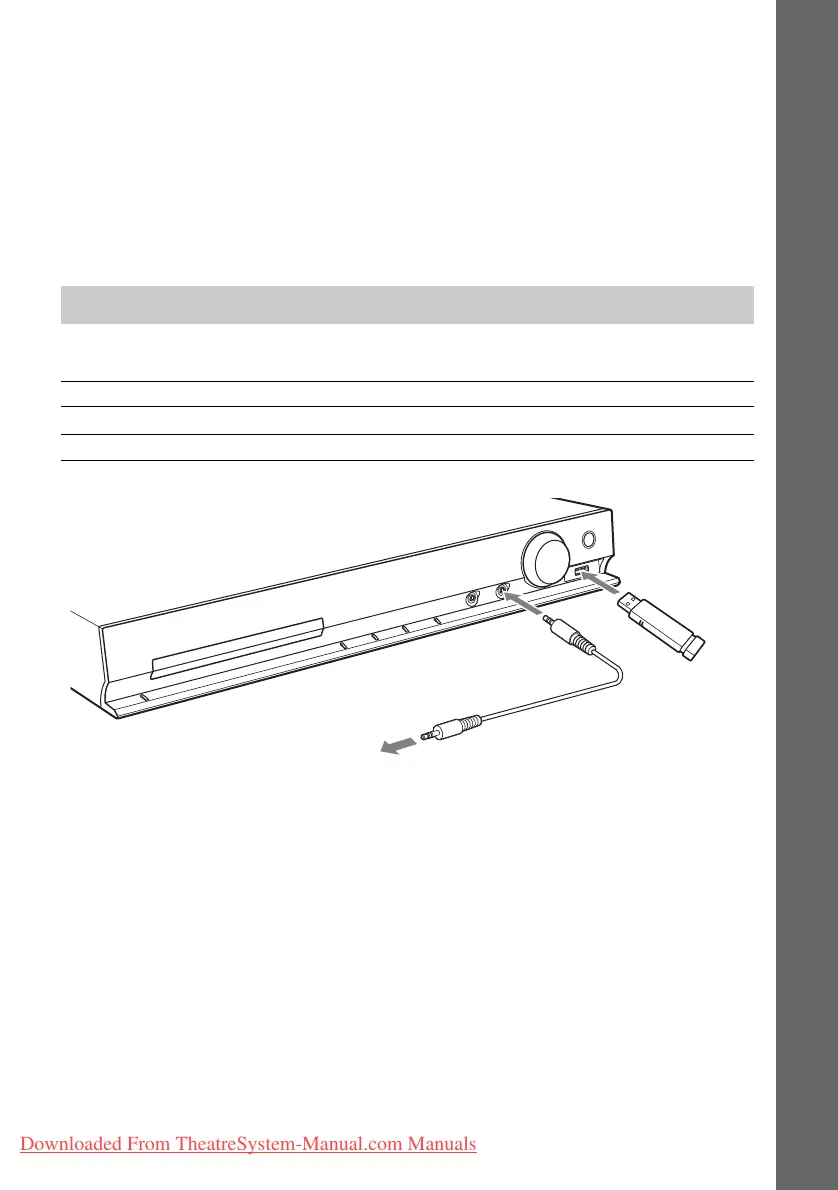
You can enjoy connected components via the system’s speakers.
Connecting the other components
Connected component Required cord for connection
Portable audio source (not supplied) A Stereo mini-plug cord (not supplied)
USB device (not supplied)
B USB connector (not supplied)
A
B
To a portable audio source.
Downloaded From TheatreSystem-Manual.com Manuals



 To Next Page