56
GB
• When transferring multiple tracks on an audio
CD or multiple MP3 files on a DATA CD/
DATA DVD
• When transferring a single track on an audio
CD or a single MP3 file on a DATA CD/
DATA DVD
• When transferring a radio program
1)
Up to 64 characters of the name are assigned
(including the extension).
2)
Folders are assigned in numeric order thereafter.
3)
Files are assigned in numeric order thereafter.
4)
A new file is transferred in the “REC1-MP3” or
“REC1-CD” folder each time single-track
transferring is performed.
1 Load an audio CD/DATA CD/DATA
DVD.
2 Press DISPLAY while the system is
in stop mode.
3 Press X/x to select [USB
TRANSFER], then press .
x For an audio CD
Press and skip to Step 5.
x For a DATA CD/DATA DVD
Follow the next Step.
4 Press X/x to select [TRACK] or
[FOLDER], then press .
• [TRACK]: The folder list appears. Press
X/x to select the desired folder, then press
.
• [FOLDER]: The folders recorded on the
DATA CD/DATA DVD appear. You can
transfer all MP3 files in the folder.
5 Press C/X/x/c to select [x ALL] (for an
audio CD) or [ ALL] (for a DATA CD/
DATA DVD), then press .
To deselect all tracks, select [s ALL], then
press .
6 Press C/X/x/c to select [START], then
press .
To cancel transferring, press x.
To select individual tracks/MP3
files/folders
Press X/x to highlight the track/MP3 file/folder,
then press to add a check in Step 5.
To cancel the selection, highlight the track/MP3
file/folder, then press to remove the check.
x For an audio CD
x For a DATA CD/DATA DVD
Source Folder name File name
MP3 Same as the transferring source
1)
Audio CD “FLDR001”
2)
“TRACK001”
3)
Source Folder name File name
MP3 “REC1-MP3”
4)
Same as the
transferring
source
1)
Audio CD “REC1-CD”
4)
“TRACK001”
3)
Folder name File name
“FM001”
4)
“TRACK001”
3)
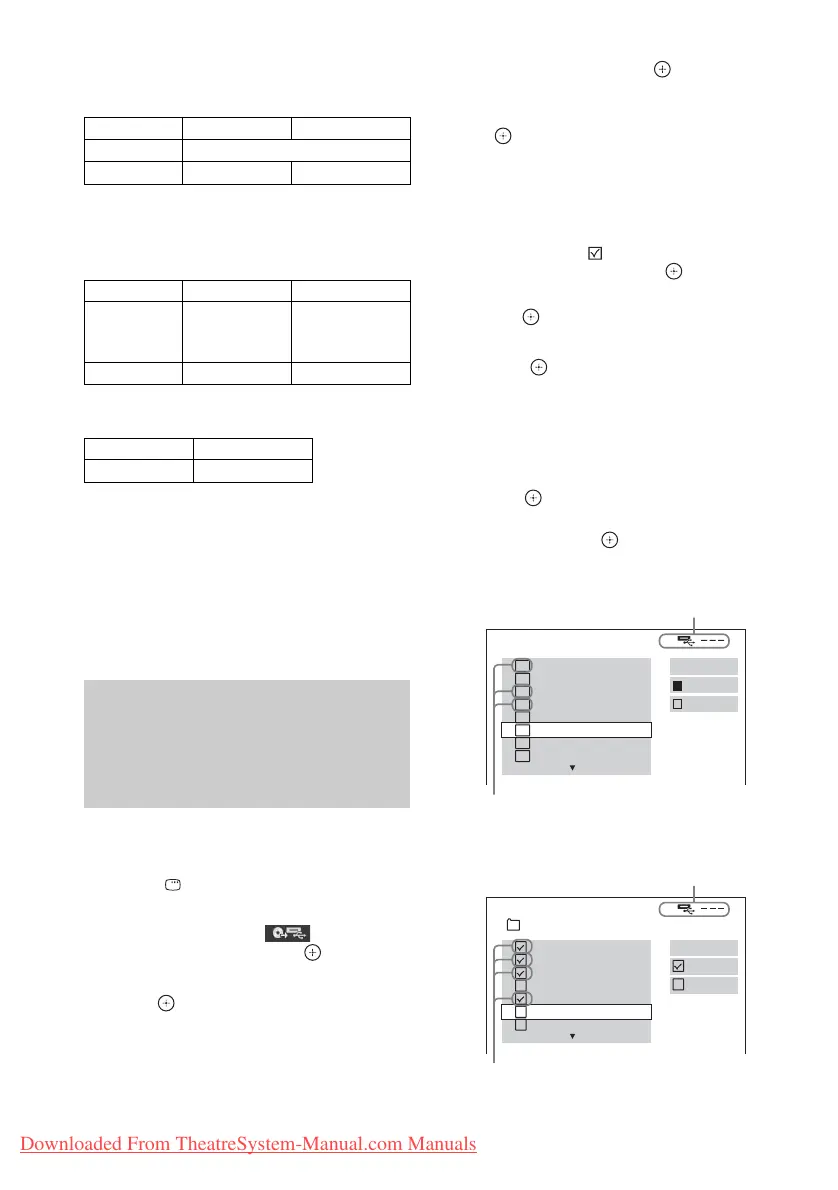
Transferring tracks on an
audio CD or MP3 files on a
DATA CD/DATA DVD onto a USB
device
USB TRANSFER
TRACK 01
1
START
ALL
TRACK 02
TRACK 03
2
TRACK 04
3
TRACK 05
TRACK 06
TRACK 07
TRACK 08
ALL
Remaining space of the USB device
Tracks to be transferred.
USB TRANSFER
START
ALL
01_Back_Seat_O...
02_One_Nights_...
03_Are_You_Ma...
04_I_Can_Lose_...
05_Soul_Survivo...
06_Strangers_B...
07_Stay_maxi_ve...
ALL
2002_Remixes
Remaining space of the USB device
MP3 files/folders to be transferred.
Downloaded From TheatreSystem-Manual.com Manuals



 To Next Page