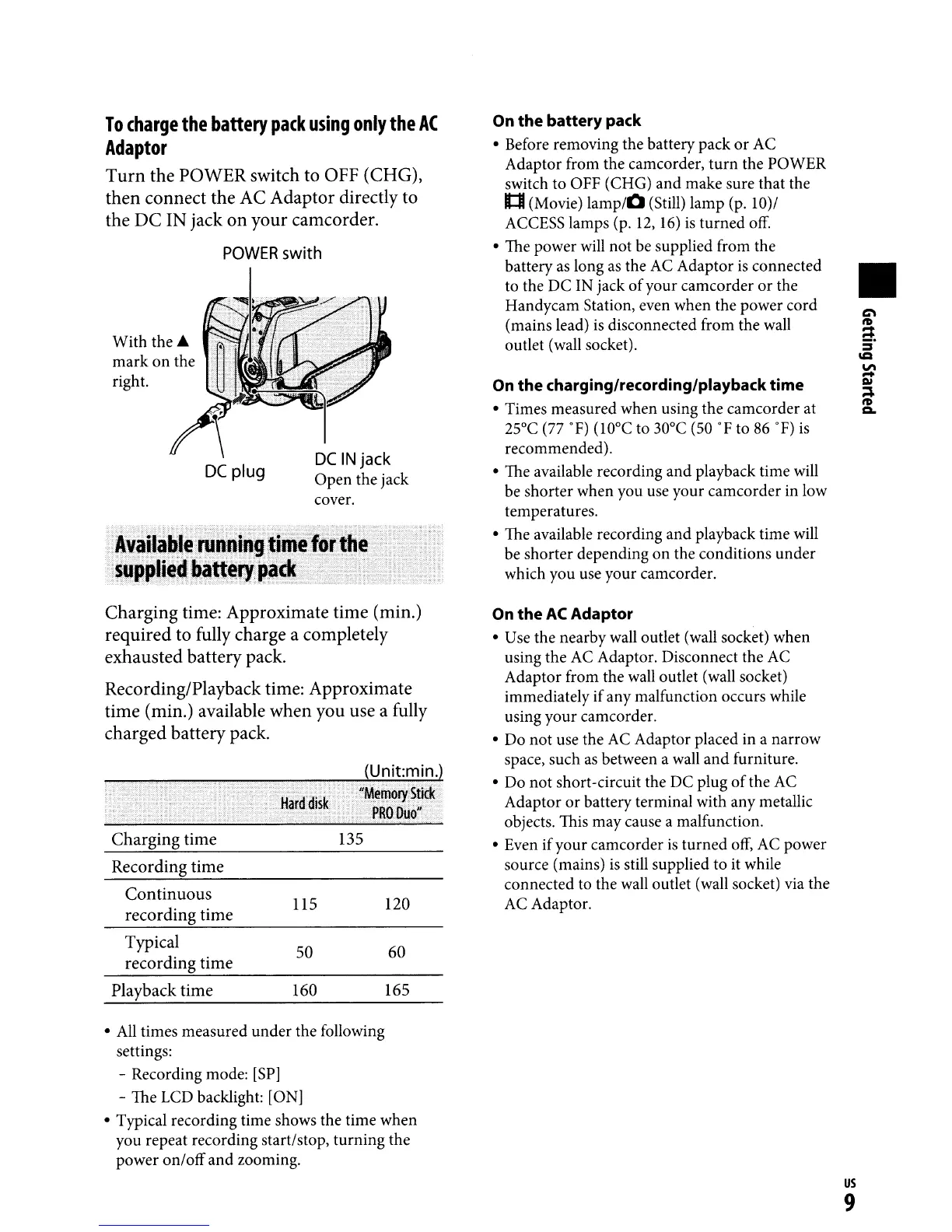
To
charge
the
battery
pack
using
only
the
AC
Adaptor
Turn
the POWER switch to OFF (CHG),
then connect the AC Adaptor directly to
the
DC
IN jack on your camcorder.
POWER
swith
•
On
the
battery pack
• Before removing the battery pack
or
AC
Adaptor from the camcorder, turn the POWER
switch to OFF (CHG) and make sure that the
It:I (Movie)
lamp/O
(Still) lamp (p. 10)/
ACCESS lamps (p.
12,
16)
is
turned
off.
• The power will not be supplied from the
battery
as
long
as
the
AC
Adaptor
is
connected
to the DC IN jack
of
your camcorder
or
the
Handycam Station, even when the power cord
(mains lead)
is
disconnected from the wall
outlet (wall socket).
On
the
charging/recording/playback time
• Times measured when using the camcorder at
25°C (77
OF)
(lO°C to 30°C (50
OF
to
86
OF)
is
recommended).
• The available recording and playback time will
be shorter when you use your camcorder in low
temperatures.
• The available recording and playback time will
be shorter depending on the conditions under
which you use your camcorder.
DC
IN
jack
Open the jack
cover.
DC
plug
With the.A.
mark
on
the
right.
Charging time: Approximate time (min.)
required to fully charge a completely
exhausted battery pack.
Recording/Playback time: Approximate
time (min.) available when you use a fully
charged battery pack.
Charging
time
135
Recording
time
Continuous
US
120
recording
time
Typical
50
60
recording
time
Playback
time
160
165
On
the
AC
Adaptor
• Use the nearby wall outlet (wall socket) when
using the
AC
Adaptor. Disconnect the
AC
Adaptor from the wall outlet (wall socket)
immediately ifany malfunction occurs while
using your camcorder.
• Do not use the AC Adaptor placed in a narrow
space, such
as
between a wall and furniture.
• Do not short-circuit the DC plug
of
the AC
Adaptor or battery terminal with any metallic
objects. This may cause a malfunction.
• Even ifyour camcorder
is
turned
off,
AC
power
source (mains)
is
still supplied to it while
connected to the wall outlet (wall socket) via the
AC Adaptor.
•
All
times measured under the following
settings:
- Recording mode:
[SP]
- The LCD backlight: [ON]
• Typical recording time shows the time when
you repeat recording start/stop, turning the
power on/off and zooming.
us
9



 To Next Page