6-12
DCR-SR32E/SR33E/SR42/SR42A/SR42E/SR52E/SR62/SR62E/SR72E/SR82/SR82C/SR82E_ADJ
1-4. DESTINATION DATA WRITE
Note: The DESTINATION DATA WRITE can be set with the
Service board only.
Performing the DESTINATION DATA WRITE with other
than the Service board causes the error (E:20:00 will be
blinking) and the power to be shut down.
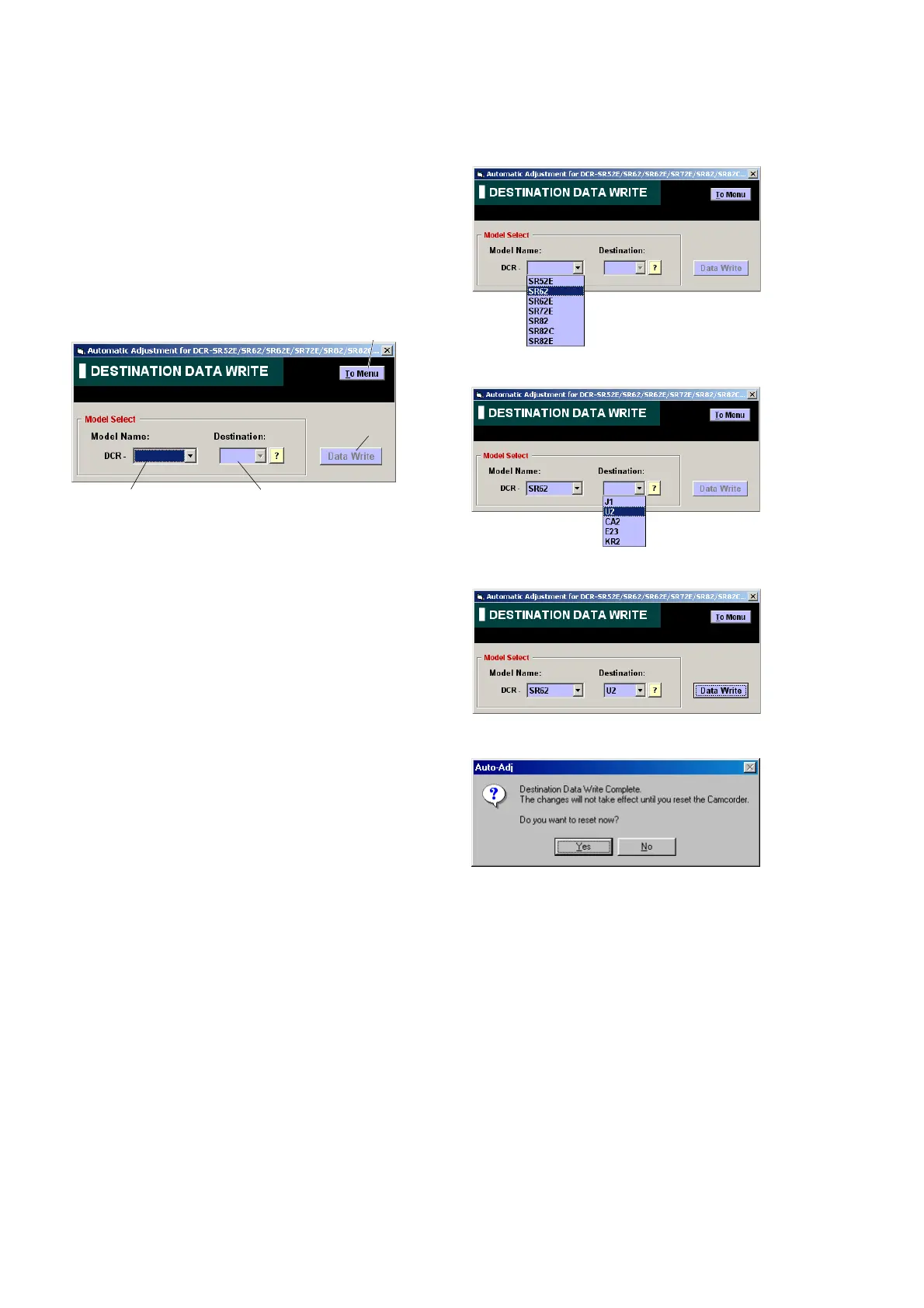
1. Function of Each Button on Destination Data Write
Screen
Click the [DESTINATION DATA WRITE] button on the Main Menu
screen, and the “DESTNATION DATA WRITE” screen in Fig. 6-
1-7 will appear.
Fig. 6-1-7
1 [To Menu] button
The Main Menu screen comes back.
2 Model Name List
Selects the model name.
3 Destination List
Selects the written destination.
4 [Data Write] button
Write the destination data to the camcorder.
2. Destination Data Write
[Writing method]
1) Select the model name with the Model Name List.
2) Select the written destination with the Destination List.
3) Click the [Data Write] button.
4) The writing finishes when the following message is displayed.
32
4
1



 To Next Page