166
3,7
4
5
6
1
MENU
C
A
M
E
R
A
M
E
M
O
R
Y
P
L
A
Y
E
R
O
F
F
(
C
H
G
)
POWER
MEMORY SET
RETURN
ST I LL SET
PR I NT MARK
PROTECT
SL IDE SHO
W
DELETE ALL
FORMAT
[
MENU
]
:
END
MEMORY SET
RETURN
ST I LL SET
PRINT MARK
PROTECT
ON
OFF
SL IDE SHO
W
DELETE ALL
FORMAT
[
MENU
]
:
END
MEMORY SET
RETURN
ST I LL SET
PR I NT MARK
PROTECT
OFF
SL IDE SHO
W
DELETE ALL
FORMAT
[
MENU
]
:
END
MEMORY SET
RETURN
ST I LL SET
PR I NT MARK
PROTECT
ON
SL IDE SHO
W
DELETE ALL
FORMAT
[
MENU
]
:
END
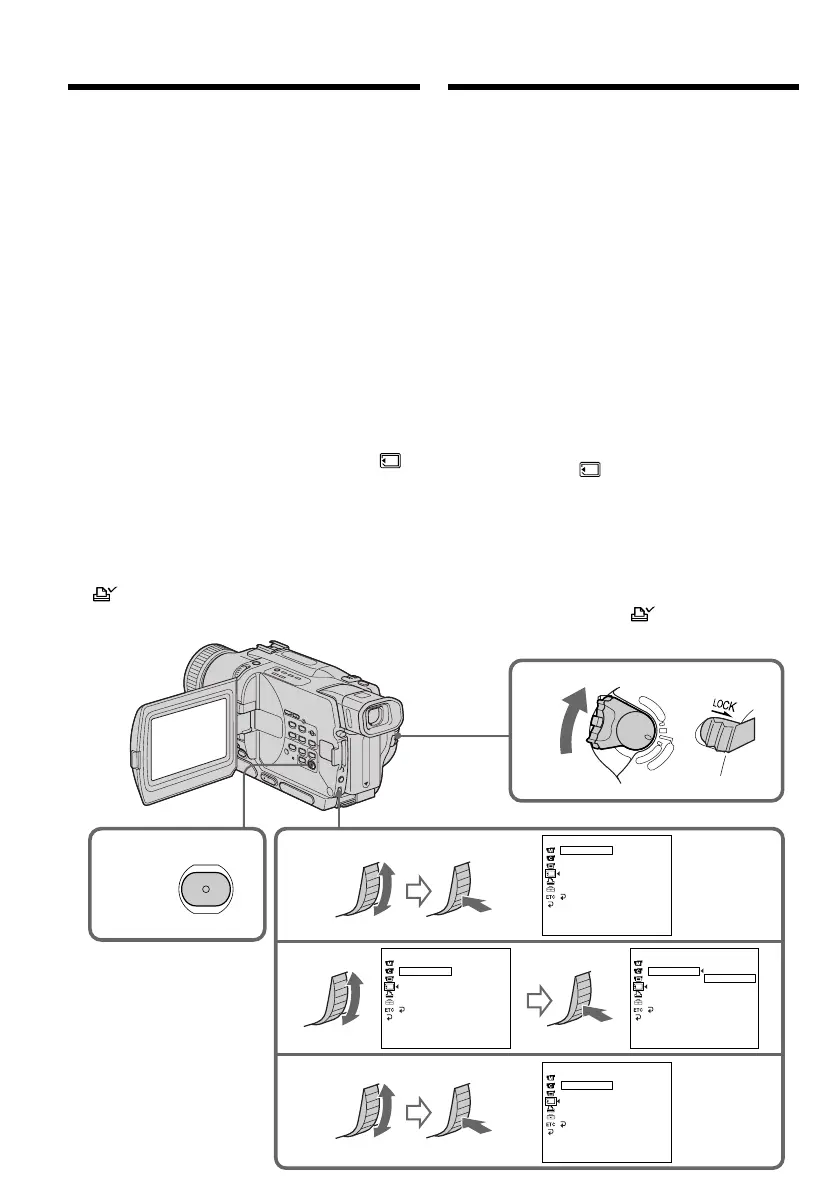
Writing a print mark
– PRINT MARK
– DCR-TRV325E/TRV330E/TRV430E/
TRV530E only
You can specify the recorded still image to print
out. This function is useful for printing out still
images later.
Your camcorder conforms with the DPOF
(Digital Print Order Format) standard for
specifying the still images to print out.
Before operation
Insert a “Memory Stick” into your camcorder.
(1) Set the POWER switch to MEMORY, PLAYER
or VCR (DCR-TRV330E only). Make sure that
the LOCK is set to the left (unlock) position.
(2) Play back the image you want to write a print
mark.
(3) Press MENU to display the menu.
(4) Turn the SEL/PUSH EXEC dial to select ,
then press the dial.
(5) Turn the SEL/PUSH EXEC dial to select
PRINT MARK, then press the dial.
(6) Turn the SEL/PUSH EXEC dial to select ON,
then press the dial.
(7) Press MENU to erase the menu display. The
mark is displayed beside the data file
name of the image with a print mark.
Markeren van af te drukken
beelden – PRINT MARK
– alleen voor de DCR-TRV325E/
TRV330E/TRV430E/TRV530E
U kunt de bestanden markeren van de stilstaande
beelden die u later wilt afdrukken. Dan kunt u later
de gemarkeerde bestanden van de af te drukken
beelden gemakkelijk herkennen. Uw camcorder
volgt de DPOF (Digital Print Order Format) normen
voor de afdrukmarkering van stilstaande beelden.
Alvorens de camcorder te bedienen
Plaats een “Memory Stick” in de camcorder.
(1) Zet de POWER schakelaar in de “MEMORY” of
“PLAYER” stand (of de “VCR” stand, alleen voor
de DCR-TRV330E). Zorg dat het LOCK
vergrendelknopje naar links (in de vrije stand) is
geschoven.
(2) Start de weergave van het beeld dat u voor
afdrukken wilt markeren.
(3) Druk op de MENU toets om het instelmenu te
laten verschijnen.
(4) Draai aan de SEL/PUSH EXEC regelknop om in
te stellen op het pictogram en druk de
regelknop in.
(5) Draai aan de SEL/PUSH EXEC regelknop om in
te stellen op het onderdeel “PRINT MARK” en
druk de regelknop in.
(6) Draai weer aan de SEL/PUSH EXEC regelknop
om de “ON” stand te kiezen en druk de
regelknop in.
(7) Druk weer op de MENU toets om het instelmenu
te laten verdwijnen. De afdrukmarkering
verschijnt nu naast de bestandsnaam van het af
te drukken beeld.




 To Next Page