56
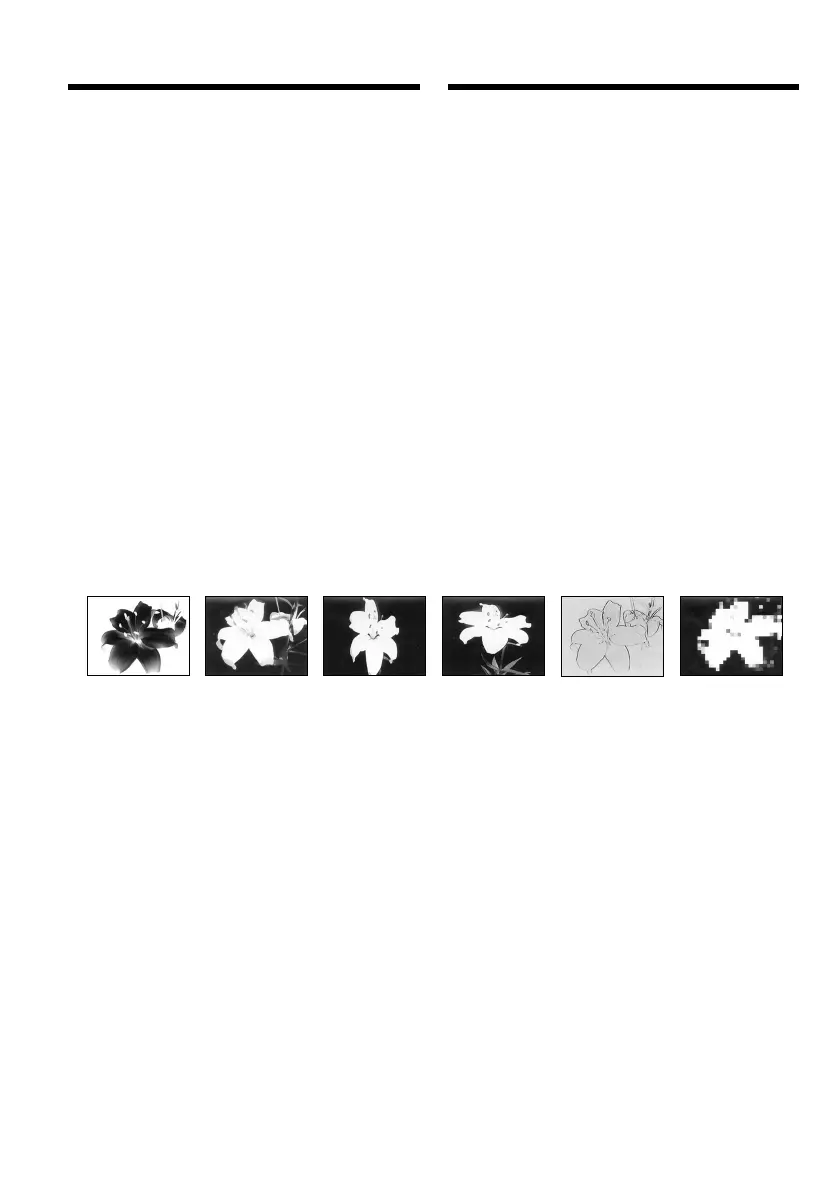
[a] [b] [c] [d] [e] [f]
Speciale effecten
– Beeldeffect/kleurenpalet
Op digitale wijze kunt u uw video-opnamen zo
treffend maken als een speelfilm of TV-productie
met speciale effecten.
NEG. ART [a] : De kleur en helderheid van het
beeld worden omgekeerd.
SEPIA : Het beeld verschijnt in sepia, de
kleur van oude foto’s.
B&W : Het beeld is in zwart, wit en
grijstinten.
SOLARIZE [b] : De lichtintensiteit wordt
aangescherpt en uw beelden
verkrijgen een abstract effect, als
van een illustratie.
SLIM [c] : Het beeld wordt smaller, in de
hoogte uitgerekt.
STRETCH [d] : Het beeld wordt in de breedte
uitgerekt.
PASTEL [e] : Versterkt het contrast en geeft
tekenfilm-achtige kleuren.
MOSAIC [f] : Uw onderwerp komt als een
mozaïek van kleine blokjes in
beeld.
Using special effects
– Picture effect
You can digitally process images to obtain special
effects like those in films or on the TV.
NEG. ART [a] : The colour and brightness of the
image is reversed.
SEPIA : The image is sepia.
B&W : The image is monochrome
(black-and-white).
SOLARIZE [b] : The light intensity is clearer, and
the picture looks like an
illustration.
SLIM [c] : The image expands vertically.
STRETCH [d] : The image expands horizontally.
PASTEL [e] : The contrast of the image is
emphasized, and the image looks
like an animated cartoon.
MOSAIC [f] : The image is mosaic.




 To Next Page