35
Recording – Basics Opnemen – basisbediening
Opnemen met de
zelfontspanner
– alleen voor de DCR-TRV325E/
TRV330E/TRV430E/TRV530E
Met de zelfontspanner kunt u de camcorder na
10 seconden automatisch met opnemen laten
beginnen. Bovendien kunt u de zelfontspanner
inschakelen met de afstandsbediening.
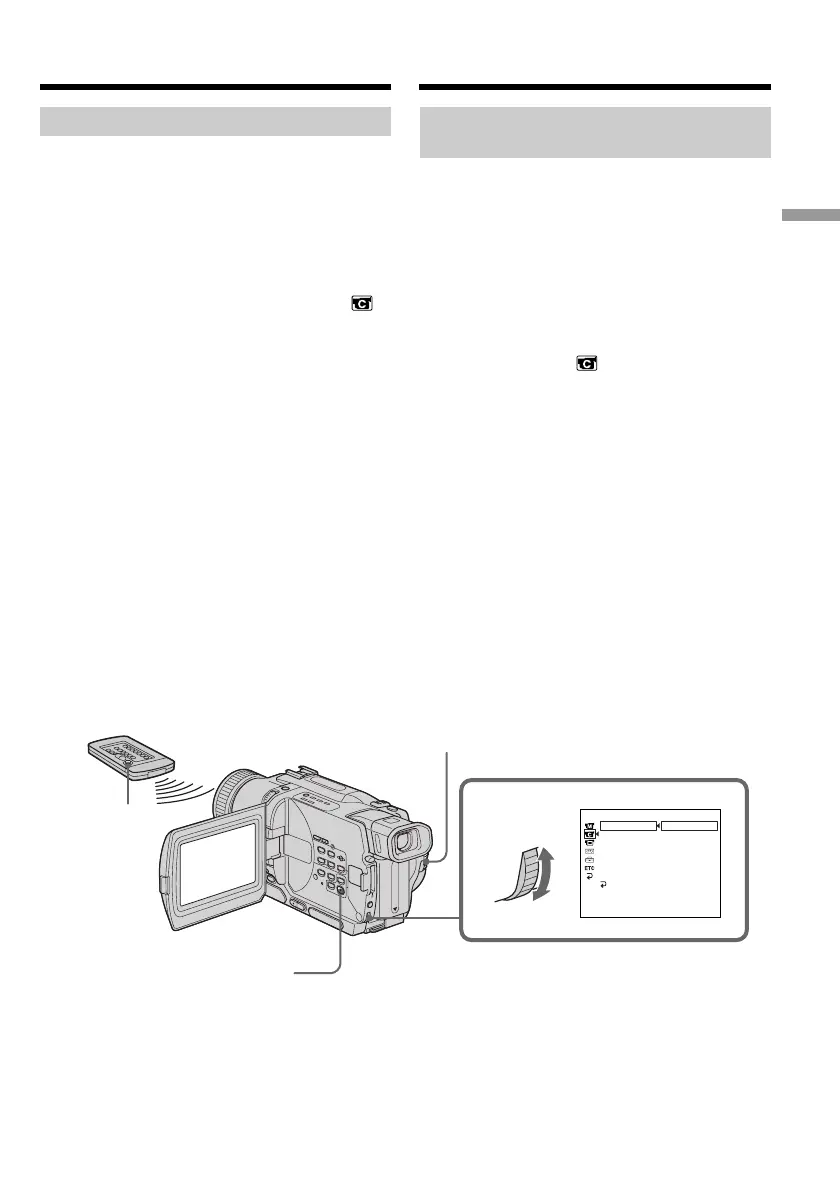
(1)Druk in de opnamepauzestand op de MENU
toets om het instelmenu te zien.
(2)Draai aan de SEL/PUSH EXEC regelknop om
in te stellen op het pictogram en druk de
regelknop in.
(3)Draai aan de SEL/PUSH EXEC regelknop om
in te stellen op SELFTIMER en druk de
regelknop in.
(4)Draai weer aan de SEL/PUSH EXEC
regelknop om in te stellen op “ON” en druk
de regelknop in.
(5)Druk weer op de MENU toets om het
instelmenu uit beeld te laten verdwijnen.
(6)Druk op de START/STOP toets.
De zelfontspanner gaat nu terugtellen vanaf
10, met telkens een pieptoon. In de laatste
twee seconden van het aftellen klinken de
pieptonen korter achtereen en dan begint
automatisch het opnemen. Om te stoppen met
opnamen drukt u nogmaals op de START/
STOP toets.
Self-timer recording
– DCR-TRV325E/TRV330E/TRV430E/
TRV530E only
Recording with the self-timer starts in 10 seconds
automatically. You can also use the Remote
Commander for this operation.
(1) Press MENU to display the menu settings in
the standby mode.
(2) Turn the SEL/PUSH EXEC dial to select ,
then press the dial.
(3) Turn the SEL/PUSH EXEC dial to select
SELFTIMER, then press the dial.
(4) Turn the SEL/PUSH EXEC dial to select ON,
then press the dial.
(5) Press MENU to make the menu settings
disappear.
(6) Press START/STOP.
Self-timer starts counting down from 10 with
a beep sound. In the last two seconds of the
countdown, the beep sound gets faster, then
recording starts automatically. To stop
recording, press START/STOP again.
Recording a picture
2-4
CAMERA SET
OFF
ON
SELFT IMER
DZOOM
16
:
9
W
IDE
STEADYSHOT
N
.
S
.
LIGHT
FLASH MODE
FLASH LVL
RETURN
[
MENU
]
:
END
1,5 MENU
START/STOP
6 START/STOP
Video-opnamen maken




 To Next Page