70
Using special effects
– Picture effect
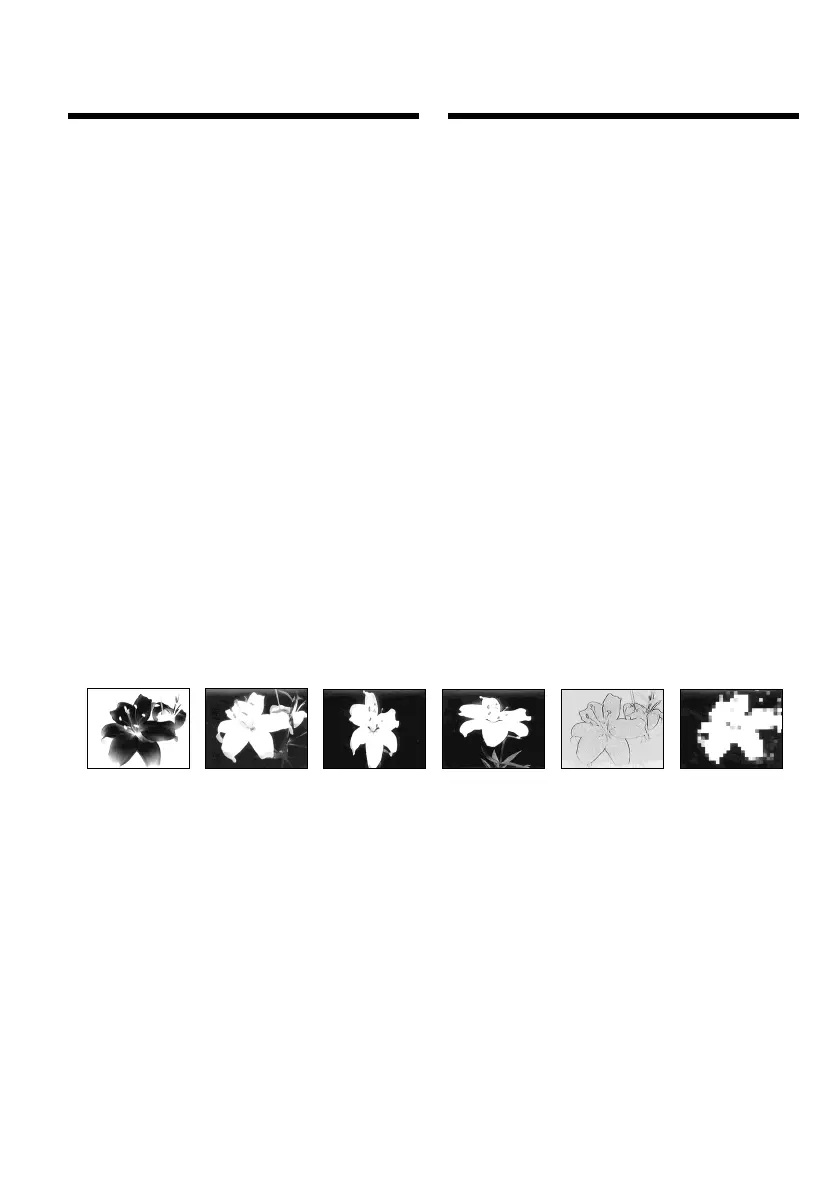
[a] [b] [c] [d] [e] [f]
You can digitally process images to obtain special
effects like those in films or on TV.
NEG. ART [a] : The colour and brightness of the
picture are reversed.
SEPIA : The picture appears in sepia.
B&W : The picture appears in
monochrome (black-and-white).
SOLARIZE [b] : The light intensity becomes
clearer to make the picture look
more like an illustration.
SLIM [c] : The picture expands vertically.
STRETCH [d] : The picture expands
horizontally.
PASTEL [e] : The contrast of the picture is
emphasised to make the picture
look more like an animated
cartoon.
MOSAIC [f] : The picture appears mosaic-
patterned.
Использование
специальных эффектов
– Эффект изображения
Вы можете выполнять обработку
изображений цифровым методом для
получения специальных эффектов, как в
кинофильмах или в телепередачах.
NEG. ART [a] : Цвет и яркость изображения
будут негативными.
SEPIA : Изображение будет в цвете
сепии.
B&W : Изображение будет
монохроматическим (черно-
белым).
SOLARIZE [b] : Яркость света будет
усиленной, а изображение
будет выглядеть как
иллюстрация.
SLIM [c] : Изображение растянется по
вертикали.
STRETCH [d] : Изображение растянется по
горизонтали.
PASTEL [e] : Подчеркивается
контрастность изображения,
которому придается
мультипликационный вид.
MOSAIC [f] : Изображение будет
мозаичным.





 To Next Page