27
Basic operations Operaciones básicas
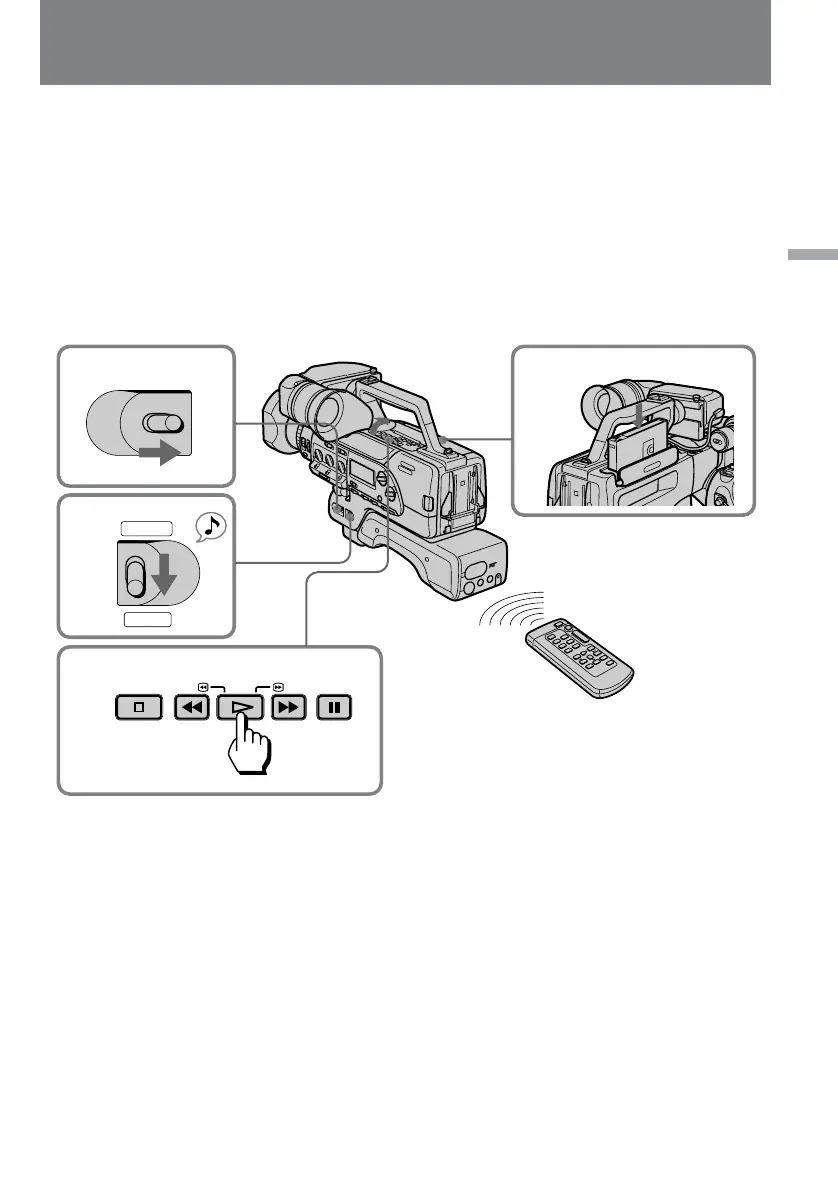
Playing back a tape
You can monitor the playback picture in the
viewfinder. You can also monitor the picture on
a TV screen, after connecting the digital
camcorder to a TV or VCR.
(1)Set the POWER switch to ON
(2)Set CAMERA/PLAYER to PLAYER.
(3)Insert the recorded tape with the window
facing out.
(4)Open the cover, then press · to start
playback.
Reproducción de una
videocinta
Usted podrá ver las imágenes de reproducción en
el visor. También podrá ver las imágenes en la
pantalla de un televisor, después de haber
conectado al videocámara digital a un televisor o
una videograbadora.
(1)Ponga el interruptor POWER en ON.
(2)Ponga CAMERA/PLAYER en PLAYER.
(3)Inserte el videocassette grabado con la
ventanilla hacia afuera.
(4)Abra la cubierta, y después presione · para
iniciar la reproducción.
STOP REW PLAY FF PAUSE
1
2
3
4
POWER
OFF ON
CAMERA
PLAYER
To stop playback, press π.
To rewind the tape, press 0.
To fast-forward the tape rapidly, press ).
Para parar la reproducción, presione π.
Para rebobinar la cinta, presione 0.
Para hacer que la cinta avance rápidamente,
presione ).















 To Next Page