64
[a] [b]
FILTER
ND
ON
OFF
FILTER
ND
ON
OFF
ND ON ND OFF
ND
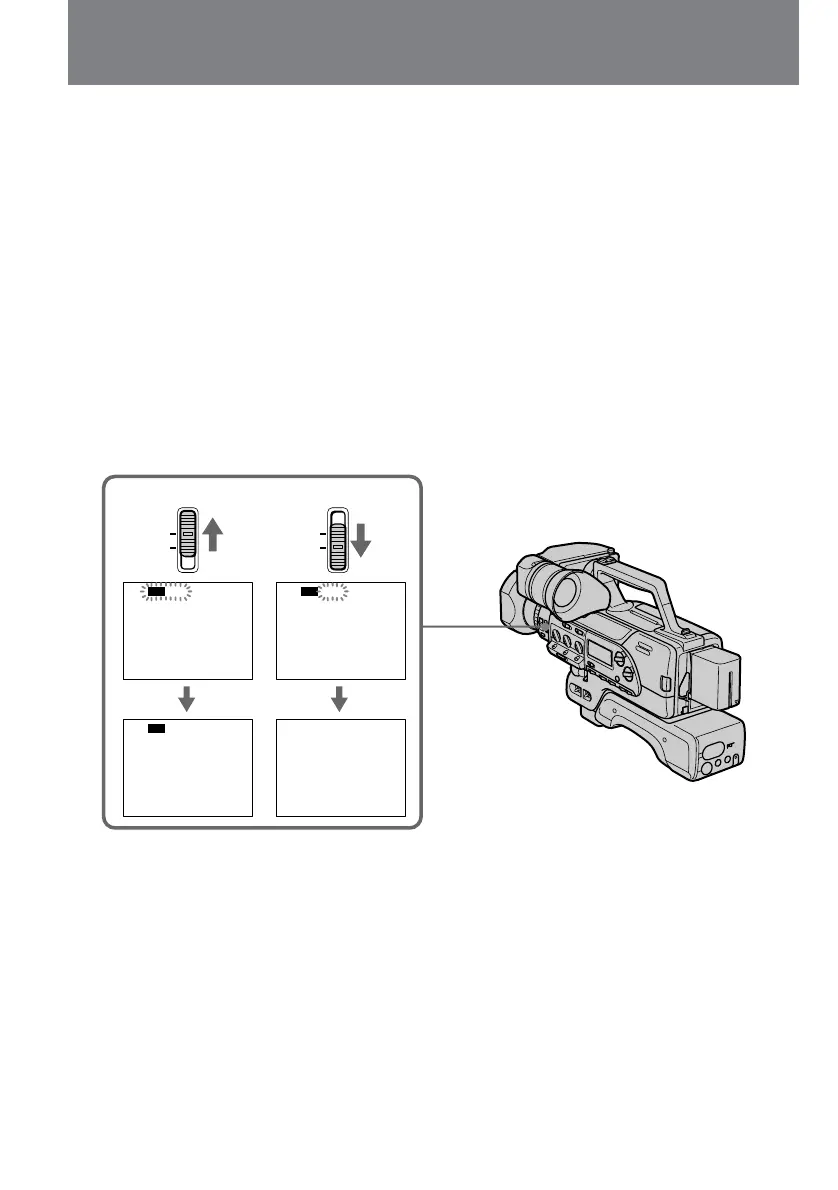
Using the ND filter
The digital camcorder automatically senses the
need for the ND filter, in such a case, ND ON/
OFF flashes in the display.
Using the ND filter (to filter down to one-tenth
the quantity of light), you can prevent the picture
from going out of focus under bright conditions.
When ND ON flashes in the
viewfinder
Set ND FILTER to ON [a].
The flashing indicator disappears, and the ND
indicator remains.
When ND OFF flashes in the
viewfinder
Set ND FILTER to OFF [b].
The indicator disappears.
Utilización del filtro
ND
La videocámara digital detectará
automáticamente la necesidad del filtro ND. En
tal caso, en el visualizador parpadeará ND ON/
OFF.
Utilizando el filtro ND (para filtrar una décima
parte de la cantidad e luz), podrá evitar que las
imágenes resulten desenfocadas en condiciones
de gran iluminación.
Cuando en el visor parpadee ND ON
Ponga ND FILTER en ON [a].
El indicador parpadeante desaparecerá, y
permanecerá visualizado el indicador ND.
Cuando en el visor parpadee ND OFF
Ponga ND FILTER en OFF [b].
El indicador desaparecerá.















 To Next Page