38
13
4
2
MENU
DIGITAL MODE
ZOOM/16:9 WIDE OVERLAP
MENU
D ZOOM OFF
16 : 9 WIDE
ZEBRA
COMMANDER
BEEP
FRAME REC
INT REC
[ MENU ] : END
MENU
16 : 9 WIDE OFF
ON
[ MENU ] : END
MENU
D ZOOM
16 : 9 WIDE ON
ZEBRA
COMMANDER
BEEP
FRAME REC
INT REC
[ MENU ] : END
Using the wide mode
function
You can record a 16:9 wide picture to watch on a
16:9 wide-screen TV.
Utilización de la función de
modo de pantalla amplia
Usted podrá videofilmar imágenes de 16:9 para
contemplarlas en un televisor de pantalla amplia
de 16:9.
[a]
[b]
[d]
[c]
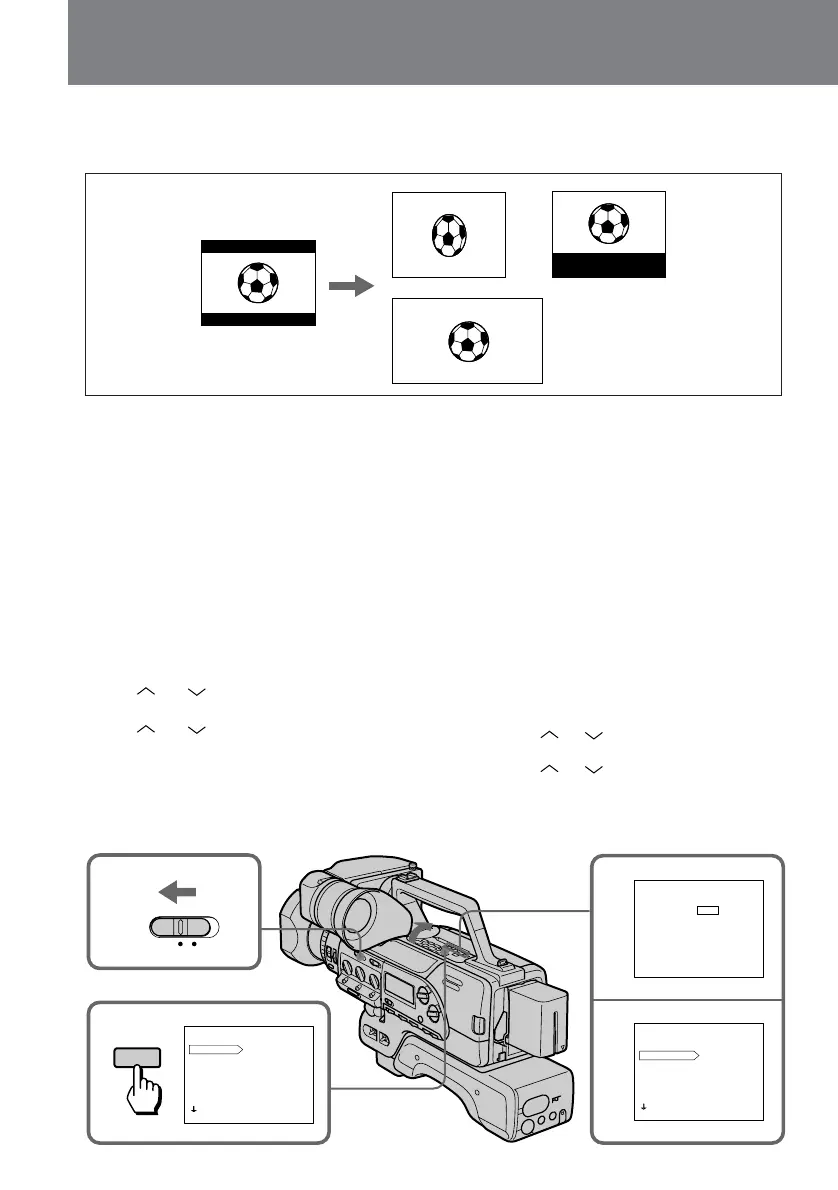
In the viewfinder black bands appear at the top
and bottom of the screen [a].
On a normal TV screen, the picture appears
horizontally compressed [b].
When setting WIDE PB to ON in the menu
system, you get a cinema-like picture with a
black band at the bottom of the screen [c].
You can watch the picture of normal images on a
wide-screen TV [d].
(1)While the digital camcorder is in Standby
mode, set DIGITAL MODE to ZOOM/16:9
WIDE.
(2)Open the cover, then press MENU to display
the menu in the viewfinder.
(3)Press or to select 16:9 WIDE, then
press EXECUTE.
(4)Press or to select ON, then press
EXECUTE.
(5)Press MENU to erase the menu display.
En el visor aparecerán bandas negras en la parte
superior e inferior de la pantalla [a].
En un televisor de pantalla normal, las imágenes
aparecerán horizontalmente comprimidas [b].
Cuando haya ajustado WIDE PB a ON en el
sistema de menús, podrá obtener imágenes
semejantes a las de un cine con una banda negra
en la parte inferior de la pantalla [c].
Usted podrá contemplar las imágenes que
aparecen realmente en un televisor de pantalla
amplia [d].
(1)Con la videocámara digital en el modo de
espera, ajuste DIGITAL MODE a ZOOM/16:9
WIDE.
(2)Abra la cubierta, y después presione MENU
para hacer que se visualice el menú en el
visor.
(3)Presione o para seleccionar 16:9
WIDE, y después presione EXECUTE.
(4)Presione o para seleccionar ON, y
después presione EXECUTE.
(5)Presione MENU para borrar la visualización
del menú.















 To Next Page