34
Using the Unit to a Camcorder
This section describes how to connect
the unit to a camcorder and how to
check the connection status.
Connecting a Camcorder
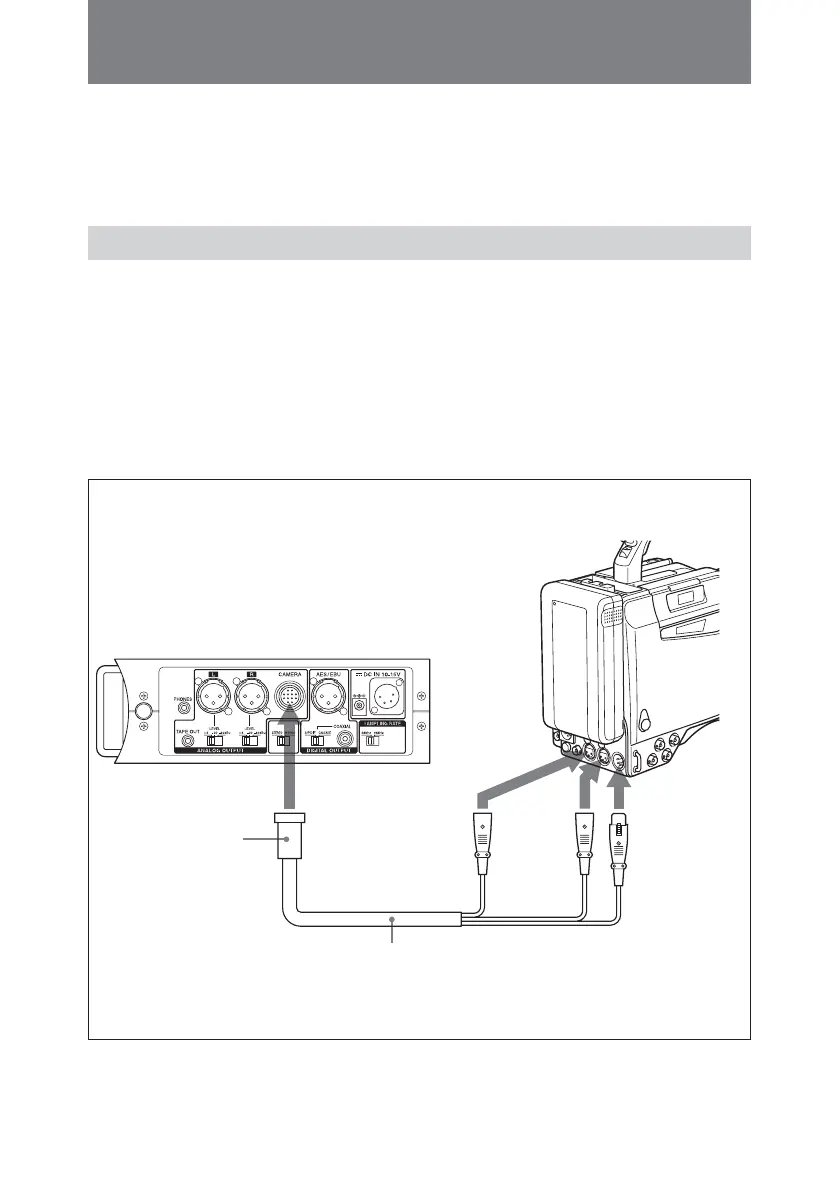
Connect the camcorder to the
CAMERA connector of the unit using
the 10-line multi cable with a 12-pin
multi connector supplied with the unit.
You can send signals from the unit
and receive return signals from the
camcorder only if you use a multi
cable.
For detailed information on the pin
assignment of the CAMERA connector
of the unit, see “Pin Assignments of
Connectors” on page 44.
Camcorder
DMX-P01
to AUDIO IN
CH-1
connector
12-pin multi
connector
(supplied)
to AUDIO
IN CH-2
connector
to AUDIO
OUT
connector
10-line multi cable
to CAMERA



 To Next Page