EasyManua.ls Logo

Sony DPS-D7 - Page 27

Sony DPS-D7
43 pages
Print Icon
To Next Page IconTo Next Page
To Previous Page IconTo Previous Page
Loading...
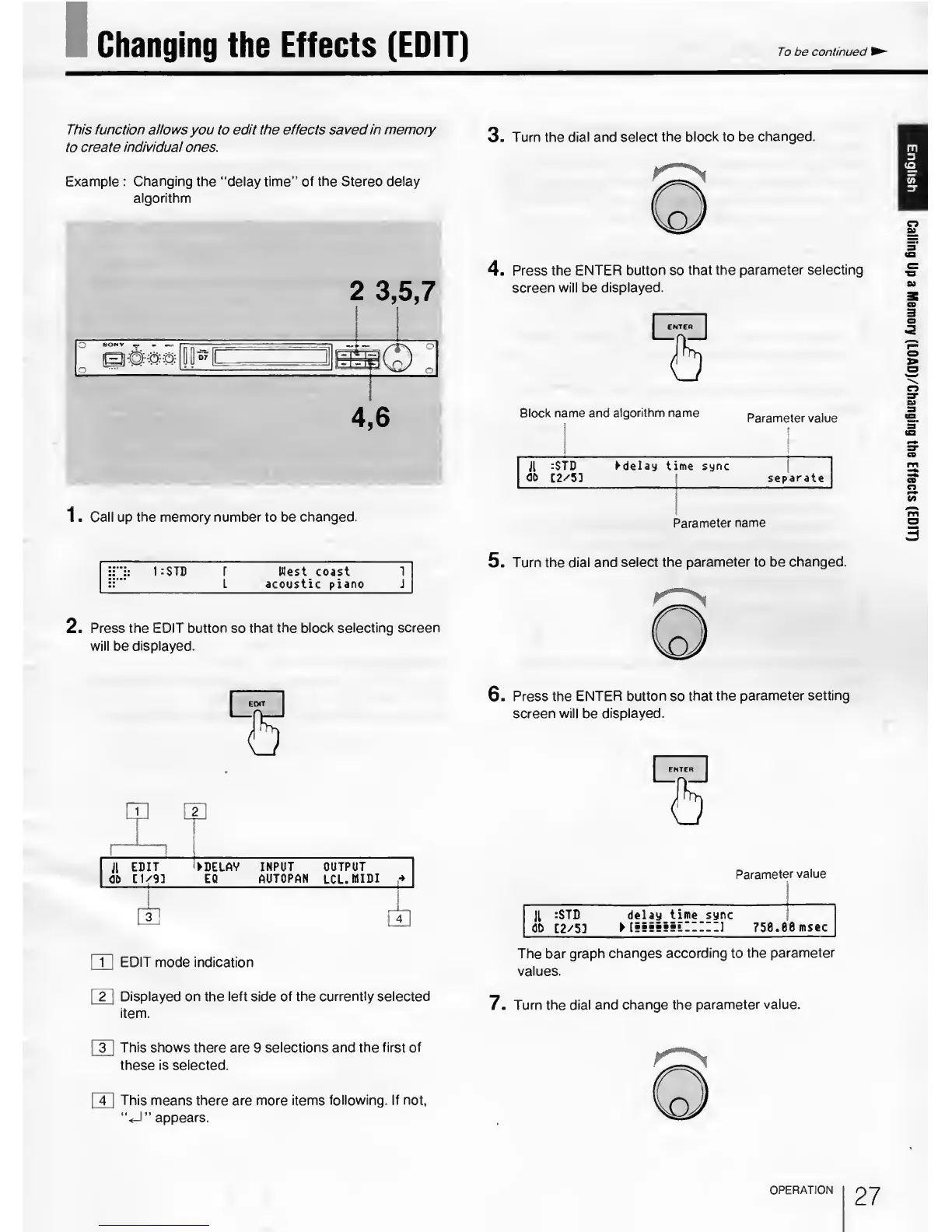
Changing the Effects (EDIT)
To
be
continued
This
function allows
you to
edit
the effects
saved in memory
to
create individual
ones.
Example : Changing
the “delay time”
of the Stereo delay
algorithm
2
3
,
5,7
1 .
Call
up
the memory number
to be
changed.
3
.
Turn the
dial and select the
block
to be
changed.
m
3
(D
«/>’
ZT
4
.
Press the ENTER
button
so
that the
parameter selecting
screen will be
displayed.
Block name
and algorithm name
Parameter value
Jl
:STD delay time sync
at>
C2/5]
|
separate
Parameter
name
1
:
STB
r
West
coast 1
L acoustic piano J
2.
Press the EDIT button so that the block
selecting screen
will
be
displayed.
5
.
Turn the dial and
select the parameter to
be changed.
11
EDIT DEIAV INPUT OUTPUT
OP
[1/91
EC
AUTOPAN
LCL.
MIDI
4
s
m
EDIT mode indication
|~2~|
Displayed on the left side of the currently selected
item.
r
in
This shows there are
9
selections and the first
of
these is selected.
[
4
]
This means there are more items
following. If not,
“<-1”
appears.
6
.
Press the
ENTER button so that
the parameter
setting
screen
will be displayed.
Parameter
value
JL
:STD delay
time
sync
dD
[2/53
75e.ee
msec
The bar graph changes
according to
the parameter
values.
7
.
Turn the dial and
change the parameter
value.
OPERATION
27
Calling
Up
a
Memory
(LOAD)/Changing
the
Effects
(EDIT)

Related product manuals