18
[ W/T Using the zoom
Press T to zoom, press W to undo zoom.
Pressing the button slightly zooms slowly and pressing the button fully down zooms fast.
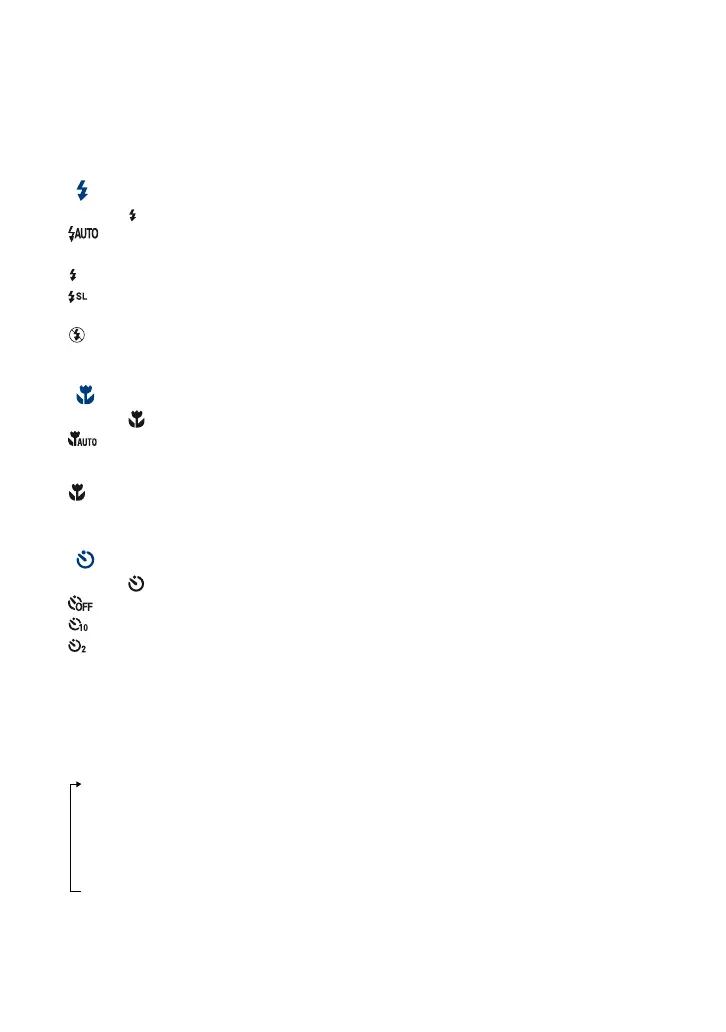
[ Flash (Selecting a flash mode for still images)
Press B ( ) on the control button repeatedly until the desired mode is selected.
: Flash Auto
Flashes when there is insufficient light or backlight (default setting).
: Flash forced on
: Slow synchro (Flash forced on)
The shutter speed is slow in a dark place to clearly shoot the background that is out of flash light.
: Flash forced off
• The flash automatically pops up and strobes. Close the flash by hand after use.
[ Macro (Shooting close-up)
Press b ( ) on the control button repeatedly until the desired mode is selected.
: Auto
The camera adjusts the focus automatically from distant subjects to close-up.
Normally, put the camera in this mode.
: Macro
The camera adjusts the focus with priority on close-up subjects. Set Macro On when shooting close
subjects.
[ Using the self-timer
Press V ( ) on the control button repeatedly until the desired mode is selected.
: Not using the self-timer
: Setting the 10-second delay self-timer
: Setting the 2-second delay self-timer
When you press the shutter button, the self-timer lamp flashes and a beep sounds until the
shutter operates.
[ DISP Changing the screen display
Press v (DISP) on the control button.
Each time you press v (DISP), the display and brightness changes as follows:
Indicators on
r
Indicators on*
r
Histogram on*
r
Indicators off*
* The brightness of the LCD Backlight is set to up.












 To Next Page