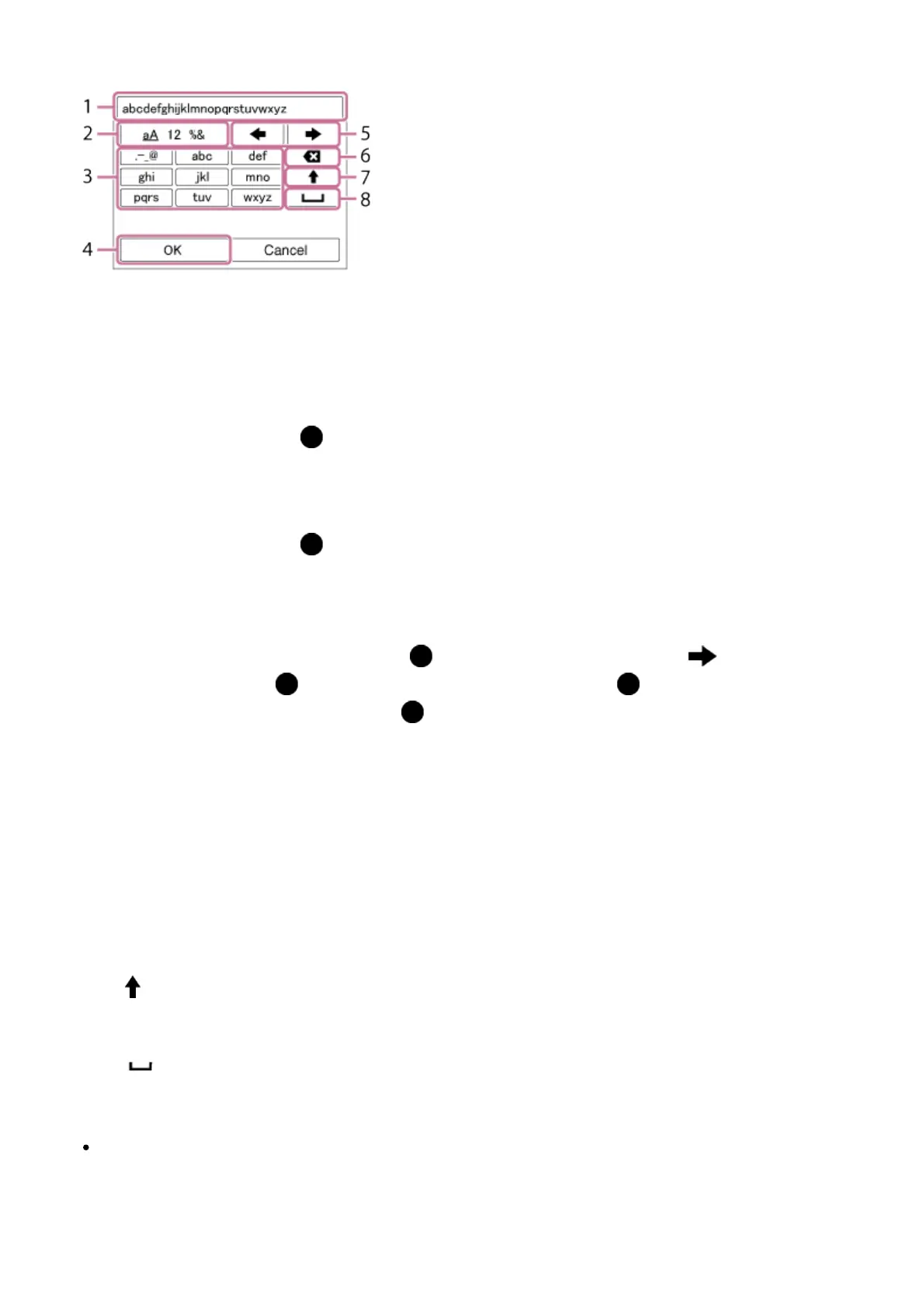
When manual character entry is required, a keyboard is displayed on the screen.
1. Input box
The characters you entered are displayed.
2. Switch character types
Each time you press in the center of the control wheel, the character type will
switch between alphabet letters, numerals and symbols.
3. Keyboard
Each time you press in the center, the characters corresponding to that key will be
displayed one-by-one in order.
For example: If you want to enter “abd”
Select the key for “abc” and press once to display “a” → select “ ”((5) Move
cursor) and press → select the key for “abc” and press twice to display “b” →
select the key for “def” and press once to display “d”.
4. Finalize
Finalizes the entered characters.
5. Move cursor
Moves the cursor in the input box to the right or left.
6. Delete
Deletes the character preceding the cursor.
7.
Switches the next character to a capital or lowercase letter.
8.
Enters a space.
To cancel input, select [Cancel].
Other setting items
Depending on the status or the setting method of your access point, you may want to set
more items.







 To Next Page