Cyber-shot User Guide
PrintSearch
Before Use
Confirming the operation
method
Shooting
Viewing
Useful shooting functions
Useful viewing functions
Changing settings
Viewing images on a TV
Using with your computer
Printing
Troubleshooting
Precautions/About this camera
Contents list
Top page > Confirming the operation method > Confirming the operation method > Changing camera
settings
Changing camera settings
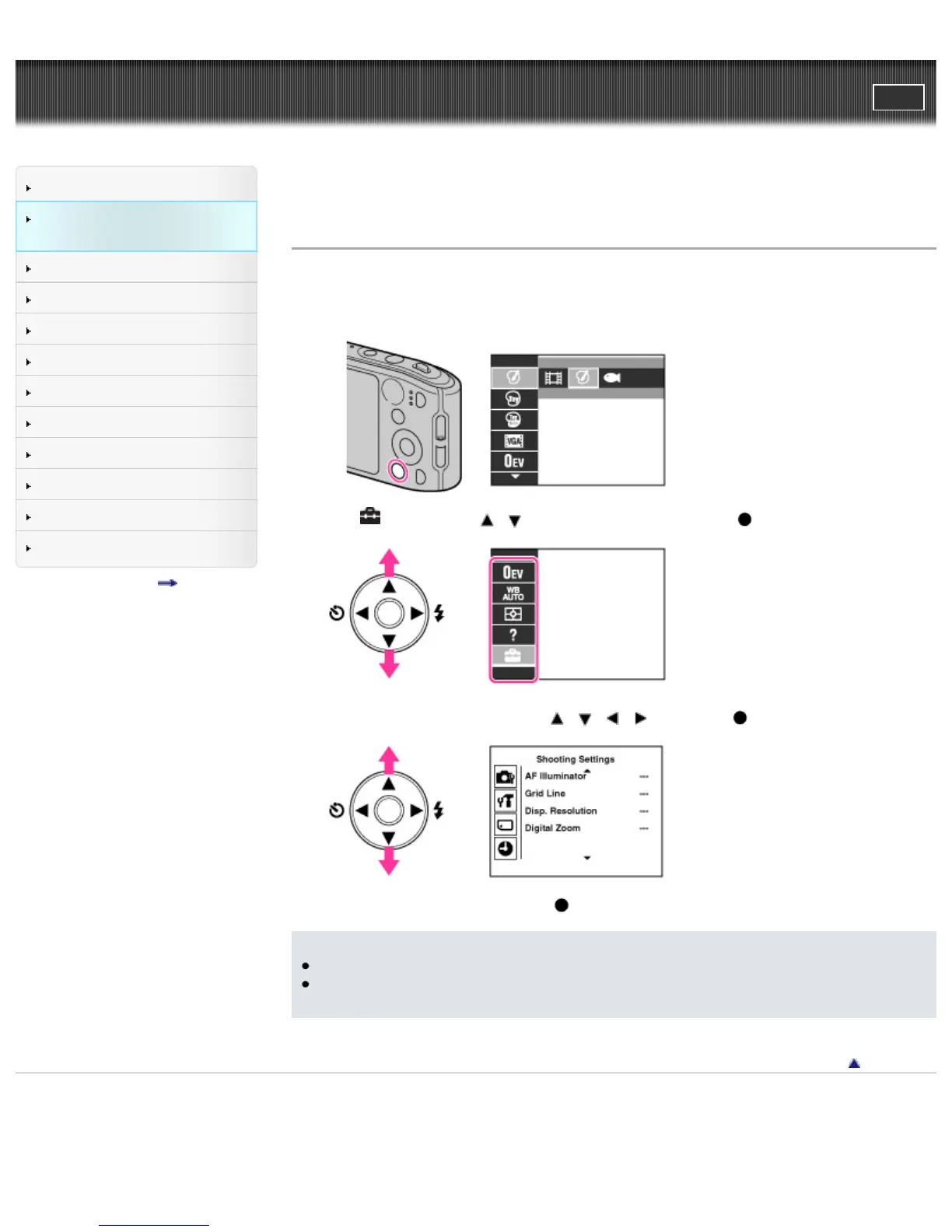
You can change the settings on the [Settings] screen.
1. Press the MENU button to display the Menu screen.
2. Select (Settings) with / on the control button, then press to display the setup screen.
3. Select the desired category by using / / / , then press to display the setup screen.
4. Select the desired setting, then press .
Notes
[Shooting Settings] appears only when settings have been entered from shooting mode.
[Memory Card Tool] appears only when a memory card is inserted in the camera, while [Internal
Memory Tool] appears only when a memory card is not inserted.
Back to top
Copyright 2013 Sony Corporation



 To Next Page