10
Connecting to a TV
You can enjoy images on your TV or
monitor by the following connection.
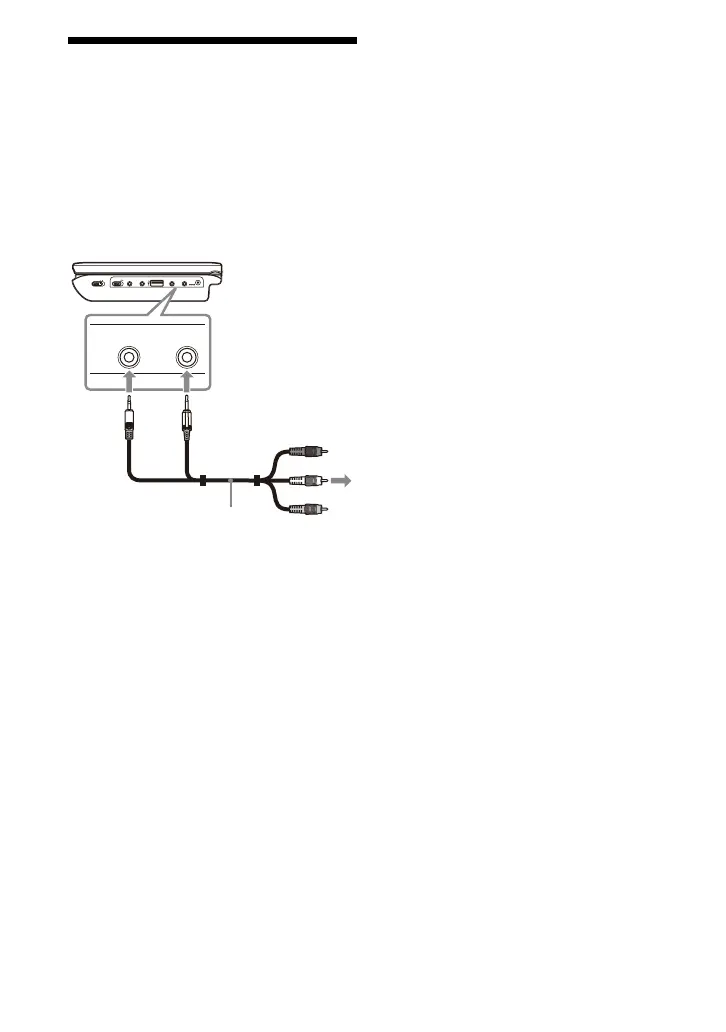
1 Connect the player to your TV or
monitor using the audio/video
cable (supplied).
z
The player can connect to an AV amplifier in the
same way as a TV.
b
• No picture is displayed on the LCD screen
while connected to a TV using the audio/video
cable.
• Refer to the instructions supplied with the
equipment to be connected.
• Before connecting, turn off the player and the
equipment to be connected, then unplug from
their wall sockets.
OPERATE
ONOFF
HOLD
PHONES
AB
AUDIO
OUT
VIDEO
OUT
DC IN
9.5V
AUDIO
OUT
VIDEO
OUT
To AUDIO/
VIDEO input
jacks of a TV or
monitor
Audio/video cable
(supplied)



 To Next Page