5
Guide to Parts and
Controls
The available functions of the player and
remote differ depending on the disc or the
situation.
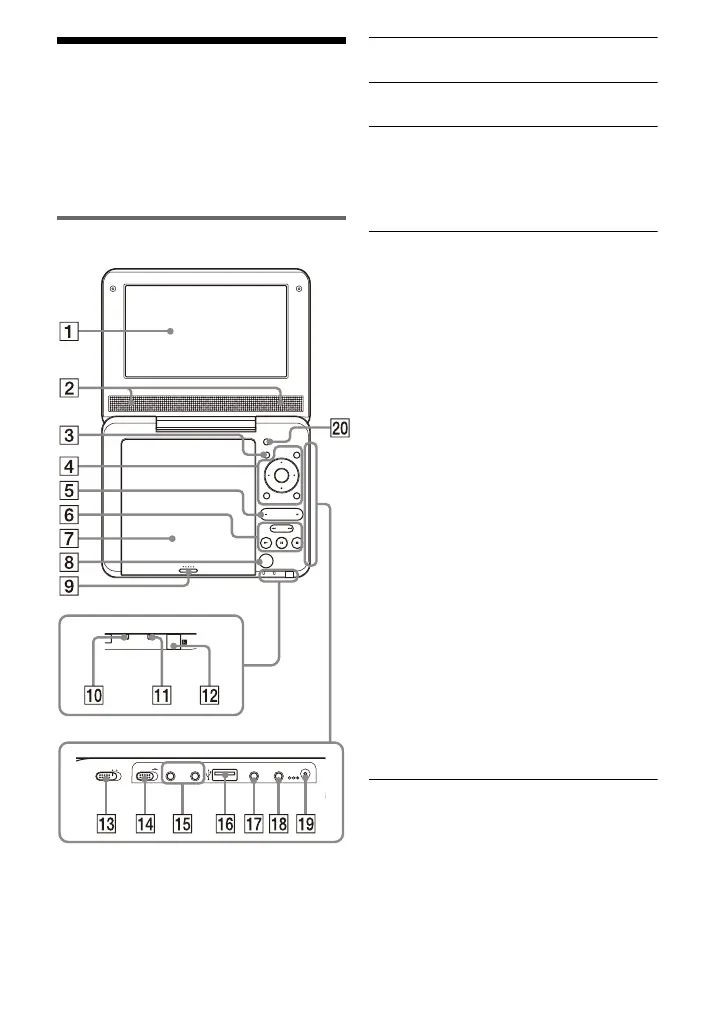
Player
The VOLUME+ and N (play) buttons
have a tactile dot. Use the tactile dot as a
reference when operating the player.
A LCD panel (page 11)
B Speaker
C DISPLAY button
Displays the playback information.
• When playing a DVD, changes the
playback mode (page 12).
D MENU button
Displays the DVD VIDEO’s menu.
• When playing a CD or VIDEO CD
(PBC function is off), switches to
Repeat Play (page 12) or Shuffle
Play.
• When playing a JPEG file, plays a
slideshow (page 14).
C/X/x/c button
Moves the highlight to select a
displayed item.
• C/c on the player works the same as
m/M on the remote.
ENTER (centre) button
Enters the selected item.
• ENTER on the player works the
same as N.
RETURN button
Returns to the previous display.
OPTIONS button
Displays the menu for adjusting the
LCD screen (page 15) and using the
setup display (page 16).
E VOLUME (sound volume) +/–
button
Adjusts the volume.
PUSH CLOSE
INPUT SELECT
DISPLAY MENU
RETURN
OPEN
OPTIONS
ENTER
VOLUME
POWER CHARGE
OPERATE
ONOFF
HOLD
PHONES
AB
AUDI O
OUT
VIDEO
OUT
DC IN
9.5V
,continued



 To Next Page