1
3
PHON ESPHON ES PHON ESPHON ES AUDI OAUDI O VIDE OVI DEO
LINE SELECTLINE SELECT IN OU TIN OU T
DC IN 9 .5VDC IN 9 .5V
4
5
6 7
8
9
2
RE
E
SE
L
ARE
E
SE
L
A
AC
H
R
G
E
AC
H
R
G
E
RP
OWE
RP
OWE
HO
L
DHO
L
D
NO
P
E
NO
P
E
Identification of Controls (continued)
Preventing Mistaken Main Button Commands
By sliding the HOLD switch to the left, the hold function is
enabled. It locks the buttons on the DVD player so that
they will not work if accidentally touched.
Even if Hold is set, the remote control can be used to
operate the player.
16
1
2
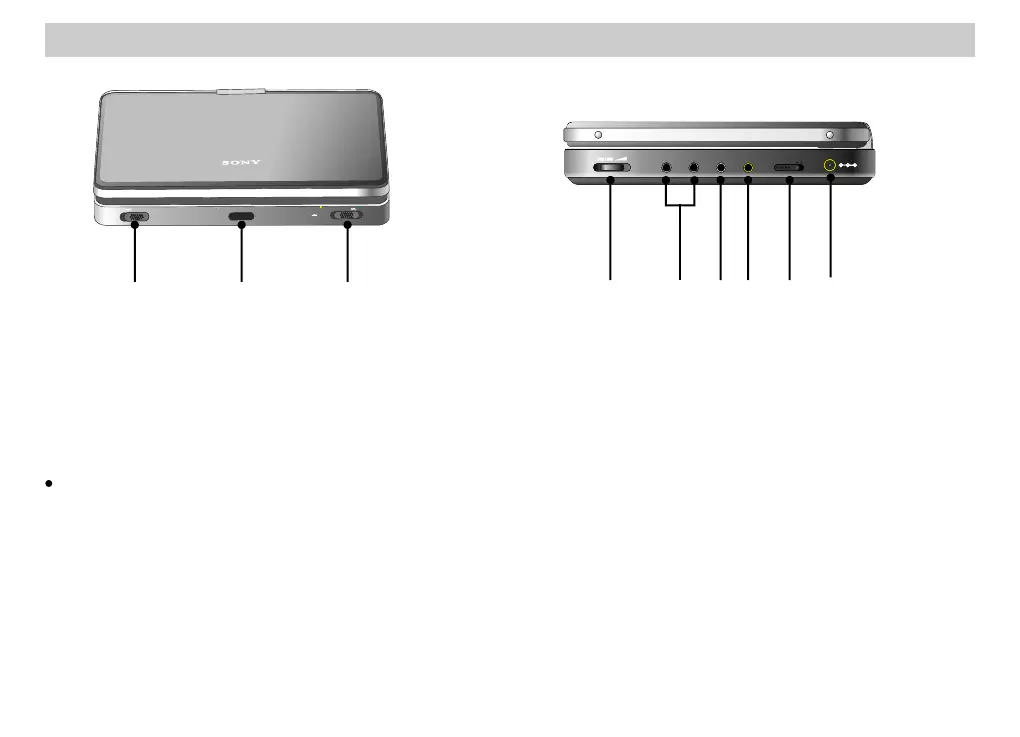
. Open Knob [OPEN]
. Remote Control Sensor (page 18)
3. Power/Hold Switch (page 23)
1. Open Knob [OPEN]
2. Remote Control Sensor (page 18)
3. Power/Hold Switch (page 23)
4. Sound Volume Knob (page 23) [VOLUME]
5. Headphone Jack 1, 2 [PHONES]
6. Audio Input/Output Jack [AUDIO] (page 47)
7. Video Input/Output Jack [VIDEO] (page 47)
8. Input/Output Line Select Knob
[LINE SELECT IN/OUT] (page 47)
9. AC Adaptor Input Jack [DC IN 9.5 V] (page 20)
4. Sound Volume Knob (page 23) [VOLUME]
5. Headphone Jack 1, 2 [PHONES]
6. Audio Input/Output Jack [AUDIO] (page 47)
7. Video Input/Output Jack [VIDEO] (page 47)
8. Input/Output Line Select Knob
[LINE SELECT IN/OUT] (page 47)
9. AC Adaptor Input Jack [DC IN 9.5 V] (page 20)













 To Next Page