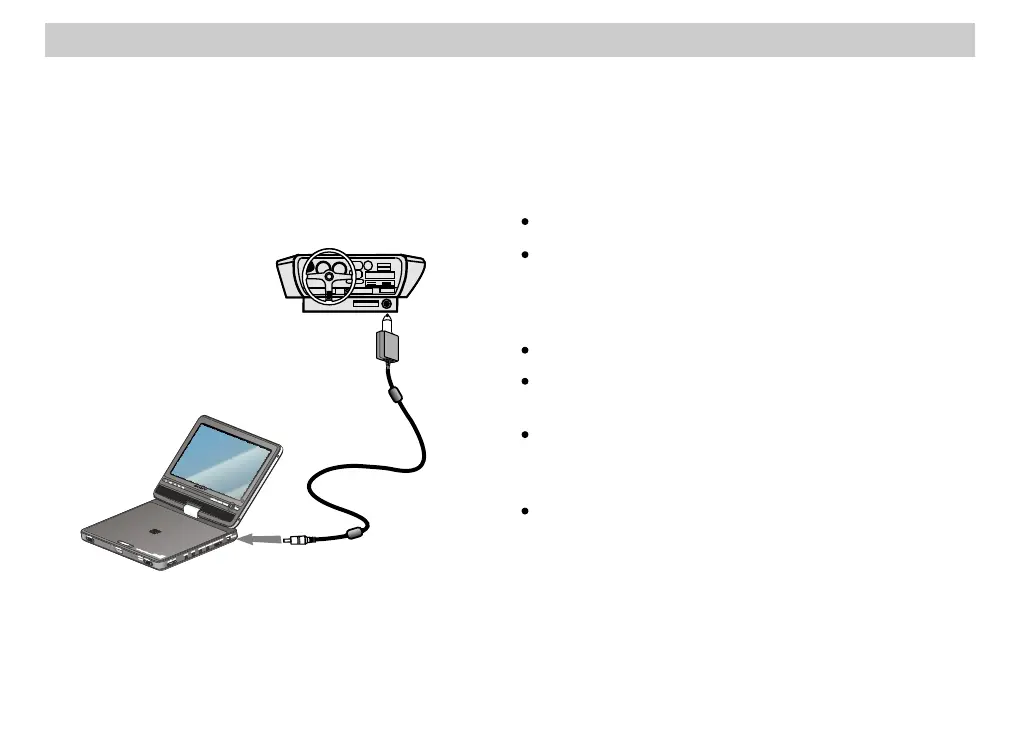
Using this Player with a Car Adaptor
Use the accessory cord included (DCC-FX110) to supply power from the cigarette lighter to this player.
The adaptor is made for a 12 V car battery. Please do not use it with a 24 V car battery.
Use the accessory cord included (DCC-FX110) to supply power from the cigarette lighter to this player.
The adaptor is made for a 12 V car battery. Please do not use it with a 24 V car battery.
Plug into the cigarette lighter socketPlug into the cigarette lighter socket
Connect the Car Adaptor included (DCC-FX110) into the cigarette lighterConnect the Car Adaptor included (DCC-FX110) into the cigarette lighter
This unitThis unit
DCC-FX110
(included) (included)
To a DC power Input Jack
(DC IN 9.5V)
To a DC power Input Jack
(DC IN 9.5V)
Notes:Notes:
Arrange the cord so as not to interfere with the driver.
If using this device with a car adaptor, when finished
using always turn the player off by its own power switch.
Turning off the car engine with the player’s power on stops
the supply of electricity to the device and may damage it.
Do not place the monitor where the driver can watch it.
If image quality deteriorates, please disconnect the car
adaptor from the main device.
When there is a danger of the car adaptor or its use
interfering with vehicle operation, using a commercial
cigarette lighter extension cord is recommended.
After use disconnect the car adaptor from the cigarette
lighter.
Since the electricity supply is coming from the cigarette
lighter, even with the car engine off there is a danger of
electrical discharge with some cars.
48













 To Next Page