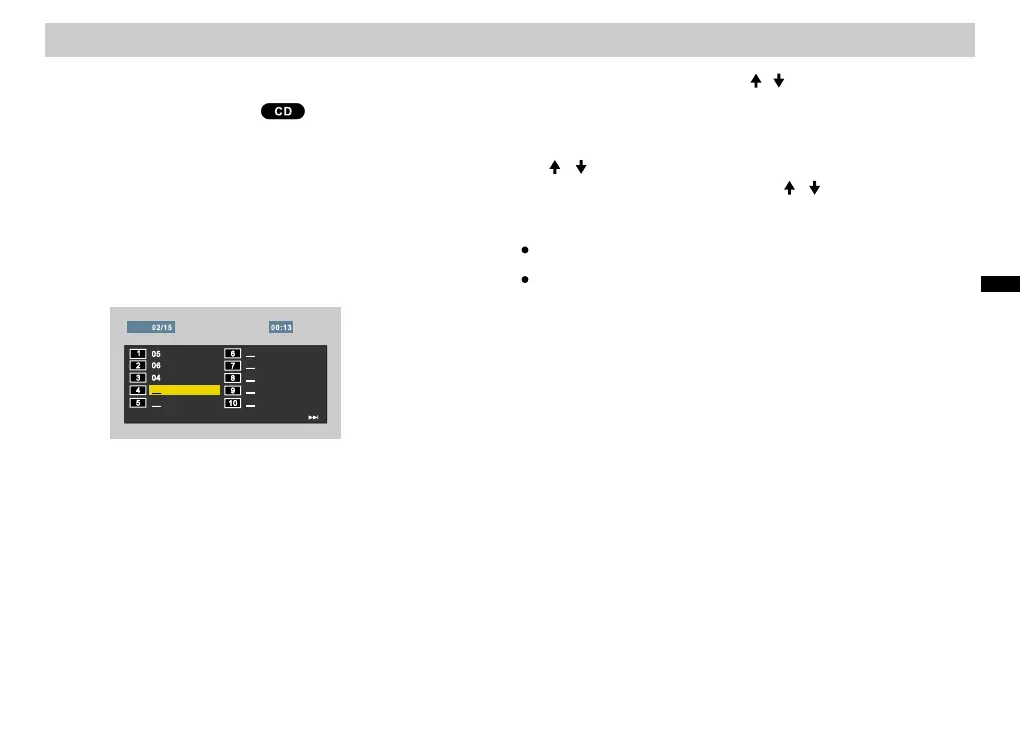
3. Enter the number of the track to be programmed by
pressing the number buttons.
4. Press [ENTER] to confirm.
Programming Playback
1. Insert the disc.
2. Press [PROGRAM] and the Program List screen will
appear.
Tracks can be arranged and played in any order desired.
Program List
5. Repeat steps 3-4 to program track numbers.
Programming PlaybackProgramming Playback
NextNext
StartStart
ExitExit
TrackTrack
6. Select “Start” by pressing / . The tracks will play in
the programmed order. The disc will stop after all the
tracks in the Program List have played one time.
To erase all program list files, select “All ” with the
/ buttons.
To end Programmed Play, use / to select “ xit”.
[ ]
Clear
[ ]
[ ] E
The maximum number of tracks programmable is 20.
When the Program List is displayed, the CD will not
operate.
Notes:Notes:
35
e
r
a
t
i
oA
d
v
a
nce
d
op
ns













 To Next Page