12
Preparation
Preparation
Attaching to a Camcorder
This receiver can be inserted into a slot
provided on compatible Sony camcorders.
The audio signal, which is converted to
digital by the digital wireless transmitter,
can be recorded as is to the camcorder,
allowing you to create a fully digital
system.
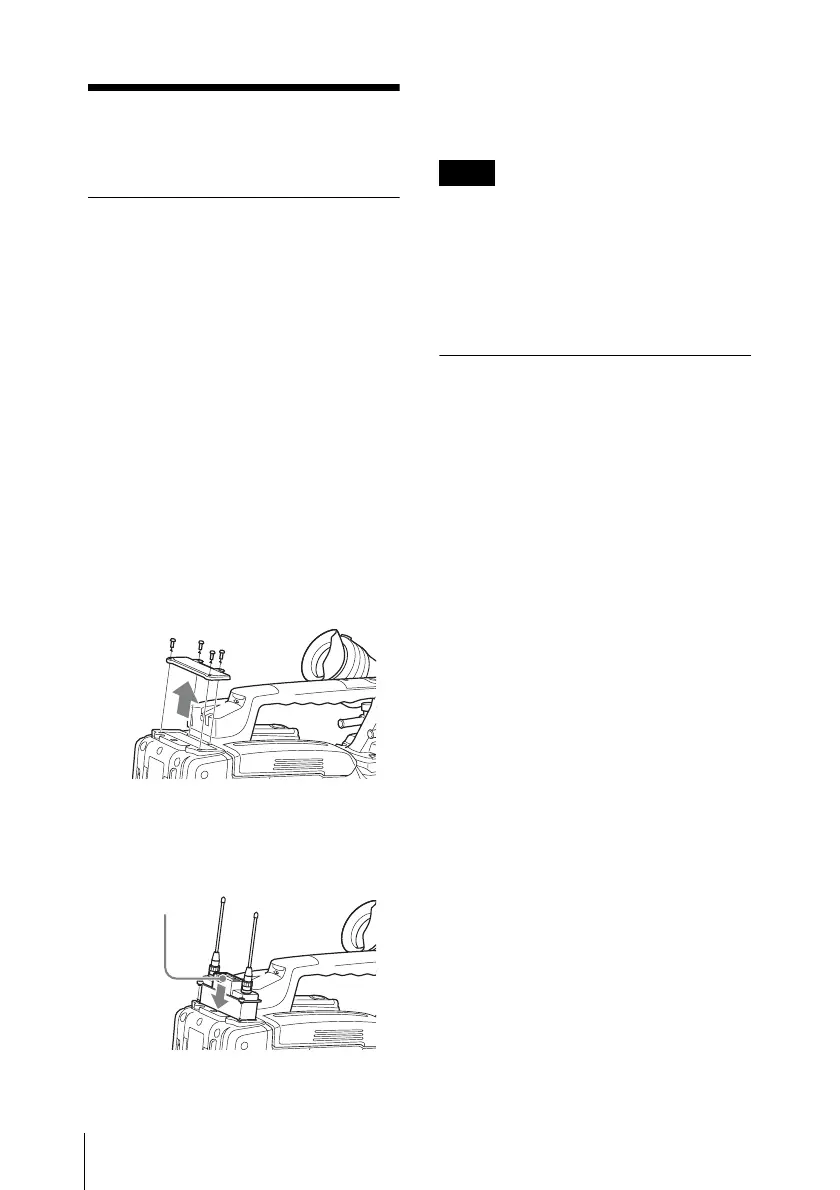
1 Remove the cover from the slot for the
wireless receiver on the camcorder,
and insert the receiver into the slot.
To avoid inserting the receiver in the
wrong direction, confirm the location
of the mounting screws and
compatibility pin before inserting the
wireless receiver.
2 After inserting the receiver completely
into slot, securely fasten the four
mounting screws.
For details about operating the camcorder with the
receiver, refer to the operating instructions supplied
with the camcorder.
If the camcorder is not compatible with the
receiver, the compatibility pin on the
receiver will make it impossible to insert
the receiver into the slot.
For details on compatible camcorders, consult a
Sony sales representative.
Using the DWA-01D
Adapter
Attaching the receiver to the DWA-01D
digital wireless adapter allows them to be
used as a portable wireless receiver.
For details, refer to the operating instructions
supplied with the adapter.
Receiver
Note



 To Next Page