EasyManua.ls Logo

Sony DXC-325P - Connections; S-VHS Portable VTR Connection

Sony DXC-325P
46 pages
Print Icon
To Next Page IconTo Next Page
To Previous Page IconTo Previous Page
Loading...
HALHHUTTITH
i.
GENERAL
DESCRIPTION
Connections
Before
making
connections,
make
sure
that
the
power
switches
of
the
camera
and
other
equipment
are
turned
off.
Connection
with
an
S-VHS
Format
Portable
VIR
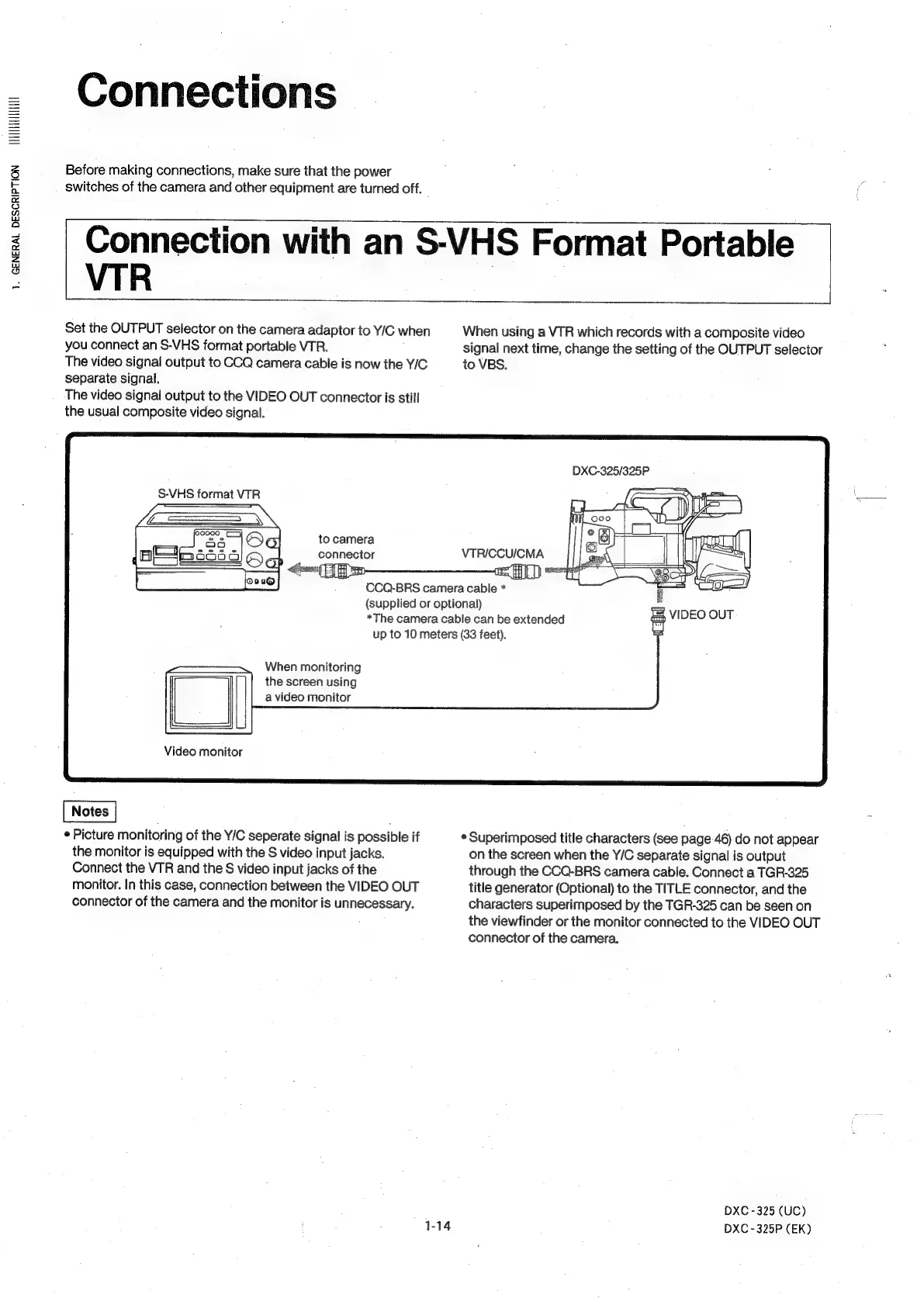
Set
the
OUTPUT
selector
on
the
camera
adaptor
to
Y/C
when
you
connect
an
S-VHS
format
portable
VTR.
The
video
signal
output
to
CCQ
camera
cable
is
now
the
Y/C
separate
signal.
The
video
signal
output
to
the
VIDEO
OUT
connector
is
still
the
usual
composite
video
signal.
S-VHS
format
VTR
Sai
to
camera
—
ESL
SSS
When
using
a
VTR
which
records
with
a
composite
video
signal
next
time,
change
the
setting
of
the
OUTPUT
selector
to
VBS.
DXC-325/325P
(supplied
or
optional)
*The
camera
cable
can
be
extended
VIDEO
OUT
up
to
10
meters
(33
feet).
When
monitoring
the
screen
using
a
video
monitor
Video
monitor
®
Picture
monitoring
of
the
Y/C
seperate
signal
is
possible
if
the
monitor
is
equipped
with
the
S
video
input
jacks.
Connect
the
VTR
and
the
S
video
input
jacks
of
the
monitor.
In
this
case,
connection
between
the
VIDEO
OUT
connector
of
the
camera
and
the
monitor
is
unnecessary.
*
Superimposed
title
characters
(see
page-46)
do
not
appear
on
the
screen
when
the
Y/C
separate
signal
is
output
through
the
CCQ-BRS
camera
cable.
Connect
a
TGR-325
title
generator
(Optional)
to
the
TITLE
connector,
and
the
characters
superimposed
by
the
TGR-325
can
be
seen
on
the
viewfinder
or
the
monitor
connected
to
the
VIDEO
OUT
connector
of
the
camera.
DXC
-325
(UC)
DXC-325P
(EK)