EasyManua.ls Logo

Sony DXC-325P - Controls and Operation; Camera Head Controls

Sony DXC-325P
46 pages
Print Icon
To Next Page IconTo Next Page
To Previous Page IconTo Previous Page
Loading...
HOTT
1,
VOINCNAL
VOOURIF
I
NAY
Location
and
Function
of
Controls
|
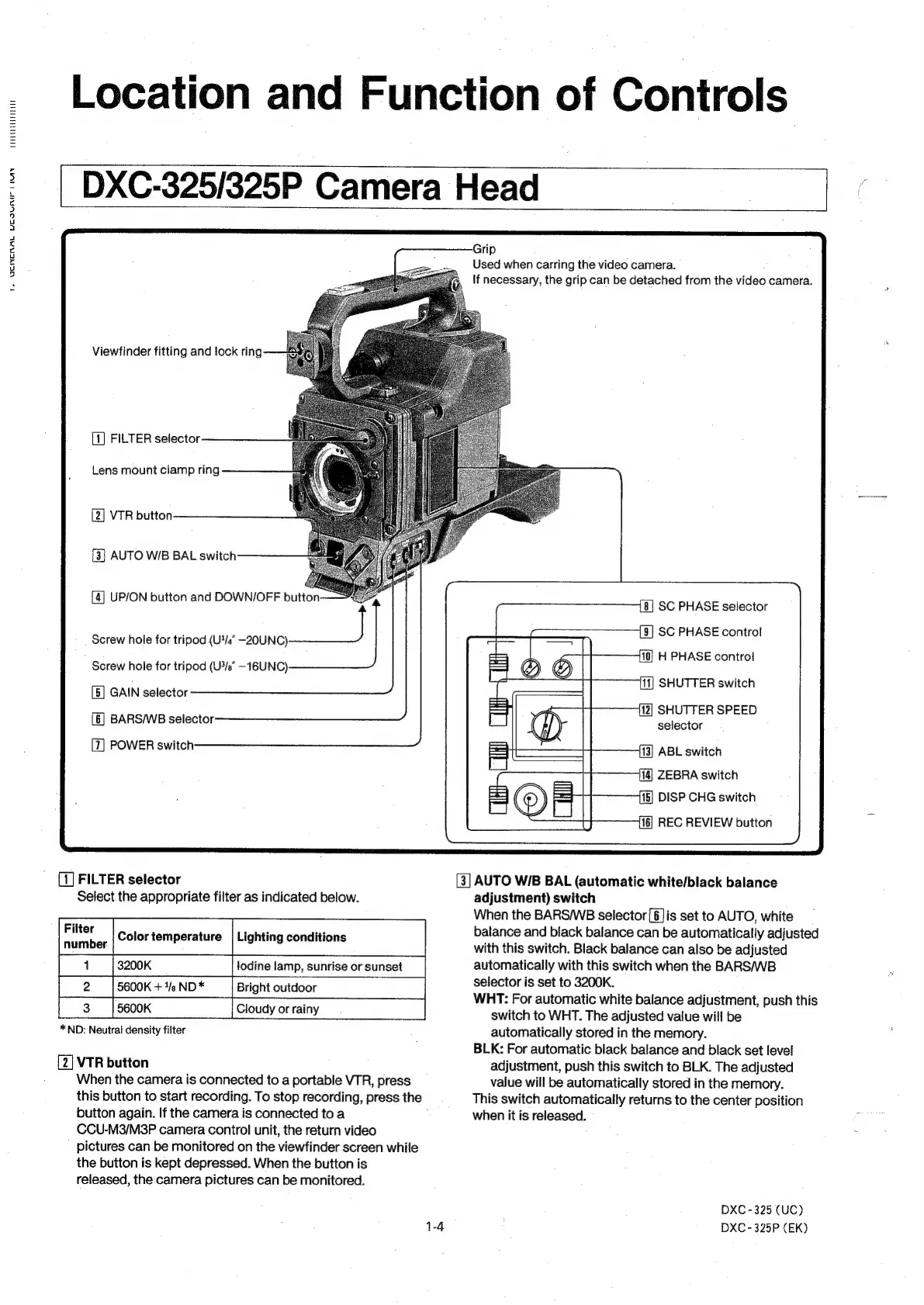
DXC-325/325P
Camera
Head
Viewfinder
fitting
and
lock
ring
FILTER
selector
Lens
mount
clamp
ring
[2]
VTR
button
[3]
AUTO
W/B
BAL
switch
[4]
UP/ON
button
and
DOWN/OFF
button
Screw
hole
for
tripod
(U4/4ā€
-20UNC)
.
Screw
hole
for
tripod
(U%/sā€
—16UNC)
[5]
GAIN
selector
(6]
BARSWB
selector
POWER
switch
[1]
FILTER
selector
Select
the
appropriate
filter
as
indicated
below.
ruter
Color
temperature
|
Lighting
conditions
number
1
3200K
todine
lamp,
sunrise
or
sunset
5600K
+
1/e
ND
*
Bright
outdoor
5600K
Cloudy
or
rainy
*
ND:
Neutral
density
filter
[2]
VTR
button
When
the
camera
is
connected
to
a
portable
VTR,
press
this
button
to
start
recording.
To
stop
recording,
press
the
button
again.
If
the
camera
is
connected
to
a
CCU-M3/M3P
camera
control
unit,
the
return
video
pictures
can
be
monitored
on
the
viewfinder
screen
while
the
button
is
kept
depressed.
When
the
button
is
released,
the
camera
pictures
can
be
monitored.
Grip
Used
when
carring
the
video
camera.
If
necessary,
the
grip
can
be
detached
from
the
video
camera.
[8]
SC
PHASE
selector
SC
PHASE
control
H
PHASE
control
SHUTTER
switch
SHUTTER
SPEED
selector
ABL
switch
ZEBRA
switch
115]
DISP
CHG
switch
REC
REVIEW
button
[3]
AUTO
WIB
BAL
(automatic
white/black
balance
adjustment)
switch
When
the
BARSWB
selector
[6]is
set
to
AUTO,
white
balance
and
black
balance
can
be
automatically
adjusted
with
this
switch.
Black
balance
can
also
be
adjusted
automatically
with
this
switch
when
the
BARS/WB
selector
is
set
to
3200K.
WHT:
For
automatic
white
balance
adjustment,
push
this
switch
to
WHT.
The
adjusted
value
will
be
automatically
stored
in
the
memory.
BLK:
For
automatic
black
balance
and
black
set
level
adjustment,
push
this
switch
to
BLK.
The
adjusted
value
will
be
automatically
stored
in
the
memory.
This
switch
automatically
returns
to
the
center
position
when
it
is
released.
DXC
-
325
(UC)
DXC
-325P
(EK)

Other manuals for Sony DXC-325P

Related product manuals