EasyManua.ls Logo

Sony DXC-325P - Operation; Recording with Portable VTR

Sony DXC-325P
46 pages
Print Icon
To Next Page IconTo Next Page
To Previous Page IconTo Previous Page
Loading...
TH
1.
GENERAL
DESCRIPTION
Operation
|
Preparation
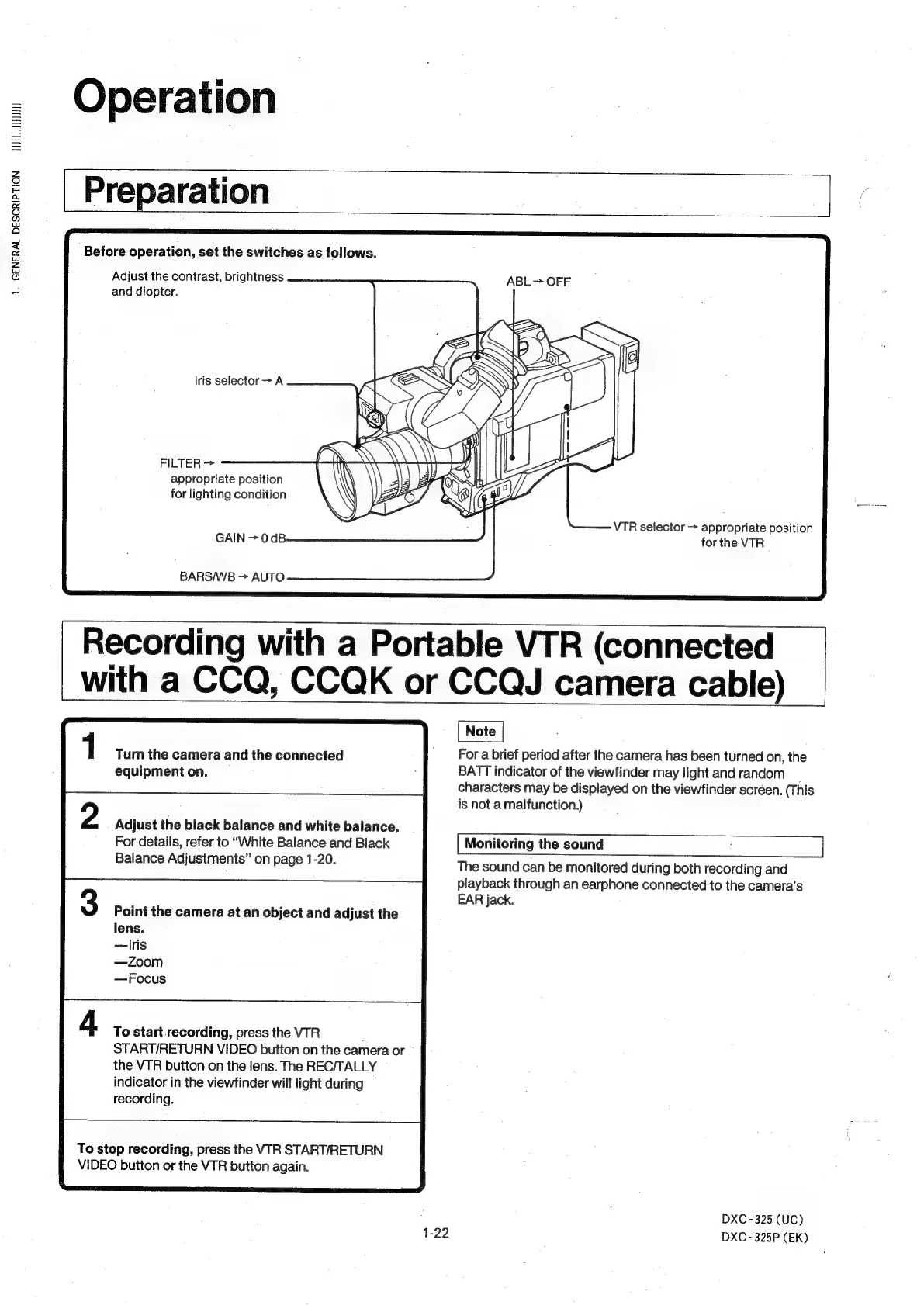
Before
operation,
set
the
switches
as
follows.
Adjust
the
contrast,
brightness
and
diopter.
lris
selector
>A
FILTER
>
appropriate
position
for
lighting
condition
GAIN
>
0
dB
BARS/WB
>
AUTO
Turn
the
camera
and
the
connected
equipment
on.
Adjust
the
black
balance
and
white
balance.
For
details,
refer
to
“White
Balance
and
Black
Balance
Adjustments”
on
page
1-20.
Point
the
camera
at
an
object
and
adjust
the
lens.
—lris
—Zoom
—Focus
To
start
recording,
press
the
VTR
START/RETURN
VIDEO
button
on
the
camera
or
the
VTR
button
on
the
lens.
The
REC/TALLY
indicator
in
the
viewfinder
will
light
during
recording.
To
stop
recording,
press
the
VTR
START/RETURN
VIDEO
button
or
the
VTR
button
again.
1-22
Recording
with
a
Portable
VTR
(connected
with
a
CCQ,
CCQK
or
CCQJ
camera
cable)
ABL
>
OFF
VTR
selector
>
appropriate
position
for
the
VTR
For
a
brief
period
after
the
camera
has
been
turned
on,
the
BATT
indicator
of
the
viewfinder
may
light
and
random
_
characters
may
be
displayed
on
the
viewfinder
screen.
(This
is
not
a
malfunction.)
Monitoring
the
sound
The
sound
can
be
monitored
during
both
recording
and
playback
through
an
earphone
connected
to
the
camera’s
EAR
jack.
DXC
-325
(UC)
DXC
-325P
(EK)