EasyManua.ls Logo

Sony EV-C3 - Remote Commander; Battery Installation; Remote Control Functions; Remote Operating Range

Sony EV-C3
22 pages
Print Icon
To Next Page IconTo Next Page
To Previous Page IconTo Previous Page
Loading...
18 19
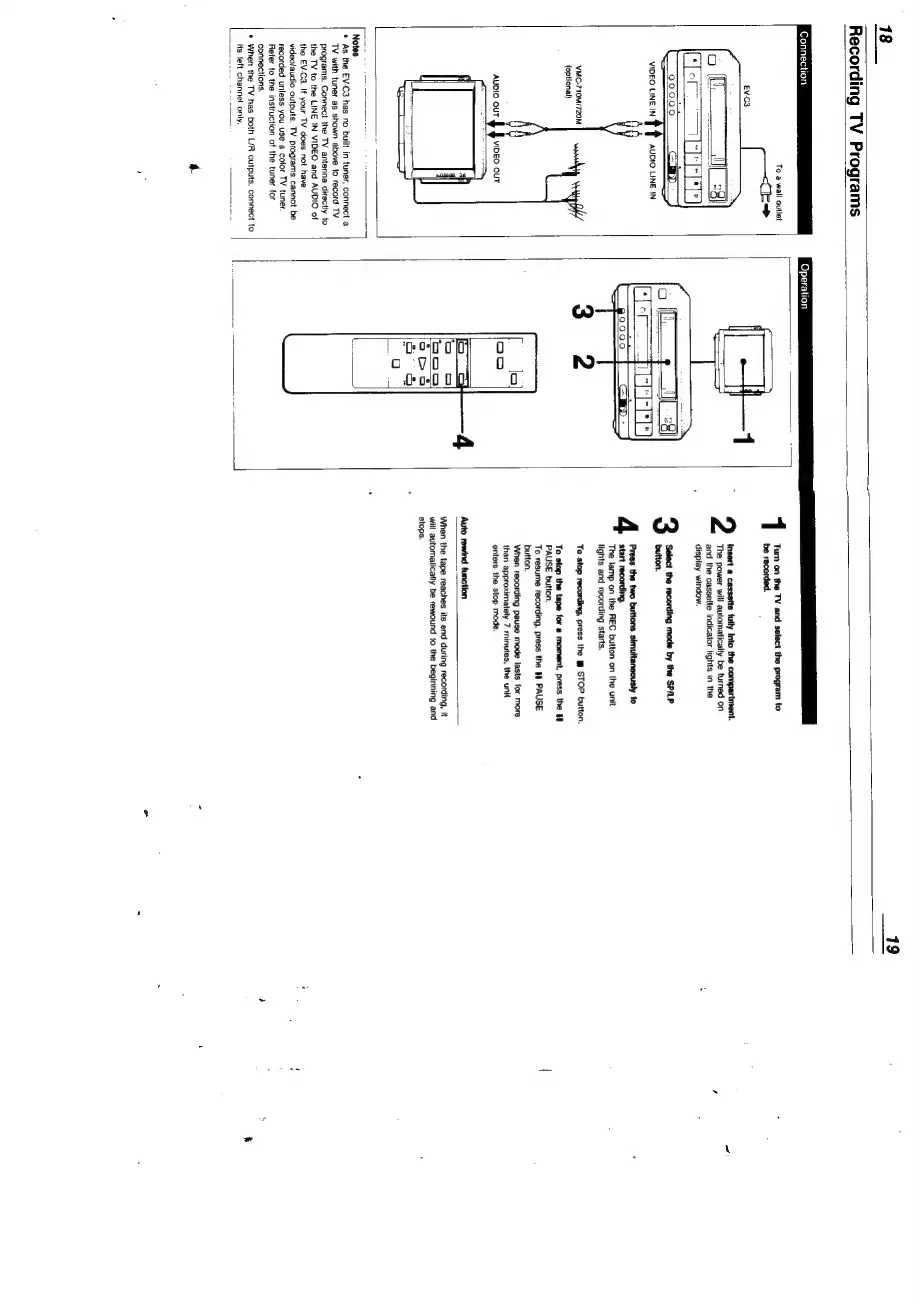
Recording
TV
Programs
Connection
Operation
To
a
wall
outlet
tr
Turn
on
the
TV
and
select
the
program
to
be
recorded.
Insert
a
cassette
fully
Into
the
compartment.
The
power
will
automatically
be
turned
on
and
the
cassette
indicator
tights
in
the
display
window.
o
f___t
Q9009
CoD
Select
the
recording
mode
by
the
SP/LP
button.
Press
the
two
buttons
simultaneously
to
start
recording.
The
lamp
on
the
REC
button
on
the
unit
lights
and
recording
starts.
moO
NO
VMC-710M/720M
(optional)
To
stop
recording,
press
the
m
STOP
button.
To
stop
the
tape
for
a
moment,
press
the
1
PAUSE
button.
To
resume
recording,
press
the
1
PAUSE
button.
When
recording
pause
mode
lasts
for
more
than
approximately
7
minutes,
the
unit
enters
the
stop
mode.
Auto
rewind
function
When
the
tape
reaches
its
end
during
recording,
it
will
automaticatly
be
rewound
to
the
beginning
and
stops.
Notes
*
As
the
EV-C3
has
no
built
in
tuner,
connect
a
TV
with
tuner
as
shown
above
to
record
TV
programs.
Connect
the
TV
antenna
directly
to
the
TV
to
the
LINE
IN
VIDEO
and
AUDIO
of
the
EV-C3.
If
your
TV
does
not
have
video/audio
outputs,
TV
programs
cannot
be
recorded
unless
you
use
a
color
TV
tuner.
Refer
to
the
instruction
of
the
tuner
for
connections,
*
When
the
TV
has
both
L/R
outputs,
connect
to
its
left
channel
only.

Related product manuals