EasyManua.ls Logo

Sony EV-C3 - Before You Begin; Supplied Accessories; Video Cassette Handling

Sony EV-C3
22 pages
Print Icon
To Next Page IconTo Next Page
To Previous Page IconTo Previous Page
Loading...
8
Getting
to
Know
the
EV-C3
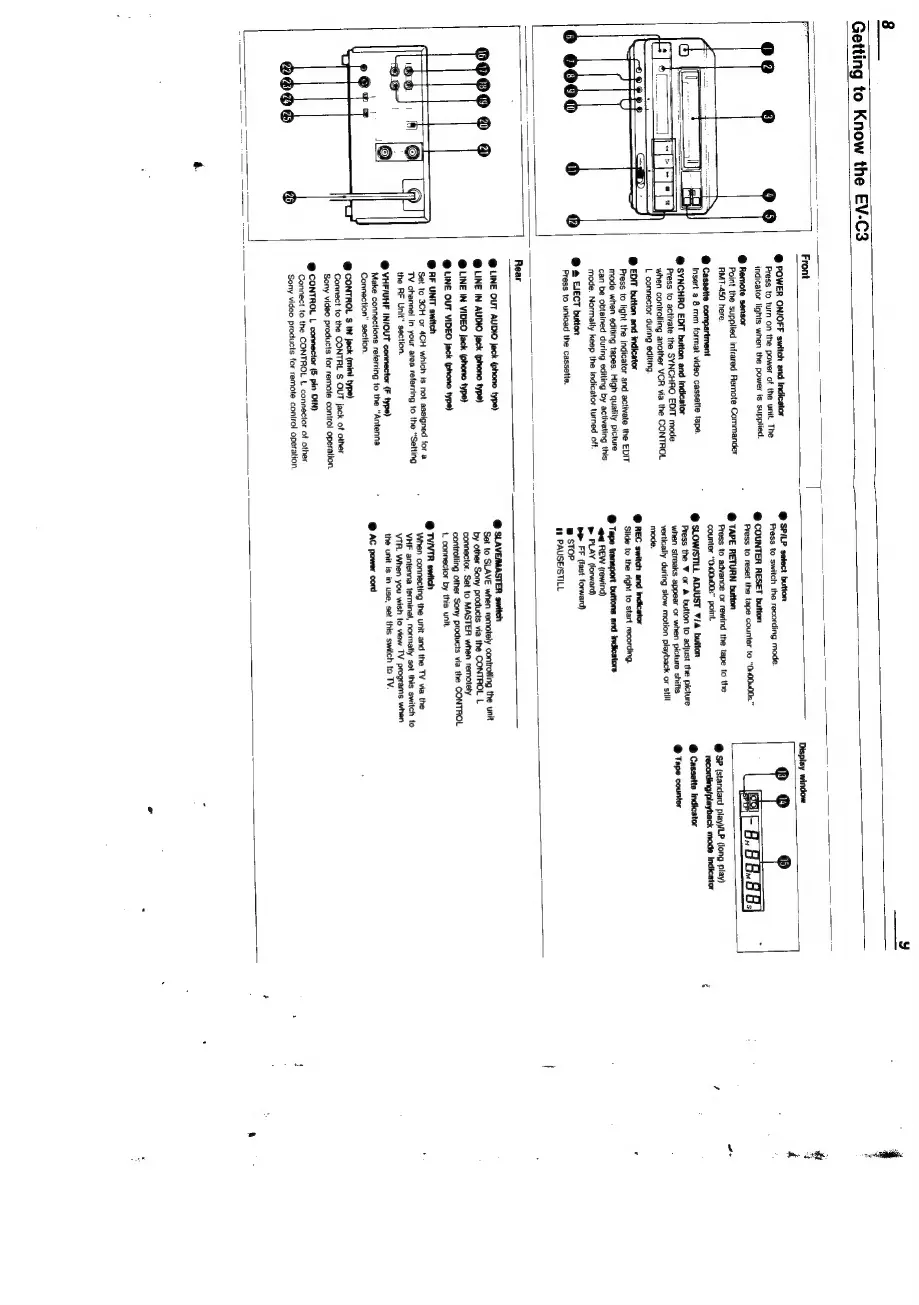
Front
@
POWER
ON/OFF
switch
and
Indicator
Press
to
turn
on
the
power
of
the
unit.
The
indicator
lights
when
the
power
is
supplied.
@
Remote
sensor
Point
the
supplied
infrared
Remote
Commander
RMT-450
here.
@
Cassette
compartment
Insert
a
8
mm
format
video
cassette
tape.
@
SYNCHRO
EDIT
button
and
indicator
Press
to
activate
the
SYNCHRO
EDIT
mode
when
controlling
another
VCR
via
the
CONTROL
L
connector
during
editing.
@
EDIT
button
and
indicator
Press
to
light
the
indicator
and
activate
the
EDIT
mode
when
editing
tapes.
High
quality
picture
can
be
obtained
during
editing
by
activating
this
mode.
Normally
keep
the
indicator
turned
off.
@
@
EJECT
button
Press
to
unload
the
cassette.
@
SPILP
select
button
Press
to
switch
the
recording
mode.
@
COUNTER
RESET
button
Press
to
reset
the
tape
counter
to
“0400W00s.”
@
TAPE
RETURN
button
Press
to
advance
or
rewind
the
tape
to
the
counter
“0400w00s”
point.
@
SLOWISTILL
ADJUST
¥/4
button
Press
the
¥
or
&
button
to
adjust
the
picture
when
streaks
appear
or
when
picture
shifts
vertically
during
slow
motion
playback
or
still
mode.
@
REC
switch
and
indicator
Slide
to
the
right
to
start
recording.
be
FF
(fast
forward)
w
sTOP
1
PAUSE/STILL
@
SP
(standard
play)/LP
(long
play)
recording/playback
mode
Indicator
@
Cassette
indicator
@
Tape
counter
Rear
@
LINE
OUT
AUDIO
jack
(phono
type)
@
LINE
IN
AUDIO
Jack
(phono
type)
@
LINE
IN
VIDEO
jack
(phono
type}
@
LINE
OUT
VIDEO
jack
(phono
type)
@
AF
UNIT
switch
Set
to
3CH
or
4CH
which
is
not
assigned
for
a
TV
channel
in
your
area
referring
to
the
“Setting
the
RF
Unit"
section.
@
VHF/UHF
IN/OUT
connector
(F
type)
Make
connections
referring
to
the
“Antenna
Connection”
section.
@
CONTROL
S$
IN
jack
(mini
type)
Connect
to
the
CONTRL
S
OUT
jack
of
other
Sony
video
products
for
remote
control
operation.
@
CONTROL
L
connector
5
pin
DIN}
Connect
to
the
CONTROL
L
connector
of
other
Sony
video
products
for
remote
control
operation.
@
SLAVE/MASTER
switch
Set
to
SLAVE
when
remotely
controiling
the
unit
by
other
Sony
products
via
the
CONTROL
L
connector.
Set
to
MASTER
when
remotely
controlling
other
Sony
products
via
the
CONTROL
L
connector
by
this
unit.
@
TVNTR
switch
When
connecting
the
unit
and
the
TV
via
the
VHF
antenna
terminal,
normalty
set
this
switch
to
VTR.
When
you
wish
to
view
TV
programs
when
the
unit
is
in
use,
set
this
switch
to
TV.
@
AC
power
cord
a

Related product manuals