EasyManua.ls Logo

Sony EV-C3 - Page 6

Sony EV-C3
22 pages
Print Icon
To Next Page IconTo Next Page
To Previous Page IconTo Previous Page
Loading...
10
Getting
to
Know
the
EV-C3
‘2
i
i
[
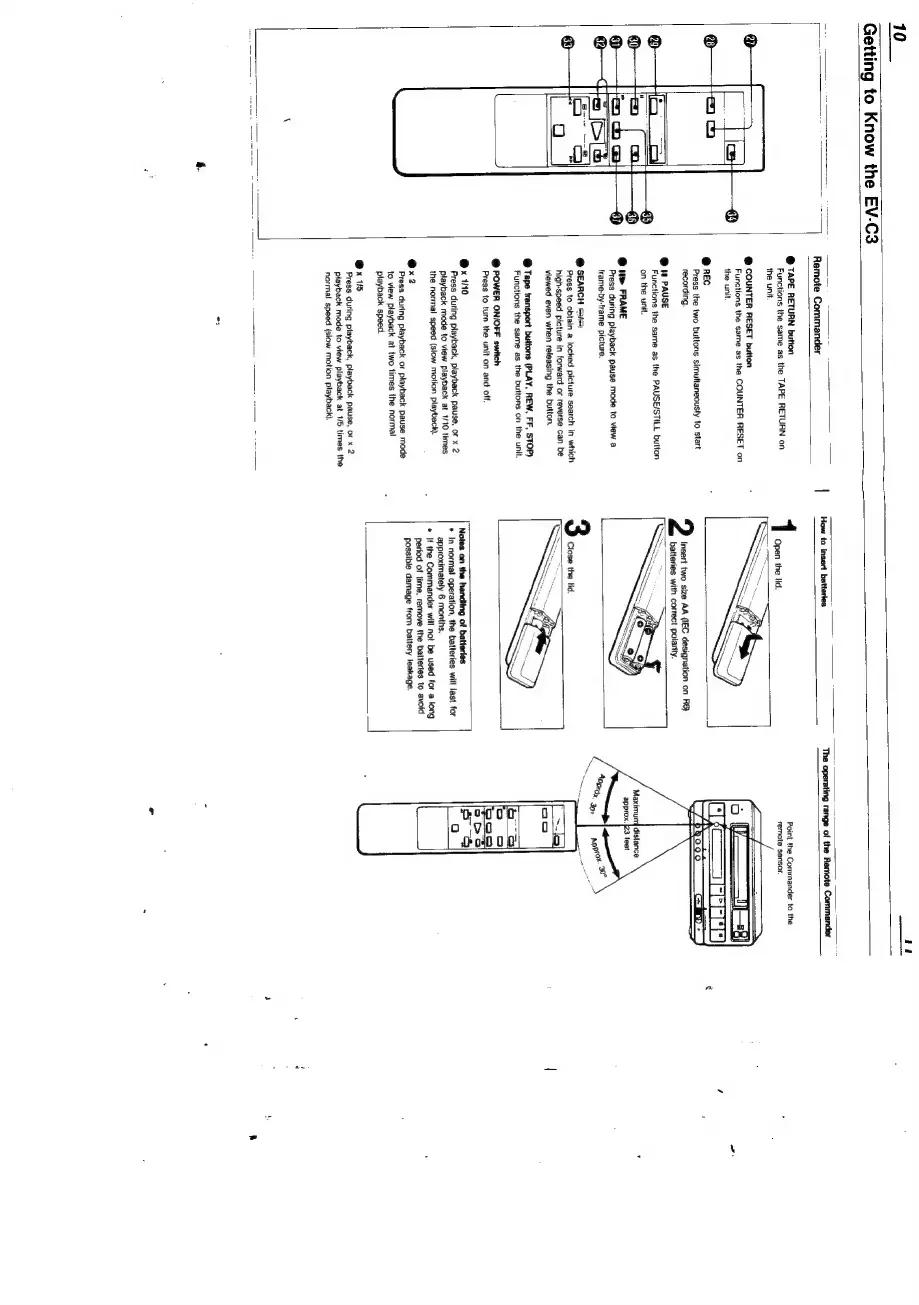
Remote
Commander
@
TAPE
RETURN
button
Functions
the
same
as
the
TAPE
RETURN
on
the
unit
@
COUNTER
RESET
button
Functions
the
same
as
the
COUNTER
RESET
on
the
unit.
@
REC
Press
the
two
buttons
simultaneously
to
start
recording.
@
tn
PAUSE
Functions
the
same
as
the
PAUSE/STILL
button
‘on
the
unit.
@
>
FRAME
Press
during
playback
pause
mode
to
view
a
frame-by-frame
picture.
@
SEARCH
se
Press
to
obtain
a
locked
picture
search
in
which
high-speed
picture
in
forward
or
reverse
can
be
viewed
even
when
releasing
the
button.
@
Tape
transport
buttons
(PLAY,
REW,
FF,
STOP)
Functions
the
same
as
the
buttons
on
the
unit.
=
er
@
POWER
ON/OFF
switch
Press
to
turn
the
unit
on
and
off.
@x
10
Press
during
playback,
playback
pause,
or
x
2
playback
mode
to
view
playback
at
1/10
times
the
normal
speed
(slow
motion
playback).
@x2
Press
during
playback
or
playback
pause
mode
to
view
playback
at
two
times
the
normal
playback
speed.
@x
115
Press
during
playback,
playback
pause,
or
x
2
playback
mode
to
view
playback
at
1/5
times
the
normal
speed
{slow
motion
playback).
\
fi
‘The
operating
range
of
the
Remote
Commander
Insert
two
size
AA
(IEC
designation
on
R6}
batteries
with
correct
polarity.
Notes
on
the
handling
of
batteries
*
In
normal
operation,
the
batteries
will
last
for
approximately
6
months.
*
If
the
Commander
will
not
be
used
for
a
long
period
of
time,
remove
the
batterles
to
avoid
possible
damage
from
battery
leakage.
Point
the
Commander
to
the
remote
sensor.

Related product manuals