EasyManua.ls Logo

Sony EV-S350 - Page 32

Sony EV-S350
50 pages
Print Icon
To Next Page IconTo Next Page
To Previous Page IconTo Previous Page
Loading...
Tape
Editing
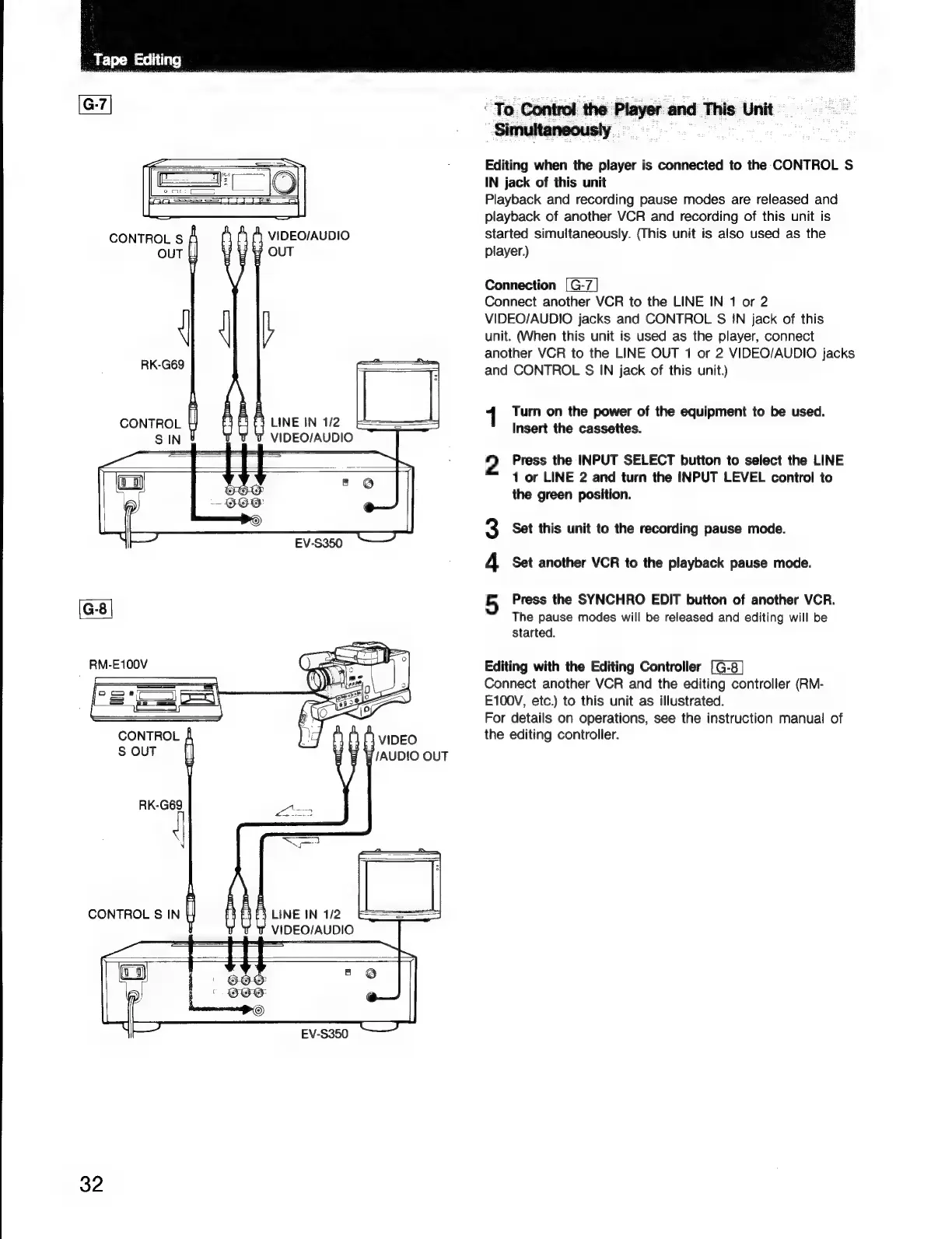
CONTROL
S
VIDEO/AUDIO
OUT
OUT
RK-G69
CONTROL
LINE
IN
1/2
SSS
SE
ea,
I
VIDEO/AUDIO
RM-E100V
CONTROL
S
OUT
LINE
IN
1/2
VIDEO/AUDIO
32
EV-S350
‘To
Control
the
Player
and
This
Unit
Editing
when
the
player
is
connected
to
the
CONTROL
S
IN
jack
of
this
unit
Playback
and
recording
pause
modes
are
released
and
playback
of
another
VCR
and
recording
of
this unit
is
started
simultaneously.
(This
unit
is
also
used
as
the
player.)
Connection
[G-7]
Connect
another
VCR
to
the
LINE
IN
1
or
2
VIDEO/AUDIO
jacks
and
CONTROL
S
IN
jack
of
this
unit.
(When
this
unit
is
used
as
the
player,
connect
another
VCR
to
the
LINE
OUT
1
or
2
VIDEO/AUDIO
jacks
and
CONTROL
IN
jack
of
this
unit.)
1
Turn
on
the
power
of
the
equipment
to
be
used.
Insert
the
cassettes.
2
Press
the
INPUT
SELECT
button
to
select
the
LINE
1
or
LINE
2
and
turn
the
INPUT
LEVEL
control
to
the
green
position.
Set
this
unit
to
the
recording
pause
mode.
4
Set
another
VCR
to
the
playback
pause
mode.
5
Press
the
SYNCHRO
EDIT
button
of
another
VCR.
The
pause
modes
will
be
released
and
editing
will
be
started.
Editing
with
the
Editing
Controller
Connect
another
VCR
and
the
editing
controller
(RM-
E100V,
etc.)
to
this
unit
as
illustrated.
For
details
on
operations,
see
the
instruction
manual
of
the
editing
controller.

Related product manuals