EasyManua.ls Logo

Sony EV-S350 - Page 41

Sony EV-S350
50 pages
Print Icon
To Next Page IconTo Next Page
To Previous Page IconTo Previous Page
Loading...
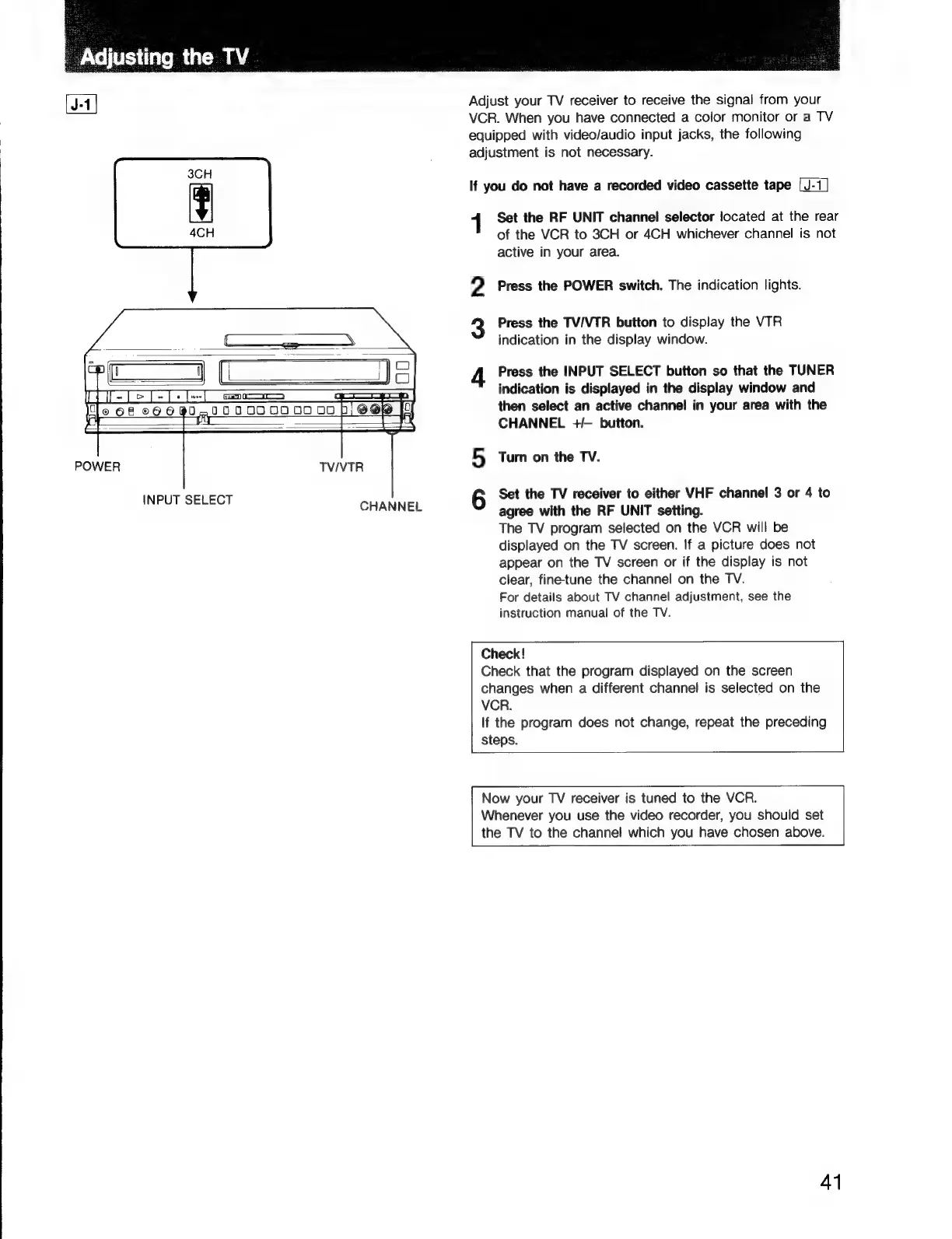
3CH
4CH
POWER
INPUT
SELECT
TV/VTR
CHANNEL
Adjust
your
TV
receiver
to
receive
the
signal
from
your
VCR.
When
you
have
connected
a
color
monitor
or
a
TV
equipped
with
video/audio
input
jacks,
the
following
adjustment
is
not
necessary.
If
you
do
not
have
a
recorded
video
cassette
tape
1
Set
the
RF
UNIT
channel
selector
located
at
the
rear
of
the
VCR
to
3CH
or
4CH
whichever
channel
is
not
active
in
your
area.
2
Press
the
POWER
switch.
The
indication
lights.
Press
the
TV/VTR
button
to
display
the
VTR
indication
in
the
display
window.
4
Press
the
INPUT
SELECT
button
so
that
the
TUNER
indication
is
displayed
in
the
display
window
and
then
select
an
active
channel
in
your
area
with
the
CHANNEL
+/-
button.
5
Turn
on
the
TV.
6
Set
the
TV
receiver
to
either
VHF
channel
3
or
4
to
agree
with
the
RF
UNIT
setting.
The
TV
program
selected
on
the
VCR
will
be
displayed
on
the
TV
screen.
If
a
picture
does
not
appear
on
the
TV
screen
or
if
the
display
is
not
clear,
fine-tune
the
channel
on
the
TV.
For
details
about
TV
channel
adjustment,
see
the
instruction
manual
of
the TV.
Check!
Check
that
the
program
displayed
on
the
screen
changes
when
a
different
channel
is
selected
on
the
VCR.
If
the
program
does
not
change,
repeat
the
preceding
steps.
Now
your
TV
receiver
is
tuned
to
the
VCR.
Whenever
you
use
the
video
recorder,
you
should
set
the
TV
to
the
channel
which
you
have
chosen
above.
41

Related product manuals