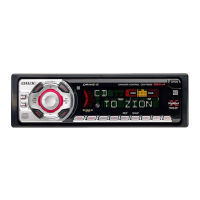
23
Changing the sound and
display settings
The following items can be set:
• REAR/SUB*
1
— to switch the audio output
REAR or SUB.
– Select “REAR” to output to a power
amplifier.
– Select “SUB” to output to a subwoofer.
• CT (Clock Time) (page 20)
• A.SCRL (Auto Scroll)*
2
(page 12).
• M.DSPL (Motion Display) — to turn the
motion display on or off.
– Select “ON” to activate the motion display
(The moving pattern appears in the display).
– Select “OFF” to deactivate the motion
display.
•DEMO*
1
— to turn the demonstration display
on or off.
– Select “ON” to activate the demonstration
display (The demonstration starts about 10
seconds after the unit is turned off).
– Select “OFF” to deactivate the
demonstration display.
•BEEP*
3
— to turn the beeps on or off.
• DIM — to change the brightness of the display.
– Select “ON” to dim the display.
– Select “OFF” to deactivate the Dimmer.
Switching the REAR/SUB*
1
Press ( SEL ) and then press the
volume + (REAR) or – (SUB) button.
After 3 seconds, the display returns to normal
play mode.
Selecting the desired item
Press ( SEL ) and the desired button
simultaneously.
(SEL) + (2): CT
(SEL) + (3): A.SCRL*
2
(SEL) + (4): M.DSPL
(SEL) + (4): DEMO*
1
(SEL) + (6): BEEP*
3
(SEL) + (DSPL): DIM
After the mode setting is completed, the display
returns to normal play mode.
To cancel the item, press (SEL) and the desired
button simultaneously again.
*1 When the unit is turned off.
*2 When CD or MD is played.
*3 The beep sound is output only when the built-in
amplifier is used.



 To Next Page