5
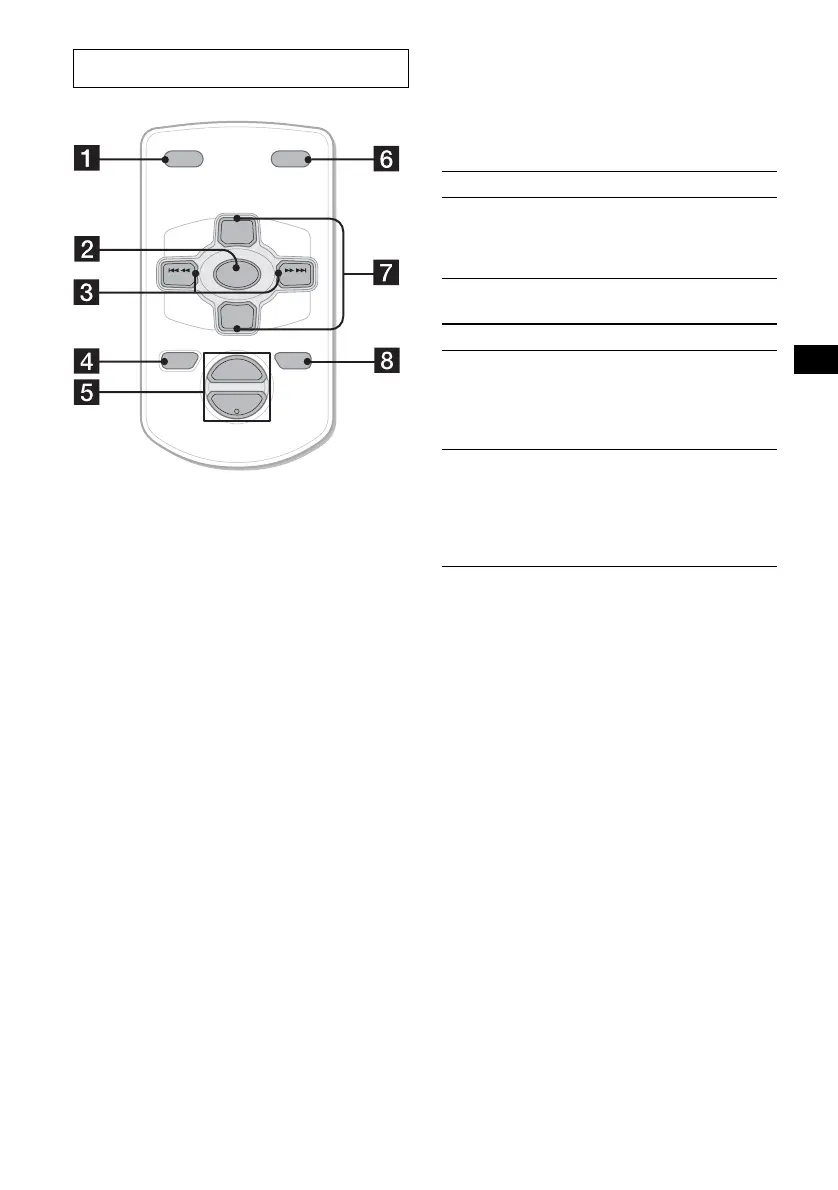
The corresponding buttons of the card
remote commander control the same
functions as those on this unit.
a DSPL button
b SOURCE button
c SEEK (–/+) buttons
d OFF button
e VOL (+/–) buttons
f MODE button
g PRESET (DISC/ALBUM) (+/–) buttons
h ATT button
Note
If the display disappears by pressing (OFF), it cannot
be operated with the card remote commander unless
(SOURCE) on the unit is pressed, or a disc is inserted
to activate the unit first.
Tip
For details on how to replace the battery, see
“Replacing the lithium battery” on page 25.
Selecting a disc and album with the
card remote commander
Disc and album can be skipped using the DISC
(ALBUM) (+/–) buttons on the card remote
commander.
(With this unit)
(With optional unit)
* Available only when an MP3 file is played.
Skipping tracks continuously
Press once (SEEK) (+) or (SEEK) (–) on the
card remote commander, then press again within
2 seconds and hold.
Card remote commander RM-X115
ATTOFF
DSPL MODE
SOURCE
VOL
+
–
PRESET
+
PRESET
–
SEEK
–
SEEK
+
To Press
Skip albums*
– Album selection
+ or – [once for each album]
To continuously skip
albums, press and hold
either button.
To Press
Skip discs
– Disc selection
+ or – [once for each disc]
To continuously skip discs,
press once and press again
within 2 seconds (and hold)
either button.
Skip albums*
– Album selection
+ or – [hold for a moment]
and release
To continuously skip
albums, press (and hold)
within 2 seconds of first
releasing the button.



 To Next Page