Need help?
Do you have a question about the Sony F970 and is the answer not in the manual?
Important safety warnings regarding impact, glass breakage, and heat exposure for safe operation.
Details on the monitor's buttons, indicator light, and light sensor functions.
Overview and identification of all input and output ports on the monitor.
Explanation of battery (F970) and DC power input for reliable monitor operation.
Instructions for installing, moving, and removing the F970 external install and power kit.
Information on thread points for mounting and using the tilt arm for camera attachment.
How to navigate the monitor's menu using the touch screen interface.
Instructions for using the menu wheel for adjustments and shortcut menu access.
Details on functions like Focus Assist, Zebra, Monochrome, False Color, and marker settings.
List of supported SDI and HDMI input/output video formats and resolutions.
Overview of the monitor's technical parameters including size, resolution, brightness, and power.
Steps to resolve issues with the picture appearing black and white or monochrome.
Guidance for troubleshooting when the monitor displays no image or power.
Instructions to resolve issues related to no sound from the earphone output.
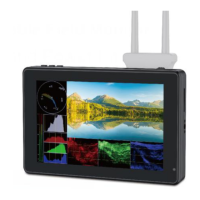
This document describes the 7" Daylight Viewable Field Monitor, model F970, which is designed for professional video monitoring. It functions as an ultra-bright touch screen monitor, ideal for use as a portable and lightweight viewfinder and video monitor in various shooting environments.
The F970 monitor offers a comprehensive set of features for professional monitoring. It supports both SDI (optional) and HDMI input and output, allowing for flexible integration into different camera setups. A key feature is its touch screen menu operation, which provides an intuitive way to navigate and adjust settings. For advanced image analysis, the monitor includes HDR monitoring capabilities and supports user 3D LUT upload, enabling precise color grading and look management.
The monitor is equipped with a Sony F970 external install and power kit on its back. This innovative design allows users to mount and power external equipment such as wireless transmitters, LED lights, or video converters directly from the monitor's F970 battery, simplifying the overall photography equipment setup. The kit features two cross grooves, offering flexibility in adjusting the position of the external device by loosening two screws (up/down or left/right) or by installing the kit upside down. When the kit is not needed, it can be easily removed by loosening the screws. It's crucial to ensure the monitor is turned off and the battery or power adapter is removed before disassembling the kit. Moving the kit involves loosening two screws and then adjusting its position. To remove an external device with a locking button, an assisting tool can be used if manual removal is difficult. Reinstallation involves screwing the two screws back into the screw holes, installing the 2P power cable into the cutout, aligning the kit's round hole with the screw, pushing the kit to the screw at the center of the cross, and then tightening the screws.
For accurate exposure and focus, the monitor provides a suite of advanced display functions. These include All Waves display, Parade, Vector, RGB Histogram, Audio Meter, Focus Assist, False Color, Zebra Exposure, Pixel to Pixel, Center Marker, Safety Marker, Marker Mat, Monochrome, Image Freeze, Zoom, and Anamorphic modes. It also offers a stereo earphone output for audio monitoring and a DC 8V power output to power DSLR or mirrorless cameras using compatible DC couplers (e.g., NP-FW50 for Sony, LP-E6 for Canon, DMW-BLF19 for Panasonic).
The monitor's power supply is versatile. It features a rear F970 battery plate compatible with Sony F970 series batteries (F970, F960, F950, F930, F770, F750, F730, F570, F550, F530, QM91D, QM91, QM90D, QM90, QM71D, QM71, QM70D, QM70, QM51D, QM51, FM71, FM70 series). The working time varies with battery capacity, with higher capacity batteries providing longer operation. For extended storage, it is recommended to remove the battery. Additionally, it has a DC IN 12V port for external power, accepting DC 7~24V input via a 5.5mm outer, 2.1mm inner barrel connector, with a positive center polarity.
The F970 monitor is designed for ease of use and versatility.

 To Next Page
 General