10
Basic Functions
FCB-EH6300(GB) A-E23-100-13(1)
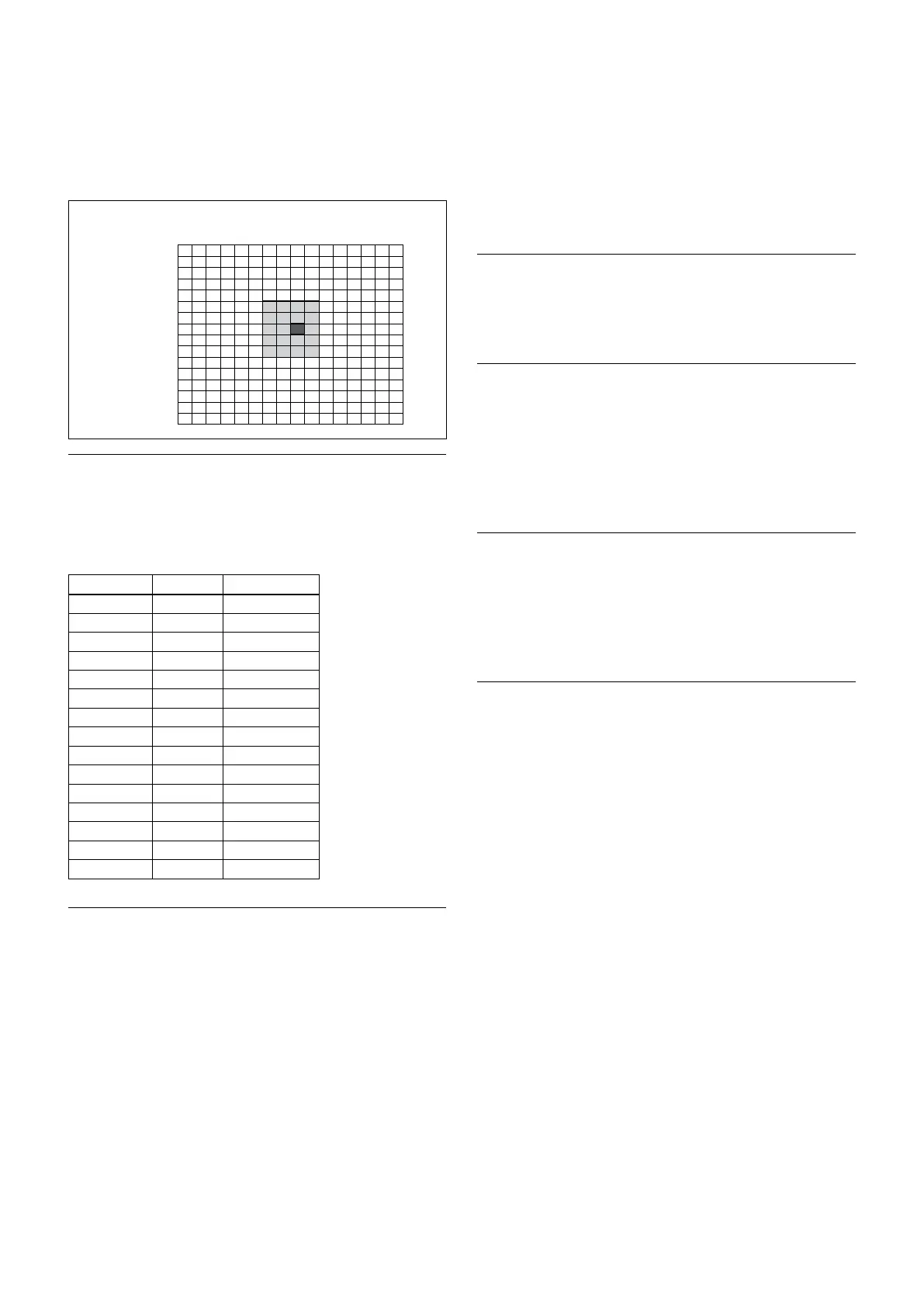
specified portions; and then the Gain and Iris are set.
The value of the designated portions and the
surrounding areas should be calculated as 100%, the
rest should be set to 20%. The range of the Spot AE
frame is fixed to 5 blocks vertically and 4 blocks
horizontally.
(8,8)
Horizontal 16
Vertical 16
0
0
1
2
3
4
5
6
7
8
9
A
B
C
D
E
F
1 2 3 4 5 6 7 8 9 A B C D E F
Exposure Compensation
Exposure compensation is a function which offsets the
internal reference brightness level used in the AE
mode, by steps of 1.5 dB.
Data Step
Setting value
0E +7 +10.5 dB
0D +6 +9 dB
0C +5 +7.5 dB
0B +4 +6 dB
0A +3 +4.5 dB
09 +2 +3 dB
08 +1 +1.5 dB
07 0 0 dB
06 −1 −1.5 dB
05 −2 −3 dB
04 −3 −4.5 dB
03 −4 −6 dB
02 −5 −7.5 dB
01 −6 −9 dB
00 −7 −10.5 dB
Slow AE (Automatic Exposure)
The slow AE Response (automatic exposure) function
allows you to reduce the exposure response speed.
Usually the camera is set up so that the optimum
exposure can be obtained automatically within about
1 second. However, using the slow AE response
function allows you to lengthen the automatic exposure
response speed from the factory setup speed (01h to
approx. 10 minutes (30h (at normal shutter speed)).
For example, with the normal setting (about 1 second),
if the headlights of a car are caught by the camera, the
camera automatically adjusts the exposure so that it can
shoot a high-intensity subject (in this case, the
headlights). As a result, images around the headlights,
that is, the rest of the subject, except the headlights,
becomes relatively dark, and poorly distinguished.
However, using the slow AE function means the AE
response speed will be slower, and response time will
be longer. As a result, even if the camera catches a high-
intensity subject (e.g., the headlights) for a moment,
you can still easily distinguish the portions of the image
surrounding the headlights.
High Resolution Mode
This mode enhances edges and produces higher
definition images.
Aperture Control
Aperture control is a function which adjusts the
enhancement of the edges of objects in the picture.
There are 16 levels of adjustment, starting from “no
enhancement.” When shooting text, this control may
help by making them sharper.
Back Light Compensation
When the background of the subject is too bright, or
when the subject is too dark due to shooting in the AE
mode, back light compensation will make the subject
appear clearer.
Wide Dynamic Range Mode (WD)
The Wide Dynamic Range mode is a function for
dividing an image into several blocks and correcting
blocked-up shadows and blown-out highlights in
accordance with the intensity difference. It enables you
to obtain images in which portions ranging from dark
to light can be recognized, even when capturing a
subject with a large intensity difference that is backlit
or includes extremely light portions.
Images with wide dynamic range are produced by
combining long-exposure signals (normal shutter) with
the signals of the high-intensity portions obtained with
a short exposure (high-speed shutter).
• About WD Set Parameter
(Command: 8x 01 04 2D 00 0q 0r 0s 00 00 00 00 FF)
q: Display brightness
(0: Dark to 6: Bright)
The brightness and the darkness can be
adjusted to seven levels. The normal brightness
is set to 3.
Default value: 3
r: Brightness compensation selection
(0: Darker, 1: Dark, 2: Standard, 3: Bright)


 To Next Page