'.
-:·;:,:.r:·
,,
.
,'
,,
..
·
··'r
. .
·.
•
TAPE
DUBBING
(deck
._
A:for_
play~ack
and
deck
B
for
recording)
.·
<
-:,,
-.
· ·
II
C=>e:::::::=J
c::2
1~1
~~
0 c:::::,
ex::::,
c:::::,
II
IOI
I I I I
===
@
0
QQ
CICIQCI
=
oc==
®
ID
I I
□~
~
........
c:::,
POW
~
~
ER-
-
I
I
II
I
4
~
- 1
..
I - 1
l J
DOLBYNR
I
1
2
3
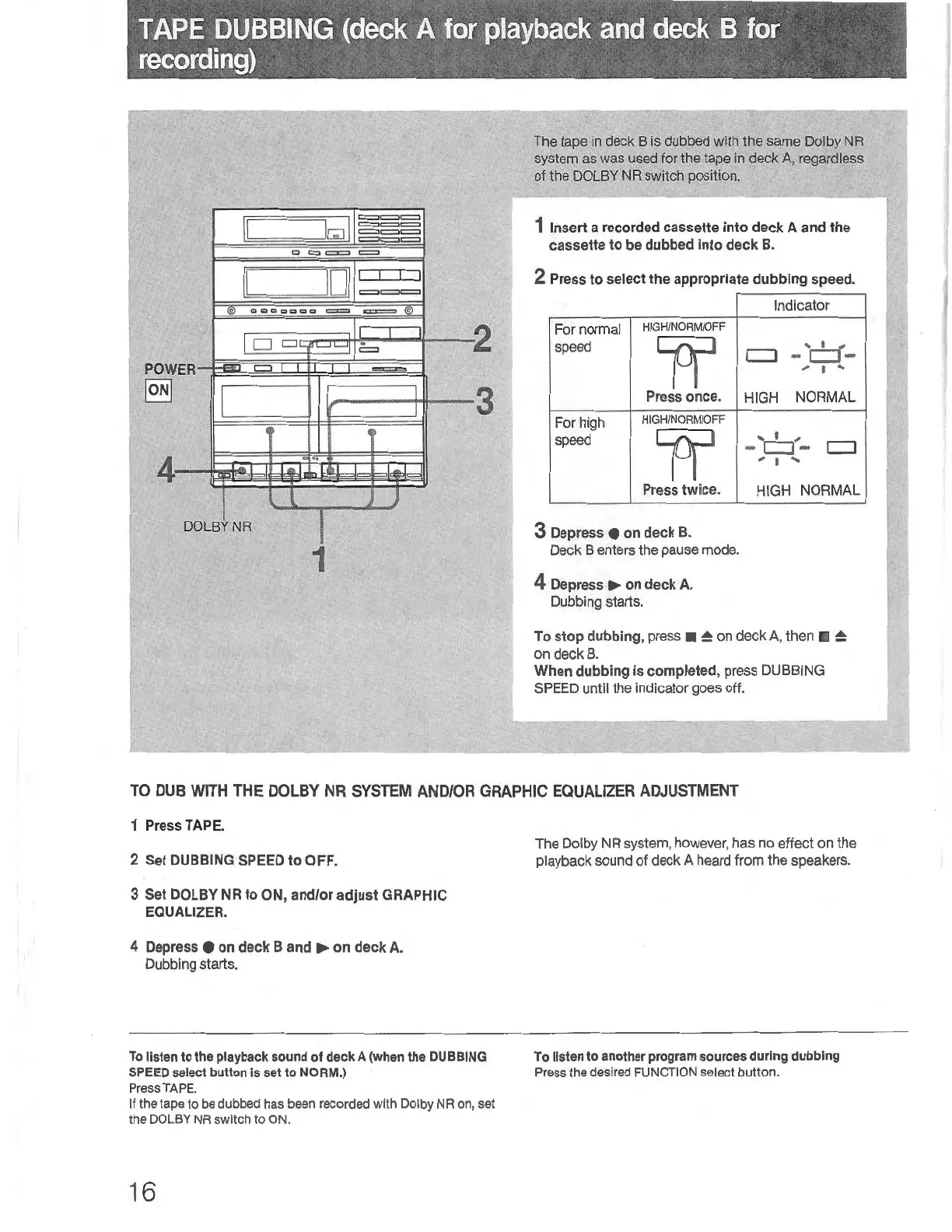
The
tape
in
deck
Bis
dubbed with the same Dolby
NA
system as
was
used
for the tape
in
deck
A,
regardless
of the
DOLBY
NA
switch position.
1 Insert a
recorded
cassette into deck A and the
cassette to
be
dubbed
into deck
B.
2
Press
to
se
lect the appropriate dubbing speed.
Indicator
For normal
HIGH/NORM/OFF
speed
1f1
' ' ,
CJ
-
CJ-
, ' '
Press once.
HIGH
NORMAL
For hi
gh
HIGH/NORM/OFF
speed
1f
' '
...
c:::J
- c:::J -
; I
...
Press
twice.
HIGH NORMAL
3
Depress
•
on
deck
B.
Deck
B enters
th
e
pause
mode.
4
Depress
►
on
deck
A.
Dubbing starts.
To
stop
dubbing,
press ■
~
on deck A, then ■
~
on deck
B.
When
dubbing
is completed, press DUBBING
SPEED
until the indicator goes off.
TO
DUB
WITH
THE
DOLBY
NR
SYSTEM
AND/OR
GRAPHIC
EQUALIZER
ADJUSTMENT
1 Press TAPE.
2 Set
DUBBING
SPEED
to
OFF.
3
Set
DOLBY
NR to ON, and/or adjust GRAPHIC
EQUALIZER.
4
Depress
•
on
deck
B and
►
on deck
A.
Dubbing starts.
To
listen
to
the
playback
sound
of deck A
(when
the
DUBBING
SPEED
select
button
Is
set
to NORM.)
Press TAPE.
If
the tape
to
be dubbed
has
been r
eco
rd
ed
with
Dolby
NR
on,
set
the DOLBY NR
swit
ch
to
ON.
16
The Dolby NA system, however, has
no
effect on the
playback sound
of
deck A heard from the speakers.
To
listen
to
anothe
r
program
sources
during dubbing
Press
the
desir
ed
FUNCTION select
button
.


 To Next Page