' • ' I •
. .
~
.
. ~
,-
..,
.
'
,~
. '
__
,
LOCATION
.
AND
·
F:UNCTION
·
..
OF
:
CONTROLS
. ·
,_
•
)•
'
"'
t.
•
~
I
ST
-
211
Tuner
I
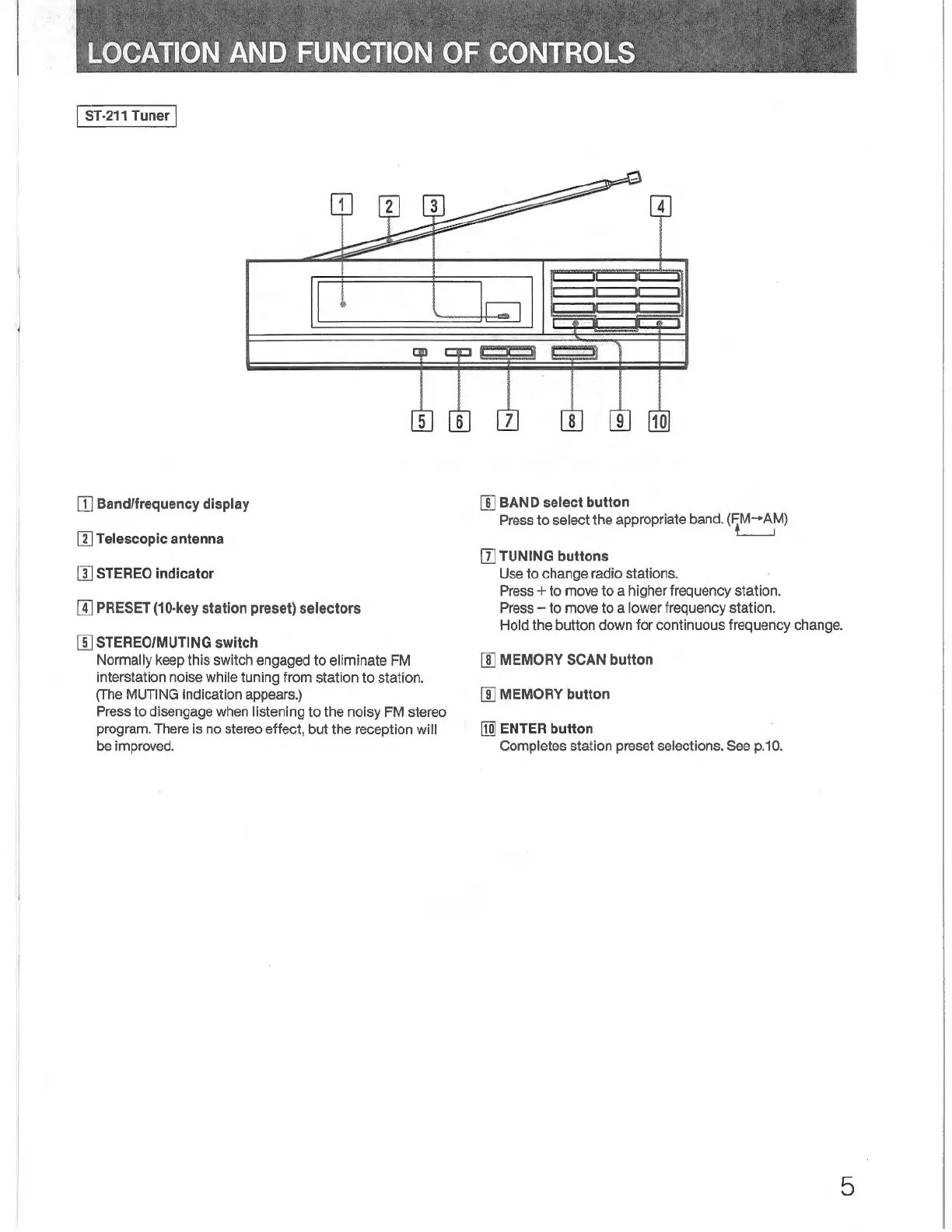
[I]
Band/frequency
display
11)
Telescopic antenna
!II
STEREO
indicator
1
1
4
~
9
10
[]]
BAND
select button
Press
to
select
the
appropriate band.
(~M-A~)
[[]
TUNING buttons
Use
to
change radio stations.
Press +
to
move
to
a higher frequency station.
Press -
to
move
to
a lower frequency station. II]
PRESET
(10-key
station preset) selectors
(]]
STEREO/MUTING
switch
Hold
the
button
down
for
continuous frequency change.
Normally keep this switch engaged
to
eliminate FM
interstation noise while tuning
from
station
to
station.
(The MUTING indication appears.)
Press
to
disengage when listening
to
the
noisy
FM stereo
program. There is no stereo effect, but the reception
will
be
improved.
[II
MEMORY
SCAN
button
II] MEMORY button
[ID
ENT
ER button
Completes station preset selections. See p.
10.
5



 To Next Page