13
GB
GB
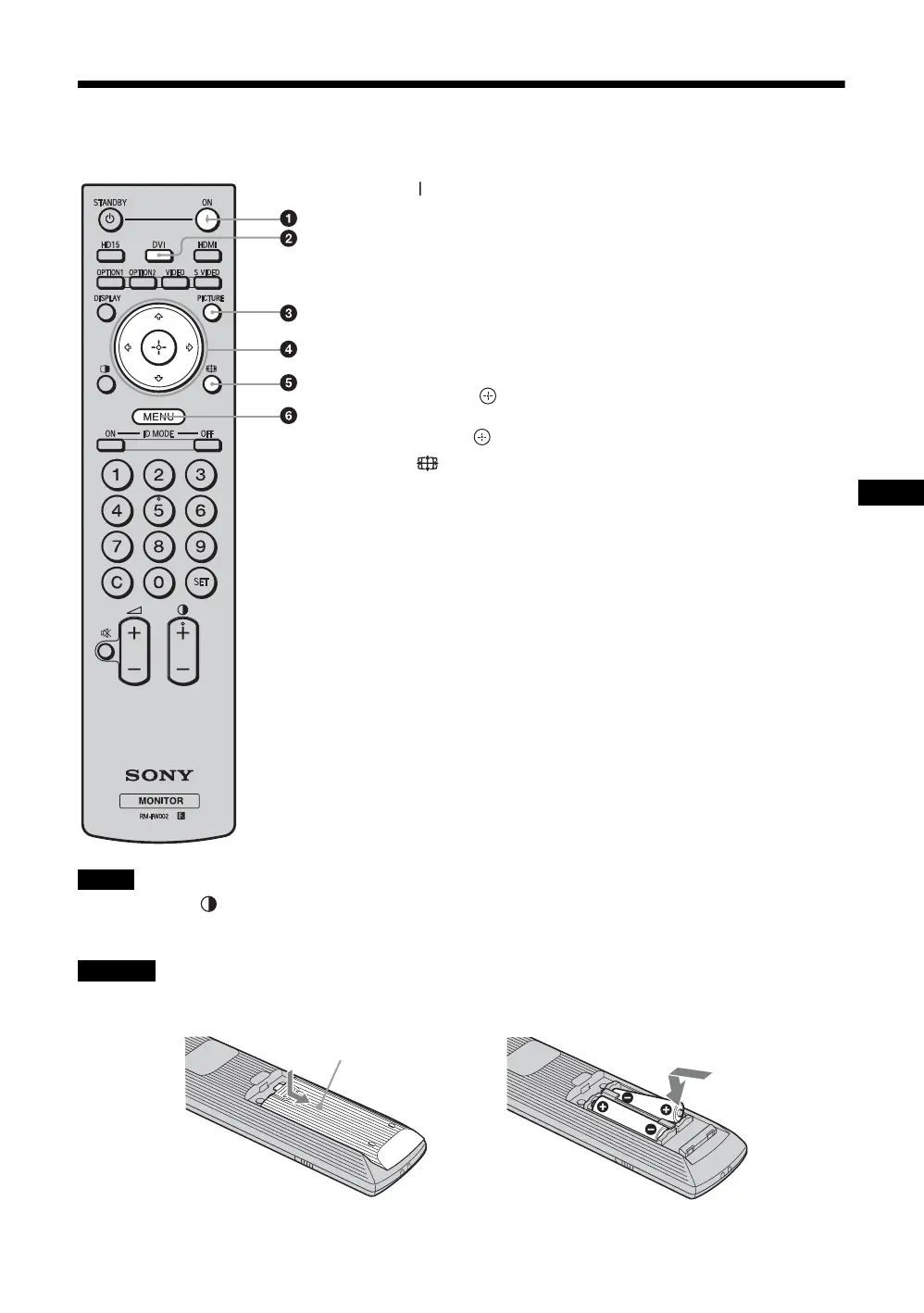
Remote Control
Button Description
• The 5 button and +/- button have a tactile dot. Use the tactile dot as a reference when operating the display.
• Insert two size AA (R6) manganese batteries (supplied) by matching the 3 and # on the batteries to the diagram inside the
remote control’s battery compartment.
Danger of explosion if battery is incorrectly replaced. Replace only with the same or equivalent type recommended by the
manufacturer. When you dispose of the battery, you must obey the law in the relative area or country.
1 ON (power on) button
Press to turn the display on.
Operate when the main power switch on the backside of the display
is “ON.”
2 DVI button
Press to select the signal input to the DVI connector.
3 PICTURE button
Selects “Picture Mode”. Each press toggles between “Vivid”,
“Standard”, “Custom”, and “Conference”.
4 F/f/G/g/ (arrow/enter) buttons
The F/f/G/g buttons move the menu cursor and set values, etc.
Pressing button sets the selected menu or setting items.
5 (wide mode) button
Press to change the aspect ratio. See page 15.
6 MENU button
Press to show menus. Press again to hide them. See page 21.
Notes
Caution
,
Push and slide to open





 To Next Page