Tape – Play
17
GB
Use buttons on the unit for the operation.
1 Press TAPE A/B repeatedly to select
deck A or B.
2 Press PUSH Z.
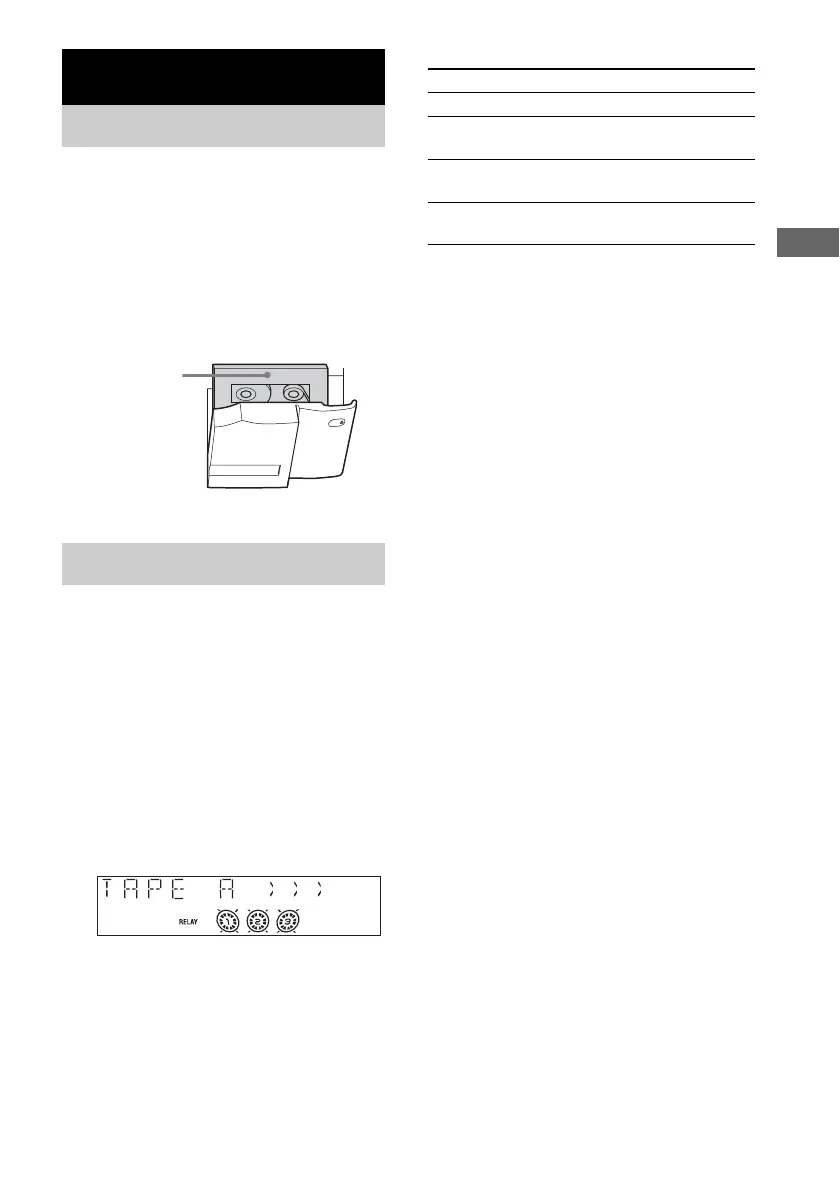
3 Load a recorded/recordable tape in
deck A or B with the side you want to
play/record facing forward.
You can use TYPE I (normal) tape.
1 Load a tape.
To play both decks in succession, press
PLAY MODE repeatedly until “RELAY”
(Relay Play)* appears in the display.
2 Press TAPE (or FUNCTION repeatedly)
to switch the function to TAPE.
3 Press N.
The tape starts playing.
* After the playback of the front side of deck A, deck
B plays the front side, then stops.
Other operations
Searching for the beginning of
the current or the next track
(AMS)*
To go forward
Press > (or turn l L on the unit
clockwise) during playback.
“TAPE A (or TAPE B) >>> +1” appears.
To go back
Press . (or turn l L on the unit
counterclockwise) during playback.
“TAPE A (or TAPE B) <<< –1” appears.
* AMS (Automatic Music Sensor)
Notes
• The AMS function may not operate correctly under
the following circumstances:
– When the unrecorded space between songs is less
than 4 seconds long.
– When the system is placed near a television.
• Do not eject the tape during playback or recording, as
this may cause irreparable damage to the tape and
cassette holder.
Tape – Play
Loading a tape
Playing a tape
With the side
you want to
play/record
facing
forward.
To Do this
Stop play Press x.
Pause Press X. Press again to resume
play.
Fast-forward or
rewind
Press m or M.
Remove a tape Press PUSH Z on the unit in stop
mode.


 To Next Page