EasyManua.ls Logo

Sony HCD-DX400 - Front Panel Block Disassembly; Volume Knob Removal

Sony HCD-DX400
28 pages
Print Icon
To Next Page IconTo Next Page
To Previous Page IconTo Previous Page
Loading...
HCD-DX400
8
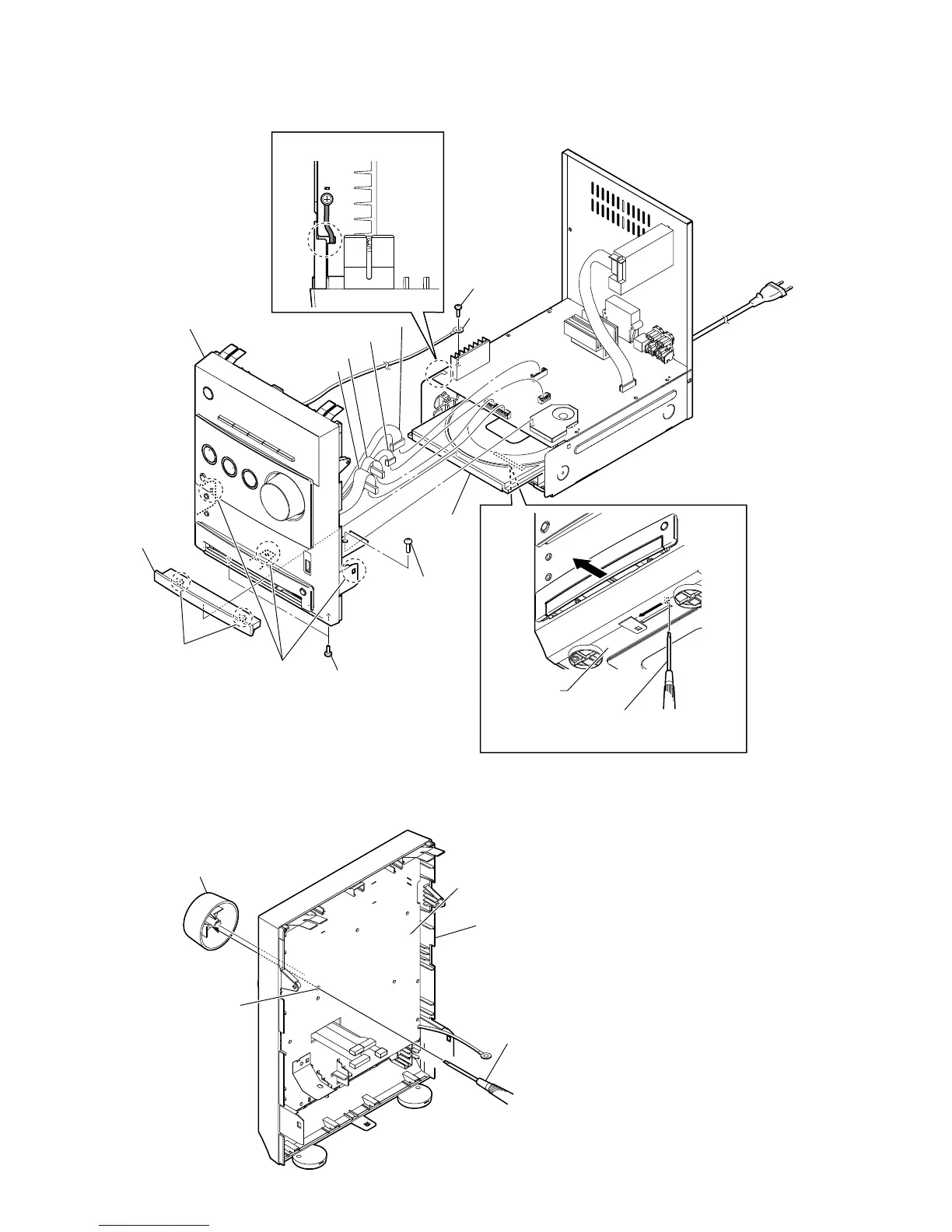
2-3. FRONT PANEL BLOCK
2-4. KNOB (VOLUME)
Note: This illustration sees the front panel block from CONTROL board side.
1 Insert the flat-head screwdriver in the hole
of the chassis, and push the lever in the
direction of the arrow.
2 Draw out
the tray.
3 two claws
4 door (DVD)
5
screw
(BVTT3
u
6)
qa
two screws
(BVTT3
u
6)
qs
three claws
qd
front panel block
5
screw
(BVTT3
u
6)
6
lug wire
7
connector (CN4)
8
connector (CN2)
9
connector (CN1B)
0
connector
(CN1A)
Note: Pass the harness through the
incision of MAIN board.
bottom side
2
knob (volume)
hole
1
Push the knob (volume) by flat-head screwdriver.
front panel block
CONTROL board