HCD-DX400
9
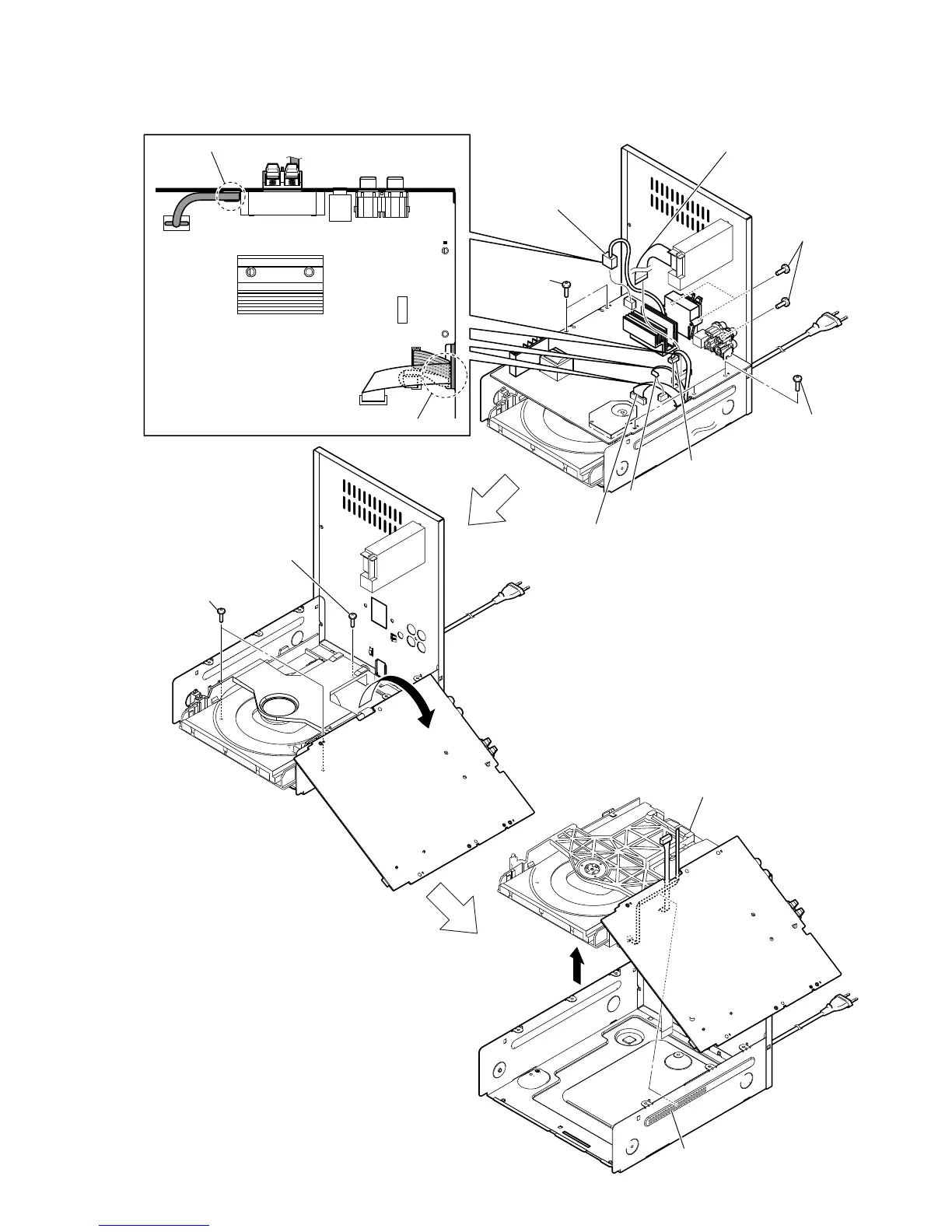
2-5. DVD BLOCK
7
qa DVD block
q;
9
Tear the flexible cable from
the adhesive sheet.
1 flexible cable (11 core)
(CN5) (AEP)
flexible cable (9 core)
(CN5) (Except AEP)
3 flexible cable (5 core)
(CN10)
4 connector
(CN9)
2 power cord
connector
(CN900)
Note 2: Pass the power cord through the incision of MAIN board.
Note 1: Do not remove this connector (CN8) at this point.
It is necessary to process electrostatic measures of
optical pick-up.
Note 3: Pass the three cables through the incision of MAIN board.
5
three screws
(BVTP3
u
10)
6
three screws
(BVTT3
u
6)
6
two screws
(BVTT3
u
6)
8
two screws
(BVTT3
u
7)
8
screw
(BVTT3
u
7)



 To Next Page