EasyManua.ls Logo

Sony HCD-H501 - Adjustments; Mechanical and Electrical Deck Adjustments

Sony HCD-H501
54 pages
Print Icon
To Next Page IconTo Next Page
To Previous Page IconTo Previous Page
Loading...
SECTION
4
ADJUSTMENTS
4-1,
MECHANICAL
ADJUSTMENTS
PRECAUTION
1.
Clean
the
following
parts
with
a
denatured-alcohol-
moistened
swab
:
record/playback
head
pinch
roller
erase
head
rubber
belts
capstan
idlers
2.
Demagnetize
the
record/playback
head
with
a
head
demagnetizer.
3,
Do
not
use
a
magnetized
screwdriver
for the
adjustments.
4,
After
the
adjustments,
apply
suitable
locking
compound
to
the
parts
adjusted.
5.
The
adjustments
should
be
performed
with
the
rated
4-2,
ELECTRICAL
ADJUSTMENTS
DECK
SECTION
1,
The
adjustment
should
be
performed
in
the
publication.
(Be
sure
to
make
playback
adjustment
at
first.)
2.
The
adjustment
and
measurement
should
be
performed
for
both
L-CH
and
R-CH.
©
Switch
position
DOLBY
NR
switch
:
OFF
FUNCTION
button
:
CD
3.
Deck
section
electrical
adjustments
are
made
in
test
mode
by
pressing
TUNER/BAND,
DISPLAY,
and
POPS
at
the
same
time.
4.
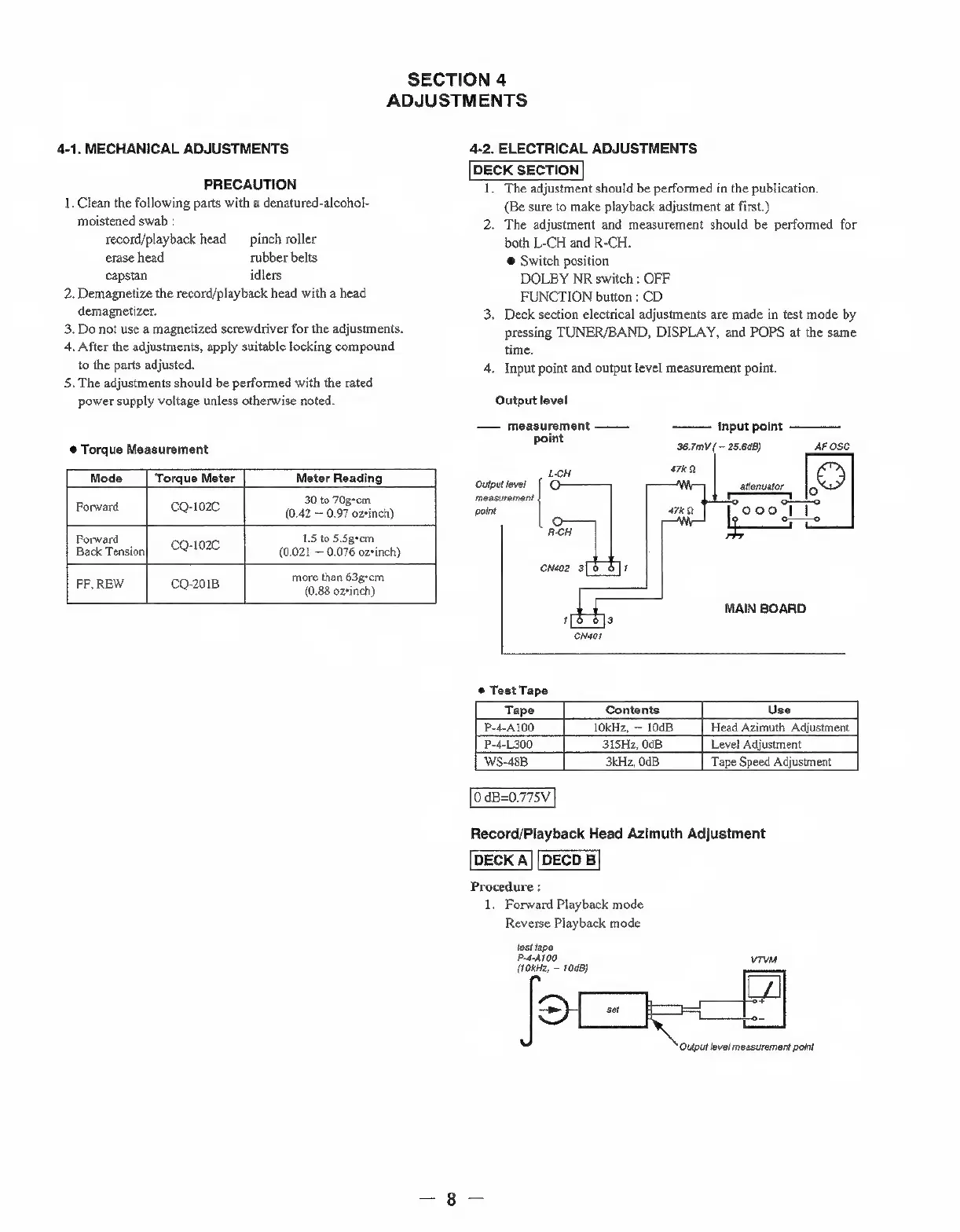
Input point
and
output
level
measurement
point.
power
supply
voltage
unless
otherwise
noted.
Output
level
measurement
Input point
point
@
Torque
Measurement
36.7mV
( ~
25.648)
AF
OSC
-
a
are
Mode
|
Torque
Meter
Meter
Reading
lene
ste
30
to
70gcm
measurement
Forward
ora
(0.42
=
0.97
ozsinch)
point
wee
peed
ooclt.
R-CH
Forward
1.5
to
5.5geom
Back
Tension]
CQ-102C
(0.021
0.076
ozsinch)
aes
onaoe
9
1
more
than
63gscm
FF,
REW
cO-2018
‘oes
earehy
MAIN
BOARD
1
3
CNéoT
©
Test
Tape
Tape
Contents
Use
P-4-A100
10kHz,
~
10dB
Head
Azimuth
Adjustment
P-4-L300
315Hz,
0dB
Level
Adjustment
WS-48B
3kHz,
Od
Tape
Speed
Adjustment
0
dB=0.775V
DECK
A
Procedure
:
1.
Forward
Playback
mode
Reverse
Playback
mode
test
tape
P-d-A100
(fokHz,
~
1008)
RS
Record/Playback
Head
Azimuth
Adjustment
DECD
B
‘Output
level
measurement
point

Related product manuals