EasyManua.ls Logo

Sony HCD-H77 - TUNER SECTION Operation

Sony HCD-H77
71 pages
Print Icon
To Next Page IconTo Next Page
To Previous Page IconTo Previous Page
Loading...
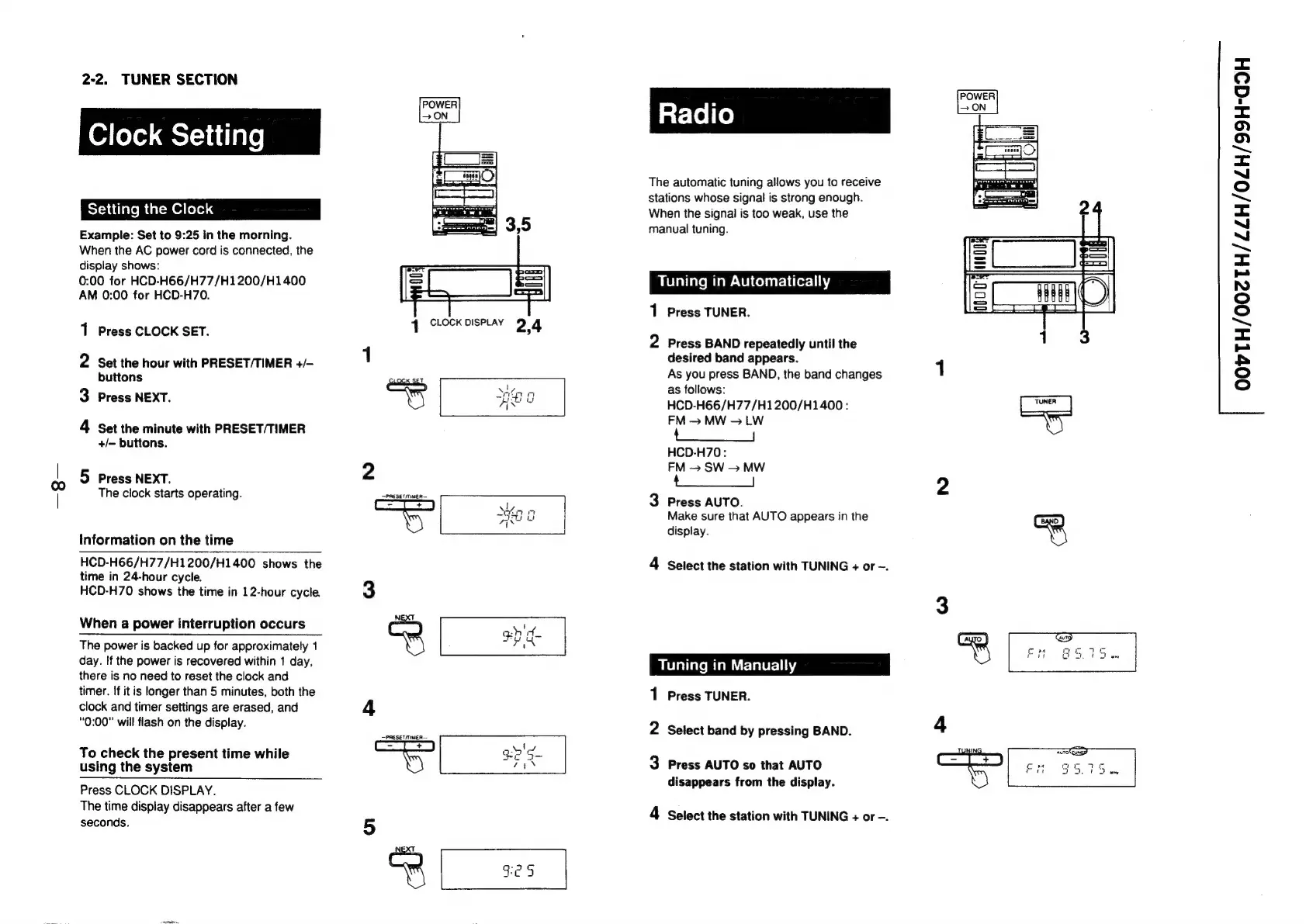
2-2.
TUNER
SECTION
Clock
Setting
Setting
the
Clock
Example:
Set
to
9:25
in
the
morning.
When
the
AC
power
cord
is
connected,
the
display
shows:
0:00
for
HCD-H66/H77/H1200/H1400
AM
0:00
for
HCD-H70.
The
automatic
tuning
allows
you
to
receive
stations
whose
signal
is
strong
enough.
When
the
signal
is
too
weak,
use
the
manual
tuning.
Tuning
in
Automatically
<
QO
“ad
<=
())
(o>)
=<
“J
©
nm
<=
“I
~~
=<
N
fo]
©
~~
<=
=
&
©
(o)
1
Press
TUNER.
1
Press
CLOCK
SET.
2
Press
BAND
repeatedly
until
the
1
desired
band
ap
2
Set
the
hour
with
PRESET/TIMER
+/-
sake
le
aati
ata
buttons
7
:
As
you
press
BAND,
the
band
changes
1
Sues
as
follows:
3
Press
NEXT.
yi
os
HCD-H66/H77/H1200/H1400
:
FM
—~
MW
>
LW
.
4
Set
the
minute
with
PRESET/TIMER
4
ns
ra
|
iy
+/-
buttons.
HCD-H70:
2
FM
>
SW
>
MW
5
Press
NEXT.
tO
2
The
clock
starts
operating.
stessermuen
z
3
Press
AUTO.
mF
7
a
Make
sure
that
AUTO
appears
in
the
(Sno)
display.
Information
on
the
time
HCD-H66/H77/H1200/H1400
shows
the
4
Select
the
station
with
TUNING
+
or
-.
time
in
24-hour
cycle.
HCD-H70
shows
the
time
in
12-hour
cycle.
3
3
When
a
power
interruption
occurs
=
ae
The
power
is
backed
up
for
approximately
1
Cr
ae
day.
If
the
power
is
recovered
within
1
day,
there
is
no
need
to
reset
the
clock
and
timer.
If
it
is
longer
than
5
minutes,
both
the
1
Press
TUNER.
clock
and
timer
settings
are
erased,
and
4
“0:00”
will
flash
on
the
display.
eae
2
Select
band
by
pressing
BAND.
4
To
check
the
present
time
while
ee
gg
3
using
the
system
©)
vis
Press
AUTO
so
that
AUTO
di
f
the
display.
Press
CLOCK
DISPLAY.
Pee
nee
eee
ae
Dee
depley
Gecbpecie-ciiena
ley
4
Select
the
station
with
TUNING
+
or
-
seconds.
5
:
oR
$e
5

Related product manuals