48
US
Enjoying a digest of
your movies
(Highlight
Playback)
You can enjoy a digest of high definition
image quality (HD) movies and photos,
similar to a short movie.
1
Press (View Images) (p. 32).
2
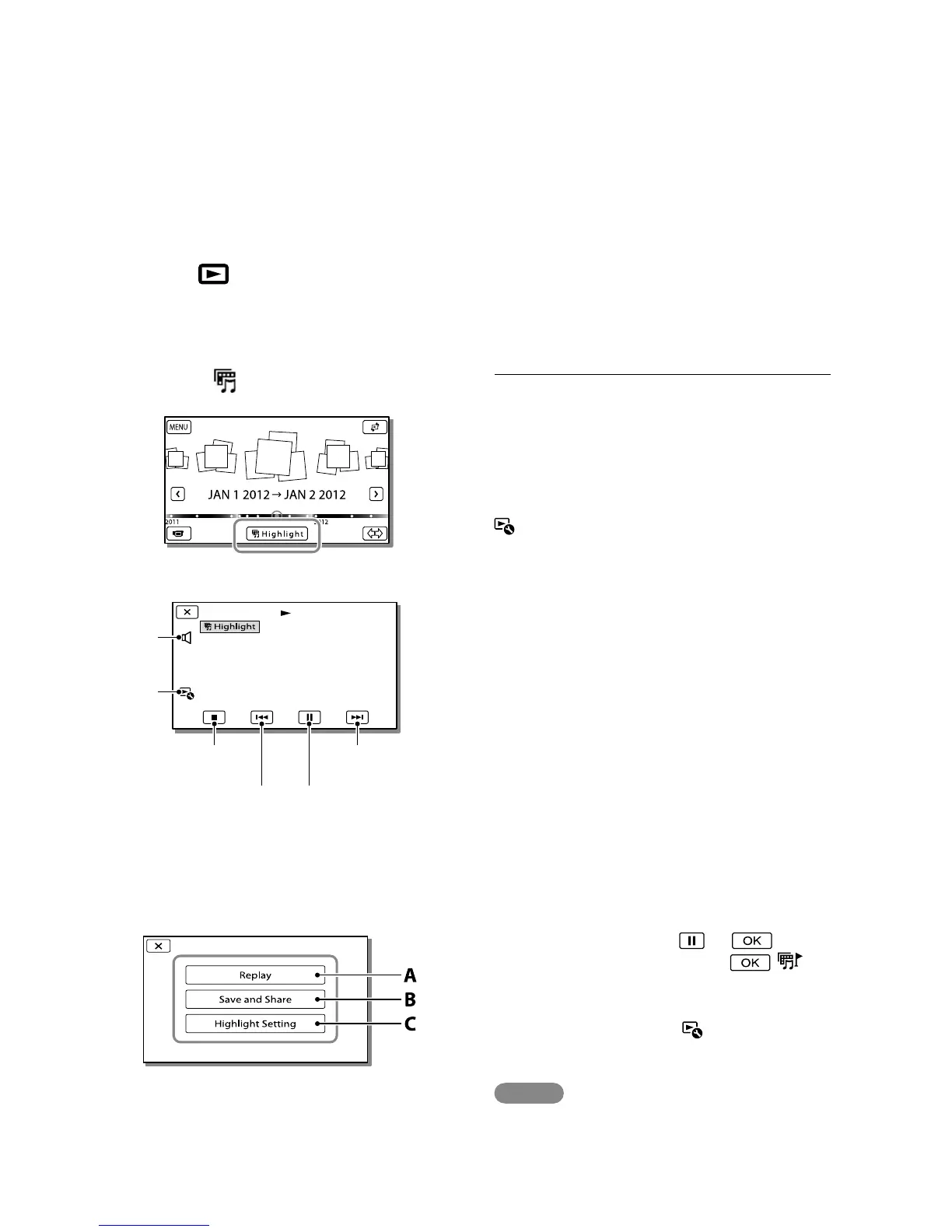
Display the desired event at the
center of the Event View, and
select [
Highlight].
3
Select the desired operation
when the highlight playback
finishes.
A: The camcorder plays the Highlight
Playback scenes again.
B: You can save the Highlight
Playback scenes in standard definition
image quality (STD) and share it
(upload it to the web, etc.).
C
: You can change the settings for
Highlight Playback.
To change the settings for Highlight
Playback
You can change the Highlight Playback
settings by selecting [Highlight Setting]
on the screen after Highlight Playback has
finished.
You can also change the setting by selecting
[Highlight Setting] while the
camcorder is playing highlight scenes.
[Playback Range]
You can set the playback range (starting and
ending date) of the Highlight Playback.
[Theme]
You can select a theme for Highlight Playback.
[Music]
You can select music.
[Audio mix]
The original sound is played back with the
music.
[Length]
You can set the length of the Highlight Playback
segment.
[Highlight Point]
You can set the points in a movie or photo that
will be used in a Highlight Playback. Play the
desired movie, and select
. Or
play the desired photo and select
.
appears on the movie or photo that is used in a
Highlight Playback.
To erase the points, select
[Clear All
Points].
Notes
Highlight Playback scenes will change each time
you select a Highlight Playback.
The [Playback Range] setting is cleared when
the Highlight Playback stops.
Volume
adjustment
Context
To pause
To stop
Previous
Next



 To Next Page