50
US
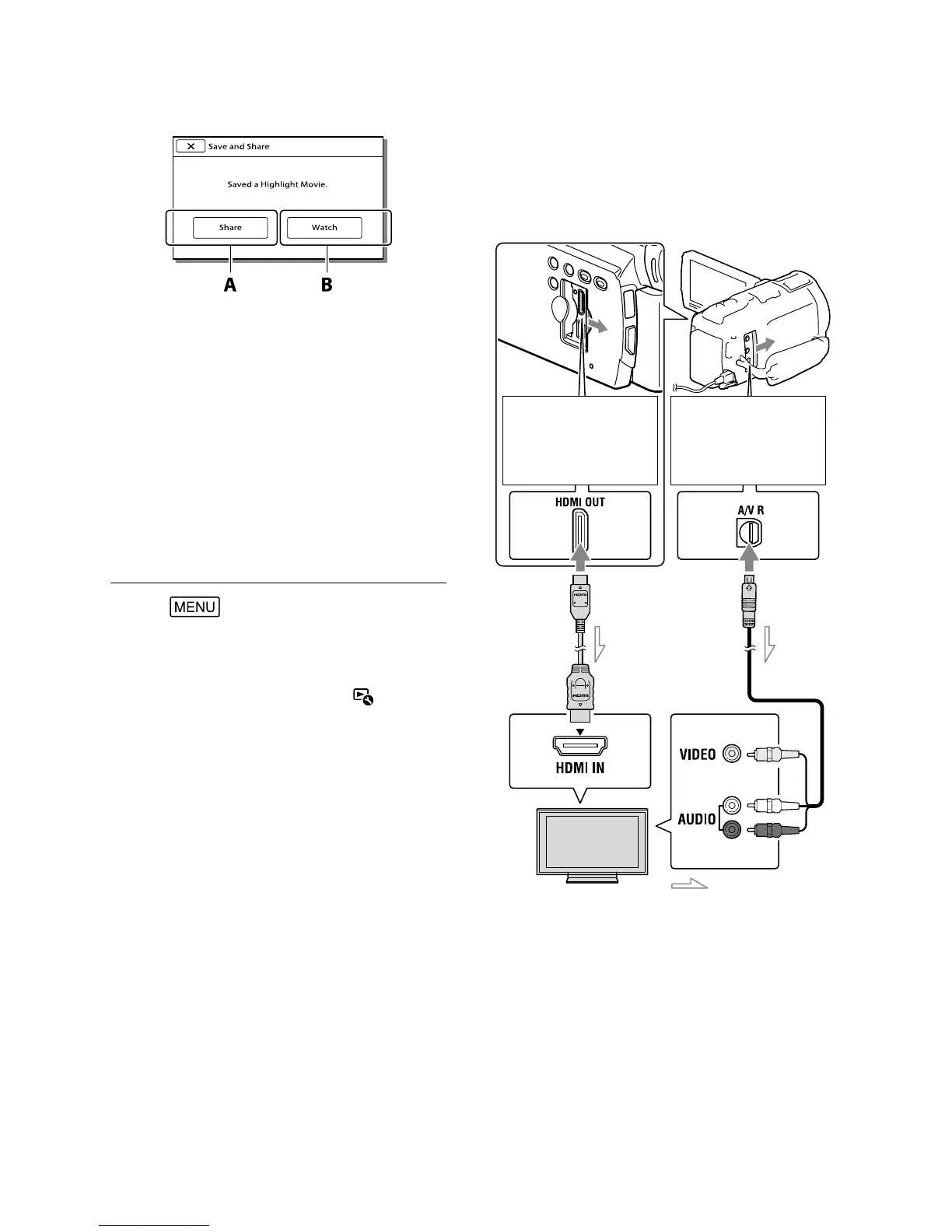
A: Selecting [Share] allows you to
upload the Highlight movie to the
Web using the built-in “PlayMemories
Home” software (p. 60), or create DVDs
using the “DVDirect Express” DVD
writer (p. 63)
B: Your camcorder plays the Highlight
Movie saved.
To play back a Highlight Movie
Select
[Playback Function]
[Highlight Movie] and select the
desired Highlight Movie.
To erase a Highlight Movie, select while the
Highlight Movie is playing.
Playing images on a
TV
Connection methods and the image quality
viewed on the TV screen differ depending
on what type of TV is connected, and the
connectors used.
* If the TV does not have the HDMI input jack,
use the A/V connecting cable for connection.
1
Switch the input on the TV to the
connected jack.
2
Connect the camcorder to a TV.
3
Play a movie or a photo on the
camcorder (p. 32).
Connecting to a high
definition TV
*
1
Connecting to a non-
high definition 16:9
(wide) or 4:3 TV
Yellow
Red
White
HDMI
Cable
(supplied)
A/V
connecting
cable
(supplied)
Input
Signal flow



 To Next Page