Chapter 10
Setup Menus
10-32
Chapter 10
Setup Menus
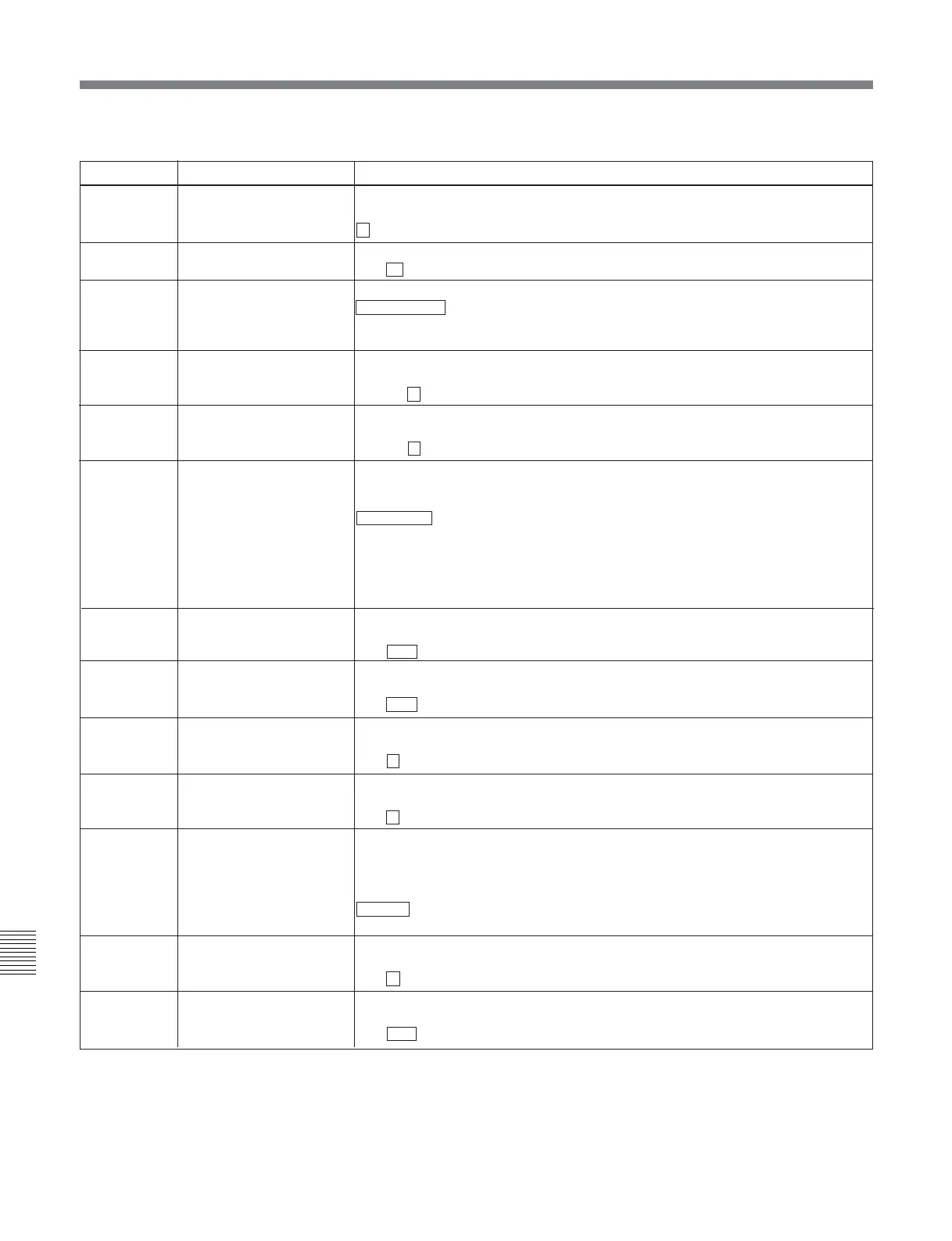
10-4 Items in the Extended Setup Menu
Item number Item name Settings
942 V FILTER SELECT Set the vertical interpolation filter coefficient for HD-SD converter output.
The vertical resolution increases as the setting grows larger.
1 to 3
943
CROSS COLOR CRISP Set the cross color crisp level for HD-SD converter output.
0 to 4 to FH
950 CONVERTER MODE (UC) Select the up-converter mode.
EDGE-CROP : Select the edge-crop mode.
LETTER BOX: Select the letter box mode.
SQUEEZE: Select the squeeze mode.
951 H CROP POSITION (UC) Adjust the “H-crop” (the horizontal position when inserting in the edge crop mode)
of the up/down converter output when menu item 950 is set to EDGE-CROP.
–120 to 0 to 120
952 LETTER BOX POSITION Adjust the vertical position of the letter box mode cutout in up-converter output
when LETTER BOX is selected in menu item 950.
–120 to 0 to 120
953 UP CONVERTER
PROCESS
Select the original picture to use when converting SD to HD.
FIELD: Use field picture.
FRAME: Use frame picture.
ADAPTIVE (standard mode): Set the ratio of converting from frames or fields to
the standard ratio when up-converting.
ADAPTIVE-2 (still picture priority mode): Set the ratio of converting from
frames higher when up-converting.
ADAPTIVE-3 (motion priority mode): Set the ratio of converting from fields
higher when up-converting.
954 DETAIL GAIN (UC) Carry out the up-converter image enhancer adjustment. Adjust the sharpness of
edge emphasis.
0 to 40H to 7FH
955 LIMITER (UC) Carry out the up-converter image enhancer adjustment.
Adjust the maximum detail level added to emphasize the original signal.
0 to 20H to 3FH
956
CRISP THRESHOLD (UC) Carry out the up-converter image enhancer adjustment. Set the threshold
amplitude at which low amplitude signals are not emphasized.
0 to 8 to FH
957
LEVEL DEPEND
THRESHOLD (UC)
Carry out the up-converter image enhancer adjustment. Set the luminance range
for edge enhancement.
0 to 8 to FH
958
H DETAIL FREQUENCY
(UC)
Carry out the up-converter image enhancer adjustment. Set the central frequency
and frequency characteristic for edge enhancement.
3.2MHz: 3.2 MHz ±1.1 MHz
4.5MHz: 4.5 MHz ±1.4 MHz
5.0MHz : 5.0 MHz ±0.7 MHz
4.0MHz: 4.0 MHz ±2.0 MHz
959
H/V RATIO (UC)
Carry out the up-converter image enhancer adjustment. Set the horizontal/vertical
ratio for edge enhancement.
0 to 3 to 7
960
GAMMA LEVEL (UC) Carry out the up-converter image enhancer adjustment. Adjust the slope of the
correction curve.
0 to 80H to 100H
(Continued)
Menu items in the range 900 to 999, relating to digital processing (continued)



 To Next Page