EasyManua.ls Logo

Sony HP-210 - Page 17

Sony HP-210
63 pages
Print Icon
To Next Page IconTo Next Page
To Previous Page IconTo Previous Page
Loading...
VOLUME
Control,
SPEAKER
Switch
and
HEADPHONE
Jack
1.
Remove
the
hex
nuts
that
secure
them
to
the
front
subchassis
as
shown
in
Fig.
2-17.
2.
Unsolder
the
lead
wires
from
the
defective
parts,
and
then
install
the
replacement
parts.
MODE
and
POWER
Switches
1.
Remove
the
two
screws
securing
the
switch
to
the
front
subchassis
as
shown
in
Fig.
2-17.
2.
Unsolder
the
lead
wires
from
the
defective
switch,
and
then
install
the
replacement
switch,
2-11.
PCB
REMOVAL
Prepare
for
removing
any
of
the
printed
circuit
boards
by
removing
wooden
case
as
described
in
Procedure
2-6.
Tone
Control
and
Preamplifier
Boards
1.
Refer
to
the
tone
control
replacement
pro-
-
cedures
for
tone-control
board
removal
as
described
in
Procedure
2-10.
2.
Refer
to
the
function
switch
replacement
pro-
cedures
for
preamplifier
board
removal
as-
described
in
Procedure
2-10.
See
Fig.
2-18.
Tuner
and
MPX
Board
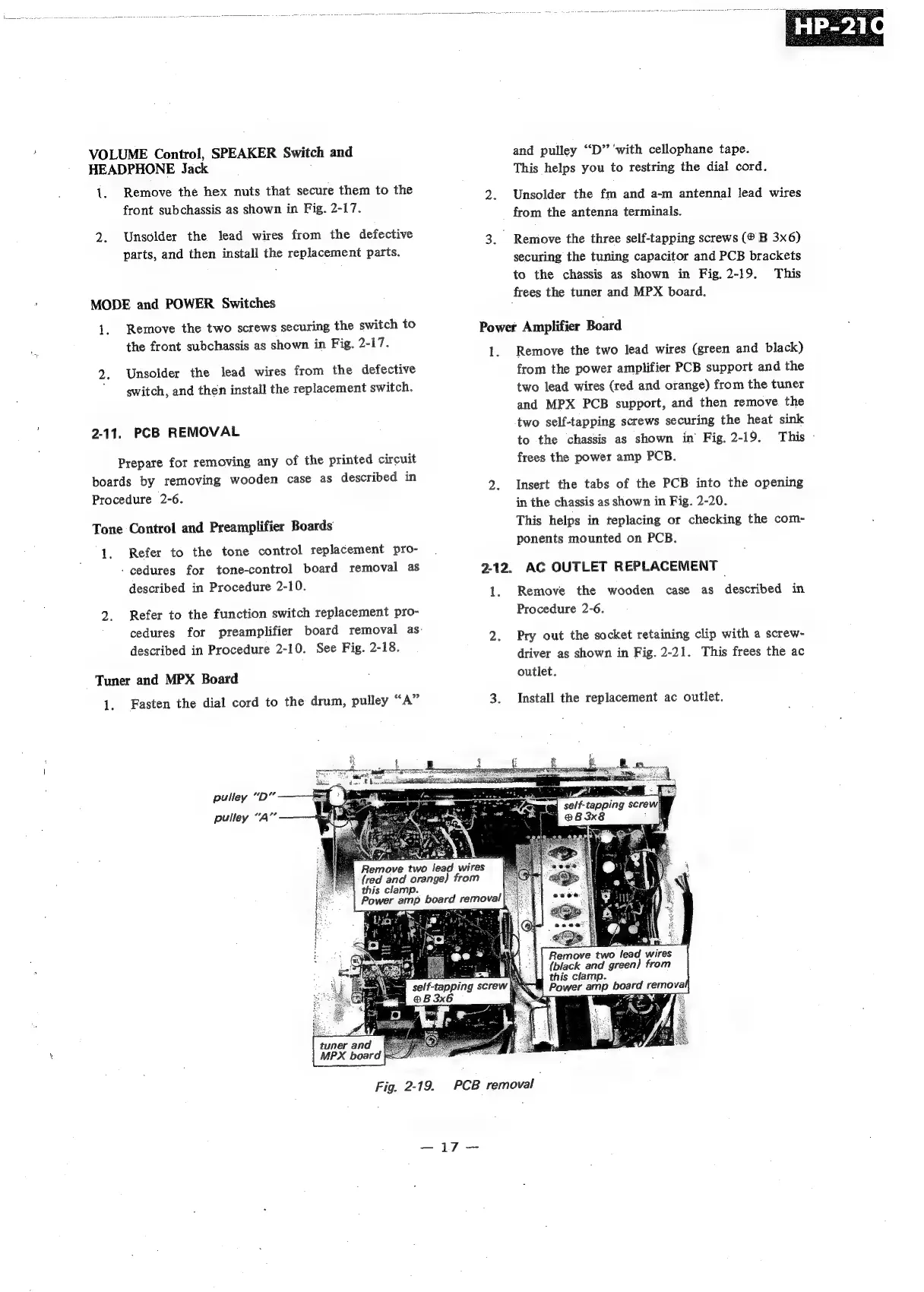
1.
Fasten
the
dial
cord
to
the
drum,
pulley
“A”
pulley
“D”
pulley
“A”
vie.
s)
A
Remove
two
lead
wires
(red
and
orange)
from
‘|
this
clamp.
Power
amp
board
removal
Crt
MPX
board
and
pulley
‘“D”
‘with
cellophane
tape.
This
helps
you
to
restring
the
dial
cord.
2.
Unsolder
the
fm
and
a-m
antennal
lead
wires
from
the
antenna
terminals.
3.
Remove
the
three
self-tapping
screws
(®
B
3x6)
securing
the
tuning
capacitor
and
PCB
brackets
to
the
chassis
as
shown
in
Fig.
2-19.
This
frees
the
tuner
and
MPX
board.
Power
Amplifier
Board
1.
Remove
the
two
lead
wires
(green
and
black)
from
the
power
amplifier
PCB
support
and
the
two
lead
wires
(red
and
orange)
from
the
tuner
and
MPX
PCB
support,
and
then
remove
the
two
self-tapping
screws
securing
the
heat
sink
to
the
chassis
as
shown
in
Fig.
2-19.
This
-
frees
the
power
amp
PCB.
2.
Insert
the
tabs
of
the
PCB
into
the
opening
in
the
chassis
as
shown
in
Fig.
2-20.
This
helps
in
replacing
ot
checking
the
com-
ponents
mounted
on
PCB.
2-12.
AC
OUTLET
REPLACEMENT
|
1.
Remove
the
wooden
case
as
described
in
Procedure
2-6.
2.
Pry
out
the
socket
retaining
clip
with
a
screw-
driver
as
shown
in
Fig.
2-21.
This
frees
the
ac
outlet.
3.
Install
the
replacement
ac
outlet.
Remove
two
lead
wires
(black
and
green)
from
this
clamp.
Power
amp
board
remova
said
:
~
Fig.
2-19.
PCB
removal
oF