EasyManua.ls Logo

Sony HP-210 - Ae Power-Amplifier Adjustments

Sony HP-210
63 pages
Print Icon
To Next Page IconTo Next Page
To Previous Page IconTo Previous Page
Loading...
Tracking
Alignment
1.
3-6.
Tune
the
set
to
the
station
whose
carrier
frequency
is
closest
to
620kHz
and
adjust
the
position
of
antenna
coil
L401
as
shown
in
Fig.
3-11
to
obtain
maximum
output.
Tune
the
set
to
the
station
whose
carrier
frequency
is
closest
to
1,400kHz
and
adjust
antenna
trimmer
CT401
to
obtain
maximum
output.
See
Fig.
3-11.
Repeat
the
above
steps
two
or
three
times.
POWER-AMPLIFIER
ADJUSTMENTS
Note:
There
are
two
adjustments
in
the
power
amplifier.
One
is
dc
bias
adjustment
and
the
other
is
ac
balance
adjustment.
These
adjustments
should
be
alternately
repeated
two
or
three
times
after
replacing
any
of
the
power-amplifier
transistors
until
the
best
operation
is
obtained.
_
De-Bias
Adjustment
Serious
deficiencies
in
performance,
such
as
thermal
runaway
of
power
transistors,
will
result
if
this
adjustment
is
improperly
set.
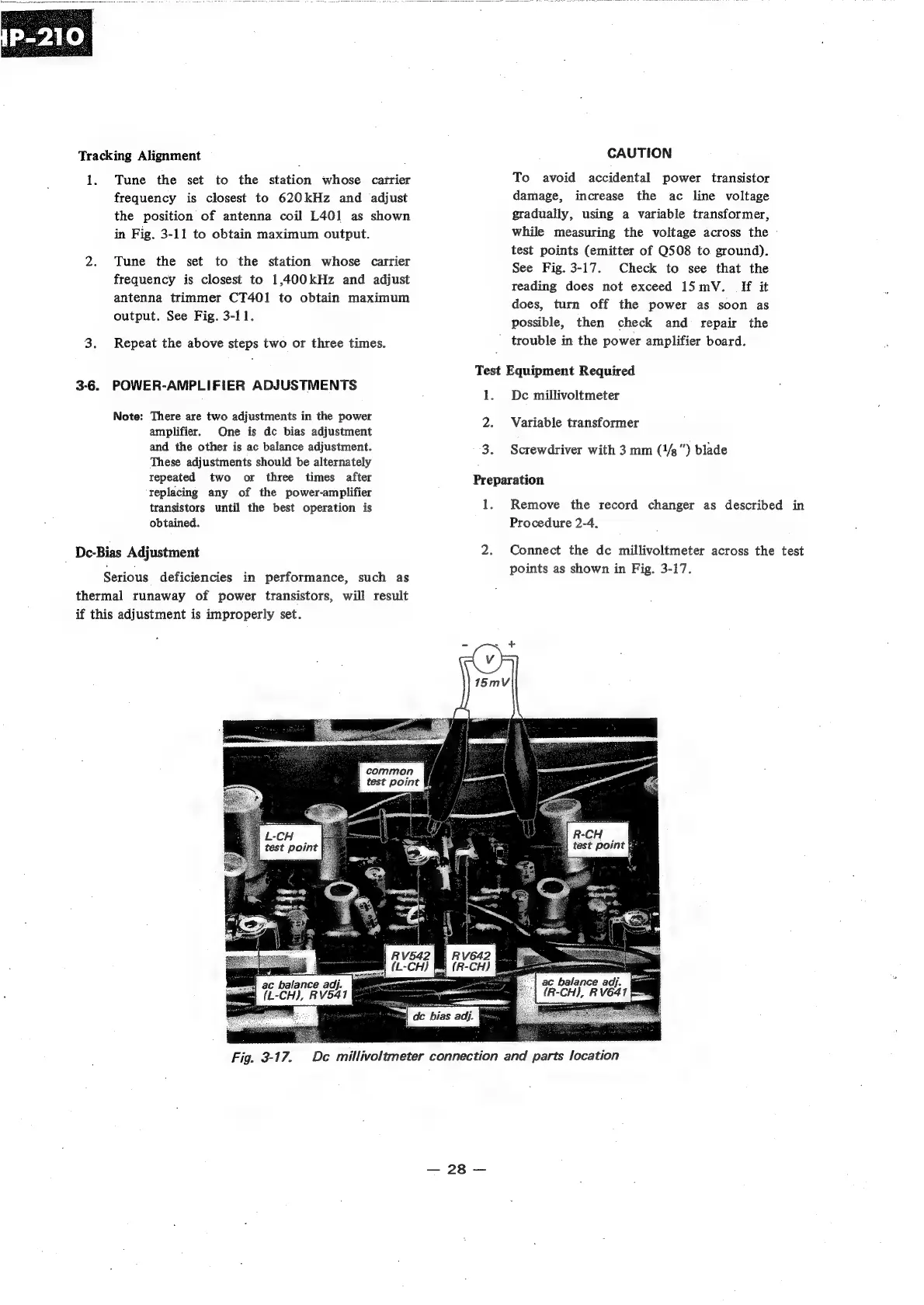
CAUTION
To
avoid
accidental
power
transistor
damage,
increase
the
ac
line
voltage
gradually,
using
a
variable
transformer,
while
measuring
the
voltage
across
the
-
test
points
(emitter
of
Q508
to
ground).
See
Fig.
3-17.
Check
to
see
that
the
reading
does
not
exceed
15mV.
If
it
does,
turn
off
the
power
as
soon
as
possible,
then
check
and
repair
the
trouble
in
the
power
amplifier
board.
Test
Equipment
Required
1.
De
millivoltmeter
2.
Variable
transformer
3.
Screwdriver
with
3
mm
(1/g”)
blade
Preparation
1.
Remove
the
record
changer
as
described
in
Procedure
2-4.
2.
Connect
the
dc
millivoltmeter
across
the
test
points
as
shown
in
Fig.
3-17.
R-CH
test
point
fm
Fig.
3-17.
De
millivoltmeter
connection
and
parts
location

Related product manuals