Setting
the
Control
for
HDMI
function
to
off
for
a
component
without
HDMI
jacks
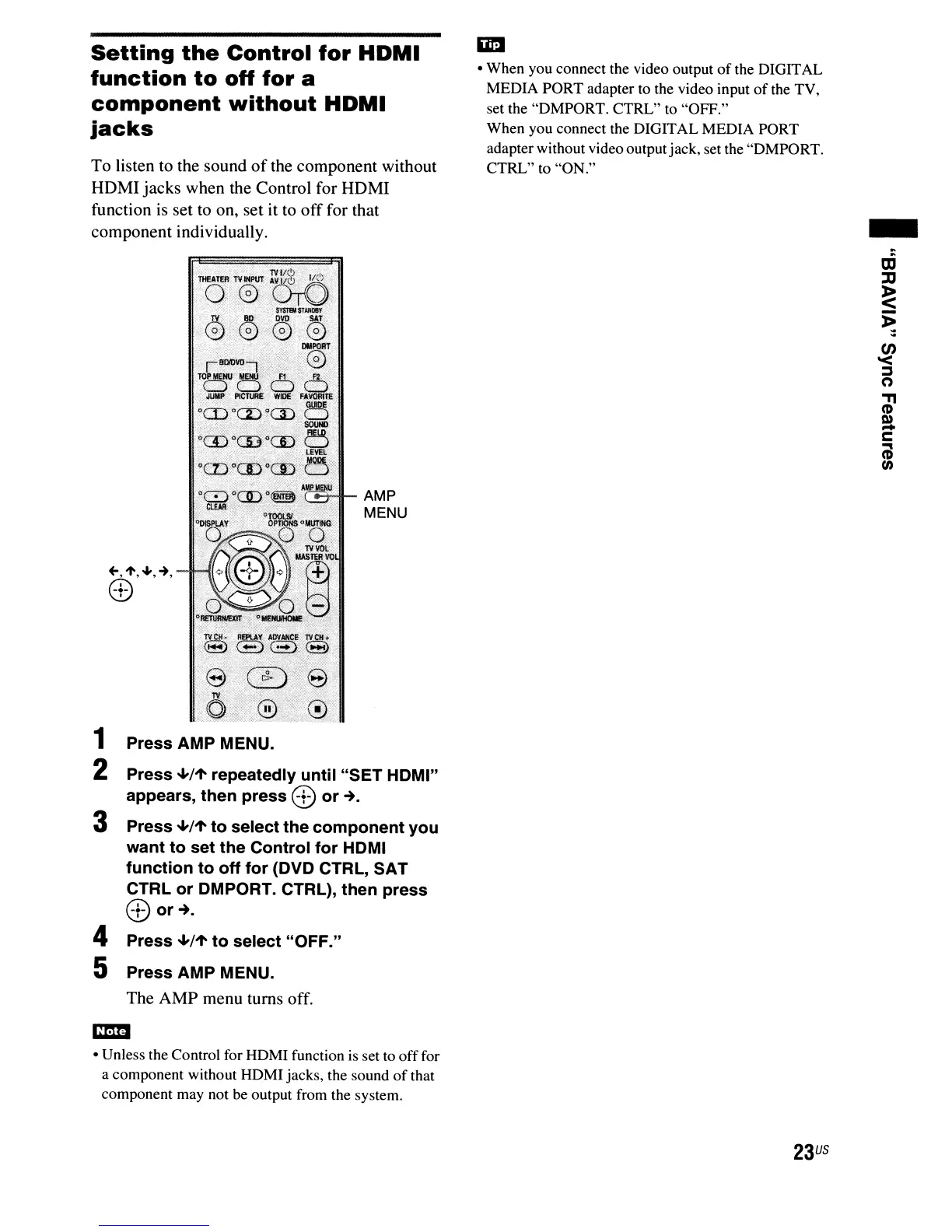
To listen to the sound
of
the component without
HDMI jacks when the Control for HDMI
function
is
set to on, set it to
off
for that
component individually.
,-='-_
...•
L.....
AM
P
MENU
<:£)78
<~:;'u<~;!
1 Press AMP MENU.
2 Press
+/1'
repeatedly until "SET HOMI"
appears, then press
8 or
~.
3 Press
+/1'
to select the component you
want to set the Control for HOMI
function to off for (OVO CTRL, SAT
CTRL or OMPORT. CTRL), then press
0J
or~.
4 Press
+/1'
to select
"OFF."
5 Press AMP MENU.
The AMP menu turns off.
• Unless the Control for HDMI function
is
set to
off
for
a component without HDMI jacks, the sound
of
that
component may not be output from the system.
• When you connect the video output
of
the DIGITAL
MEDIA PORT adapter to the video input
of
the TV,
set the "DMPORT. CTRL" to "OFF."
When you connect the DIGITAL MEDIA PORT
adapter without video outputjack, set the "DMPORT.
CTRL" to "ON."
23
US
-



 To Next Page