EasyManua.ls Logo

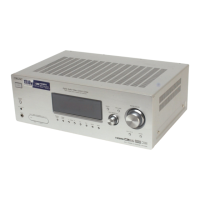
Sony HT-DDW795 - User Manual

Sony HT-DDW795
60 pages
Print Icon
To Next Page IconTo Next Page
Loading...
©2007 Sony Corporation
2-898-427-51(1)
Home Theatre
System
Operating Instructions
Owner’s Record
The model and serial numbers are located on the rear of the unit. Record the
serial number in the space provided below. Refer to them whenever you call
upon your Sony dealer regarding this product.
Model No.
Serial No.
HT-DDW795

Table of Contents

Other manuals for Sony HT-DDW795

Questions and Answers

  • T
    Todd JohnsonSep 9, 2025
    Why is there no sound from the subwoofer on my Sony HT-DDW795?
    • D
      Desiree SmithSep 9, 2025
      If there is no sound from the subwoofer of your Sony Home Theater System, check that the subwoofer is connected correctly and securely.
  • J
    Jason MathisSep 12, 2025
    Why can't I tune into radio stations on my Sony Home Theater System?
    • J
      joshua26Sep 12, 2025
      If you're having trouble tuning into radio stations on your Sony Home Theater System: * Check that the antennas are securely connected. Adjust the antennas or connect an external antenna if needed. * If the signal strength is weak when using automatic tuning, try direct tuning. * Ensure you've set the tuning interval correctly when tuning in AM stations with direct tuning. * If tuning by scanning preset stations, ensure stations have been preset. * Press DISPLAY repeatedly on the receiver to show the frequency on the display.
  • B
    Brandon StephensSep 14, 2025
    How to improve FM reception on Sony Home Theater System?
    • J
      Jennifer BradfordSep 14, 2025
      If the FM reception is poor on your Sony Home Theater System, use a 75-ohm coaxial cable (not supplied) to connect the receiver to an outdoor FM antenna. If you connect the receiver to an outdoor antenna, ground it against lightning. To prevent a gas explosion, do not connect the ground wire to a gas pipe.
  • M
    Miss Samantha JohnsonSep 16, 2025
    What to do if there is no picture on TV screen from Sony Home Theater System?
    • M
      mary20Sep 16, 2025
      If there is no picture on the TV screen or monitor when using your Sony Home Theater System, make sure you have connected the video output of your video component to the TV.

Summary

Safety and Warning Information

General Safety Warnings

Describes risks of fire, shock, and proper usage of the apparatus.

Speaker Installation

Connecting Components

Initial Setup and Preparation

Power Connection and Factory Reset

Covers connecting AC power and performing an initial system reset.

Automatic Calibration (DCAC)

Performing Automatic Calibration

Steps for setting up and running the auto calibration process.

Calibration Measurement Process

Details the measurement steps and completion of auto calibration.

Auto Calibration Warning Codes

Explains warning codes and their remedies during calibration.

Speaker Level and Balance Adjustment

Using Test Tone for Manual Adjustment

Guides on adjusting speaker levels using the test tone feature.

Amplifier Menu Operations

Navigating Receiver Menus

Explains how to access and navigate through the receiver's menus.

Menu Parameter Overview (Part 1)

Details parameters for LEVEL, TONE, SUR, and TUNER menus.

Menu Parameter Overview (Part 2)

Details parameters for AUDIO, SYSTEM, and A. CAL menus.

Adjusting Speaker Levels and Dynamic Range

Explains LEVEL menu parameters like speaker balance and dynamic range.

System Speaker Distance Configuration

Details setting front and center speaker distances.

Surround Speaker Setup and Positioning

Covers setting surround speaker distances and positions.

Surround Sound Modes

Tuner Operations

Precautions and Safety

Troubleshooting Guide

Troubleshooting Audio Issues

Provides solutions for common audio problems like no sound or hum.

Troubleshooting Sound and Video Issues

Addresses issues with speaker sound, balance, surround effects, and video.

Tuner, Remote, and Error Message Troubleshooting

Covers tuner reception, remote function, and error message resolution.

Sony HT-DDW795 Specifications

General IconGeneral
TypeHome Theater System
Number of Channels5.1
Speaker Configuration5.1 channel
SubwooferYes
DVD PlayerNo
HDMI Inputs2
Component Video Inputs1
FM TunerYes
Remote ControlYes
Total Output Power800 W
Built-in DecodersDolby Digital, DTS
Wireless Rear SpeakersNo
USB PortNo
BluetoothNo
Total Power Output800 Watts
Digital Audio Inputs2
Receiver Tuner BandsAM/FM
Input Video Formats480p, 720p, 1080i

Related product manuals