13
GB
Connecting and Preparation
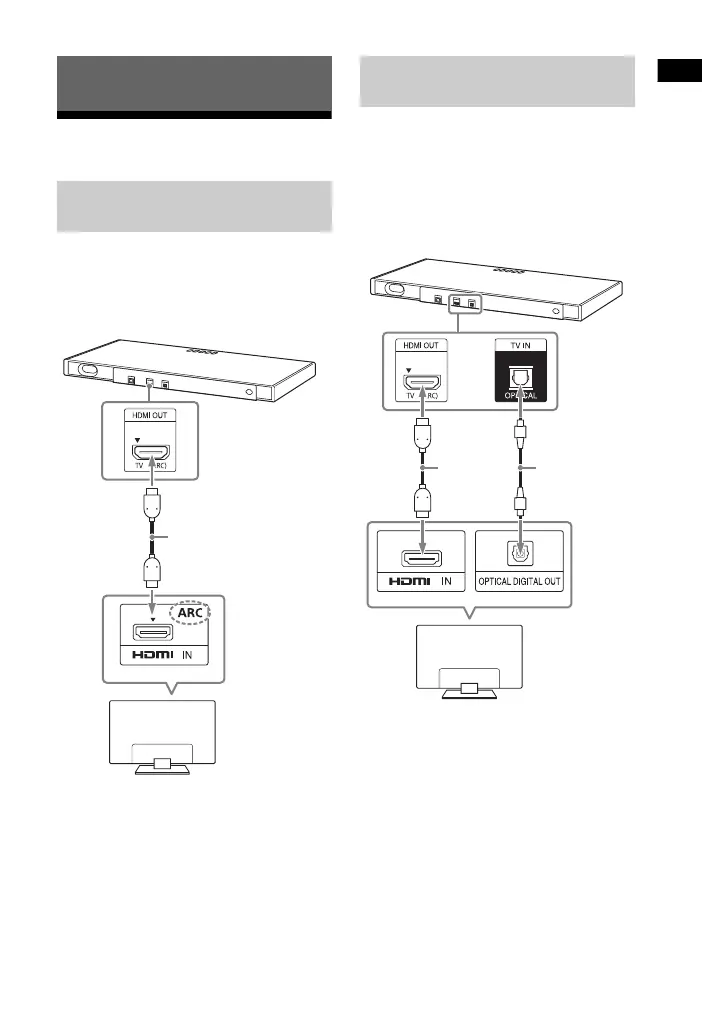
Connecting the TV
Connect the HDMI OUT jack on the unit
and the ARC-compatible HDMI IN jack of
the TV with the HDMI cable (not
supplied).
If your TV’s HDMI IN jack is not
compatible with ARC, the TV sound is
not output from the system.
In this case, connect the optical output
jack of the TV and the TV IN (OPTICAL)
jack of the unit with the optical digital
cable (supplied).
Connecting and Preparation
When the TV’s HDMI IN Jack
is Labeled with ARC
TV
HDMI cable
(not supplied)
When the TV’s HDMI IN Jack
is not Labeled with ARC
TV
HDMI cable
(not
supplied)
Optical digital
cable
(supplied)



 To Next Page